Google is finally adding the ability to schedule messages in Google Chat.
Google took forever to bring this feature
Message scheduling is one of the most common features among nearly all messaging apps used in workspaces. Microsoft Teams, Slack, and Signal all support the ability to schedule messages for later delivery. In fact, Gmail gained the power to schedule emails for automatic delivery at a set time in the future way back in 2019. Other apps like Google Messages and Instagram have had this feature for some time. However, this important ability was missing in Google Chat until now.
The Mountain View-based company has now announced that the feature is coming, also confirming that it has been one of the most requested additions. Well, why wouldn’t it be? It ensures you’re being respectful of your colleague’s time zone and not bombarding their DMs late at night in their region while it’s still working hours in yours. You can schedule the message to be automatically delivered when their work shift begins.
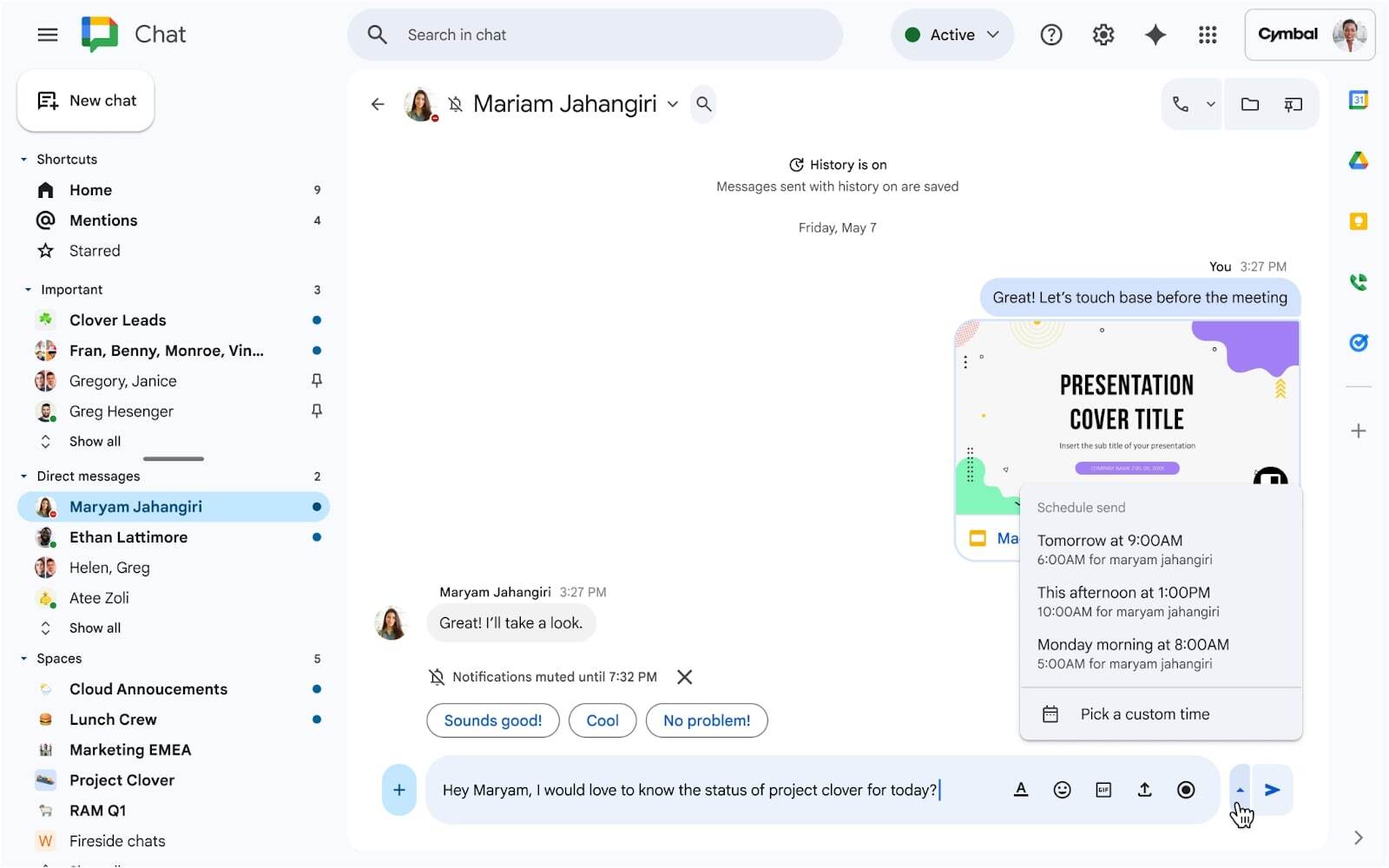
The process of scheduling messages in Google Chat is very similar to scheduling emails in Gmail. First, you need to draft your message, then click the new up-arrow icon that appears next to the Send button. Next, select the date and time when you want the message to be delivered. You can schedule a message up to 120 days in advance, which is similar to what Slack supports but much longer than Microsoft Teams, which allows scheduling messages only up to 7 days out.
Recommended For You
Google Chat will keep all scheduled messages under a new Drafts shortcut that appears in the left sidebar. From there, you can manage your scheduled messages – edit them, reschedule them, or cancel them altogether. That said, Google has started rolling out the feature, and it should become widely available by mid-January 2026.
Were you eagerly waiting for the message scheduling feature in Google Chat?
11 Votes
Yes – the feature was long overdue.
81.82%
No – I don't think I'd be using this feature.
18.18%
It's finally here!
Message scheduling feature in Google Chat. | Image by Google
Message scheduling is one of the most important features every messaging app should have. I really don't know what took Google so long to introduce this feature to Google Chat – especially since it's already available in most other communication-based Google Workspace apps like Google Meet and Gmail for quite some time.
In addition to introducing the message scheduling feature, the search giant also announced that Chat can now be accessed from chat.google.com along with mail.google.com/chat. The latter method still works, but Google says the new one loads Chat faster. Of course, the Google Chat smartphone apps are still available, and you also have the option to open Gmail in your browser and click on Chat, which appears in the left sidebar, to access it.
Switch flash sale! Limited time offer!
Save $20 on Switch consoles from Back Market. Discount automatically applied at checkout. Offer ends 13 September 2026 at 23:59.
Aman Kumar is a news writer at PhoneArena covering Google Pixel phones, Android features, AI-powered smartphone tools, and mobile tech news. Before joining PhoneArena, he spent over five years writing about consumer technology for publications like MakeUseOf, How-To Geek, and Guiding Tech. His current daily drivers are the Pixel 10 and Samsung Galaxy S26 Plus, while his red iPhone SE (2nd gen) remains a personal favorite. Aman also appreciates bold smartphone experiments and still considers the Nokia N-Gage one of the industry’s most iconic designs.
A discussion is a place, where people can voice their opinion, no matter if it
is positive, neutral or negative. However, when posting, one must stay true to the topic, and not just share some
random thoughts, which are not directly related to the matter.
Things that are NOT allowed:
Off-topic talk - you must stick to the subject of discussion
Offensive, hate speech - if you want to say something, say it politely
Spam/Advertisements - these posts are deleted
Multiple accounts - one person can have only one account
Impersonations and offensive nicknames - these accounts get banned
To help keep our community safe and free from spam, we apply temporary limits to newly created accounts:
New accounts created within the last 24 hours may experience restrictions on how frequently they can
post or comment.
These limits are in place as a precaution and will automatically lift.
Moderation is done by humans. We try to be as objective as possible and moderate with zero bias. If you think a
post should be moderated - please, report it.
Have a question about the rules or why you have been moderated/limited/banned? Please,
contact us.















Things that are NOT allowed:
To help keep our community safe and free from spam, we apply temporary limits to newly created accounts: