Firefox is getting an upgrade you'll definitely wish your default browser had too
Get rid of all the AI clutter in just one click.
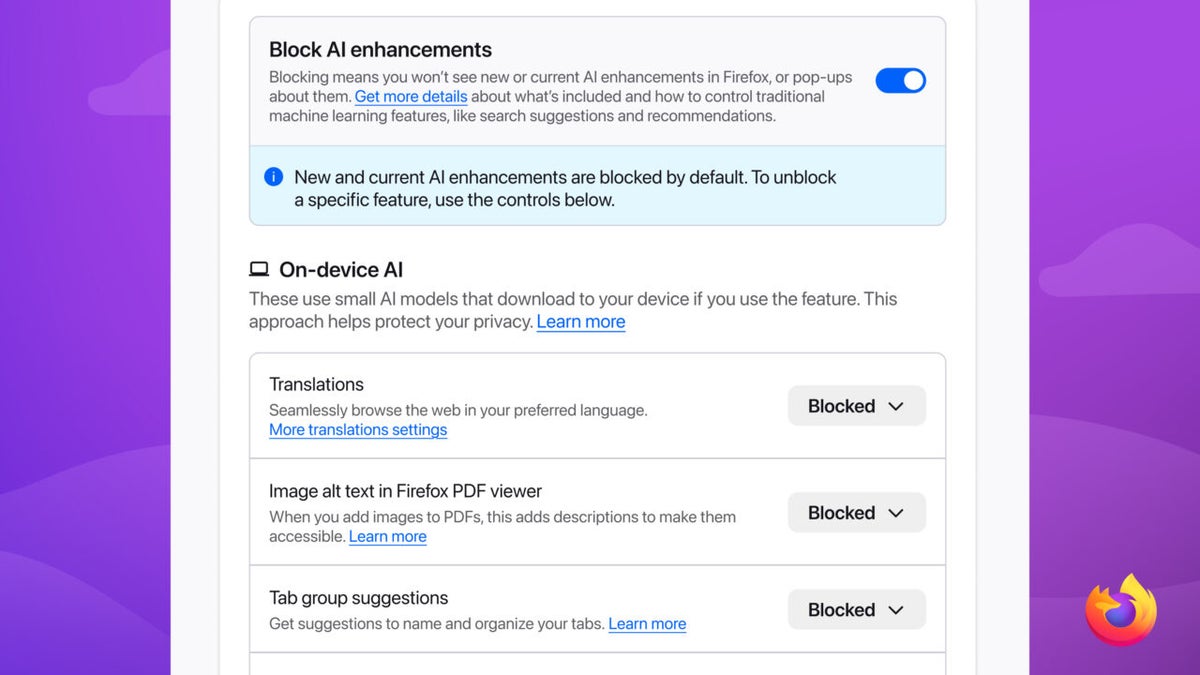
Most of the features that browsers are getting these days are all related to AI. Whether it's Help me Write and Auto Browse in Chrome, page summarization in Microsoft Edge, or the recently announced "AI Windows" in Firefox, all these new features are powered by different AI chatbots. Until now, there hasn't been a way to disable them if you don't want them. But if you use Firefox, you will soon be able to disable all its AI features with just a single click.
Similar to Chrome and Microsoft Edge, Mozilla Firefox has also received plenty of AI upgrades over the past few months. Shake to Summarize, AI Window, and AI Summarization are a few of the AI features available in Firefox. The worst part is that most of these features are enabled by default, requiring you to manually disable them if you don't want them interfering with your browsing experience.
Introducing an option to get rid of all the AI clutter is definitely a great move by Firefox. Unfortunately, data shows that just over 2% of worldwide users use Firefox, while others prefer Chrome, which has plenty of AI features and no one-click way to disable them.
A big win for veteran Firefox users
Anthony Enzor-DeMeo, who recently became the new CEO of Mozilla Corporation, announced in his introductory post that he wants to introduce more AI upgrades to the browser. This statement unfortunately didn't sit well with the most veteran Firefox users, who believe that turning Firefox into an AI browser will hamper its many years of reputation for prioritizing privacy, as privacy and AI are considered two sides of the same coin.
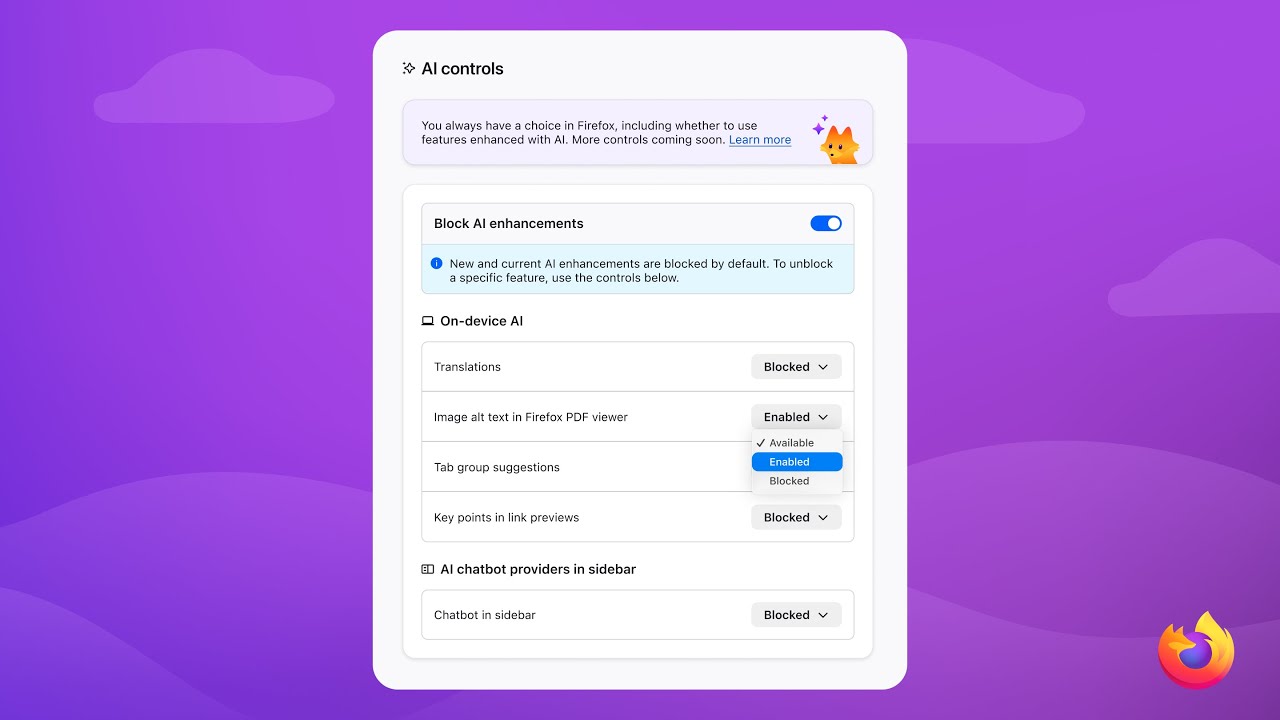
After significant backlash, Anthony hinted that an AI kill switch could be made available for the browser. This is finally becoming reality, as the company published a blog post announcing a new settings page called "AI Controls." It'll allow you to manage all the AI features the browser offers. As expected, the page isn't actually called "AI Kill Switch" as that would have been a bit too dramatic.
The browser gives you two options. You can either turn on the "Block AI enhancement" toggle, which will disable all AI features in the browser, or you can manually go through all the AI features and disable the one you don't like. For instance, if you don't like the translation feature powered by AI, you simply need to choose "Blocked" from the dropdown menu next to it.
The best thing about this change is that Firefox explicitly mentions in its post that you won't be shown pop-ups or reminders to use the AI features once you enable the Block AI enhancement toggle. Furthermore, your preference will remain saved even after downloading future browser updates. That said, the new AI Controls page will be added to Firefox in version 148, which is expected to arrive on February 24.
What kind of AI features do you really want to see in your browser?
39 Votes
AI-powered scam detection features.
20.51%
AI features that boost browser performance.
10.26%
AI features that bring voice-driven browsing.
0%
Basic AI stuff like page summarizer, translator, etc.
7.69%
I don't want any AI clutter at all.
61.54%
Chrome, Edge, and other browsers should learn from this

In fact, there's no easy way to turn off Chrome's AI features. For instance, if you want to remove the recently added AI mode button from the search bar, you must edit the browser's flag settings, something most non-technical users would avoid. Like Chrome, Microsoft Edge, which holds nearly 5% of the global browser market share, offers no simple way to control its AI features.
All AI-related settings are scattered across different submenus in Edge's settings. For instance, to control an AI setting that manages language, you need to go to the language section of the settings menu. To manage an AI setting that controls appearance, on the other hand, you would go to the appearance section.
All this eventually makes it difficult for a normal user to disable the AI features even if they want to. That's why I really hope that Chrome, Microsoft Edge, and other popular browsers take inspiration from Firefox and introduce a kill switch-like feature as well.


Popular stories






Latest News






Things that are NOT allowed:
To help keep our community safe and free from spam, we apply temporary limits to newly created accounts: