Online scams have skyrocketed in recent years. In 2024 alone, more than $16.6 billion in losses were reported to the FBI. One main reason internet crimes continue to grow is that scammers constantly devise new ways to trick victims into surrendering their hard-earned money and data. The latest tactic some scammers are using involves sending emails from official-looking Microsoft accounts, in which they falsely claim that you need to pay for a transaction made on your account.
Scam emails coming from an official Microsoft account
Microsoft has plenty of products under its umbrella besides the Windows operating system. One of these is Power BI, a business analytics platform that, according to Microsoft, offers "integrated tools and services to connect, visualize, and share data across your organization." The service has an associated email address—no-reply-powerbi@microsoft.com—which is used to send subscription emails.
To ensure you don't miss an important notification, Microsoft explicitly recommends whitelisting this address in your spam filter. As it turns out, some online scammers are exploiting this trust, as it was recently reported that a user received an email from this address in which the scammer falsely claimed a $399 transaction had been made on their account.
Recommended For You
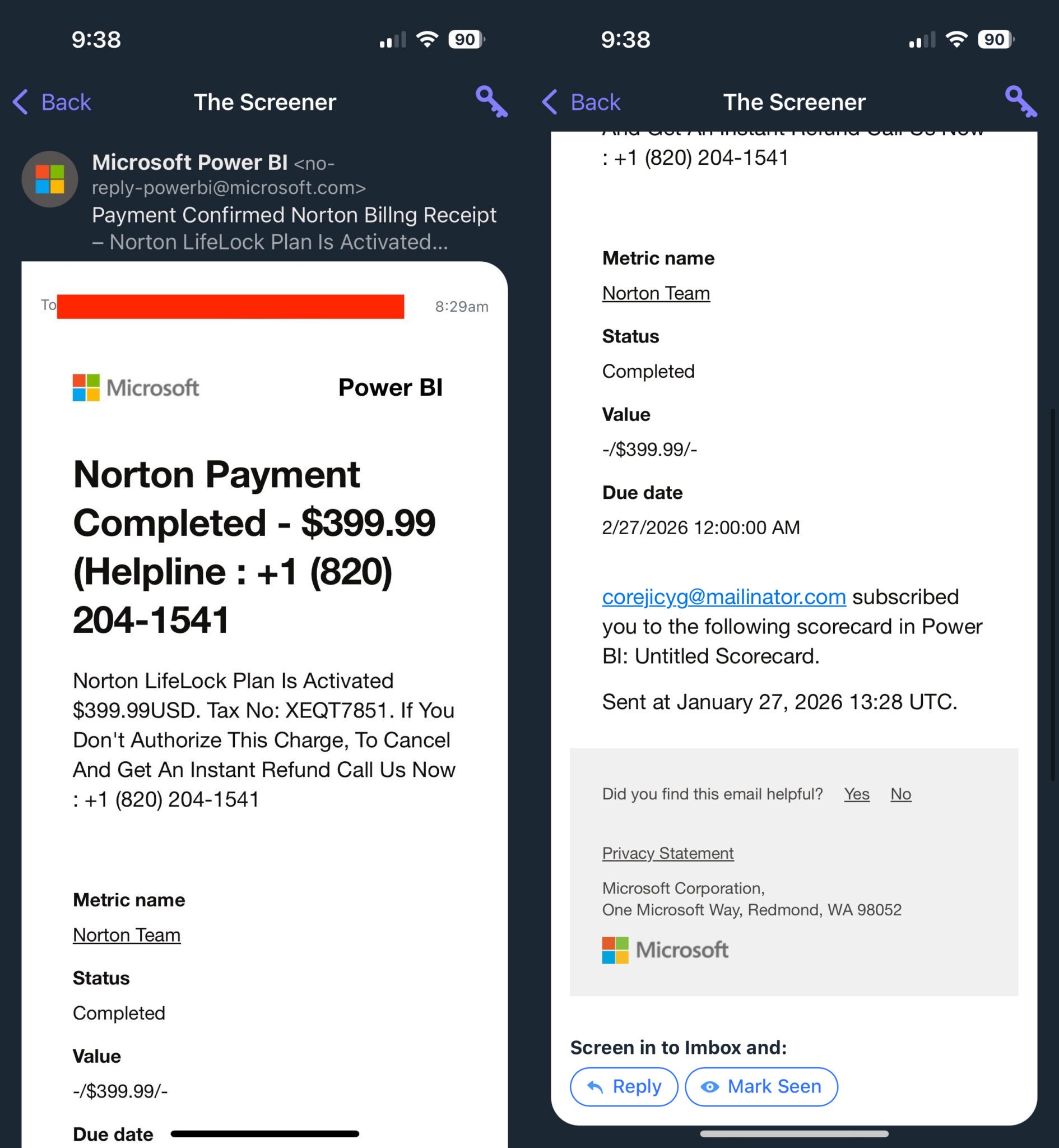
Unlike most scams, where you usually expect the scammer to provide a link in the email for paying the transaction fee, the cybercriminal took a different approach here. The email stated that if you hadn't done this transaction, you needed to call the provided number to "cancel or get an instant refund."
The lady to whom this email was sent called the number, where she was asked to install a remote access application on her device. The criminals' intention was likely to gain access to her device through that app and steal her data. So basically, the main scam doesn't begin when you receive the email. Instead, it starts when you call the provided number and install the requested application.
Interestingly, many similar cases have been reported on various online forums. Another user on the Microsoft forum mentioned receiving an email from a similar address in which the scammer claimed that Bitcoin worth $600 had been purchased through their account. If they hadn't made the purchase (which they obviously didn't), they were instructed to contact the provided number to reach the support team.
How are cybercriminals even able to use a Microsoft email address?
Scam email received from a Microsoft email address. | Image by Arc Technica
If you've read this far, you're probably wondering how these phishing emails appear to come from a Microsoft email address. As it turns out, Power BI allows you to add any external email address as a subscriber to a dashboard. Those addresses then receive emails sent from this official Microsoft address: no-reply-powerbi@microsoft.com.
The catch here is that the person who has added your email address as a subscriber to the Power BI dashboard has permission to edit the content of the mail, and this ability is what scammers are exploiting. They add any random valid email address to the dashboard, edit the mail content with all that transaction information, and send the mails.
Since the email comes from an official Microsoft account, many users who don't know how phishing scams work may end up believing it and losing their data to a scammer. The email does indicate that you are receiving this email only because your email address has been added as a subscriber to a Power BI dashboard, but since it is mentioned at the very end of the email, many users might miss it. Fortunately, Microsoft has reportedly disabled the email subscription feature as a temporary fix while it is developing a permanent solution.
How can you tell whether an email is genuine or a scam?
17 Votes
Misspellings, extra words, or random numbers in email.
47.06%
Unnecessary signs of urgency, like "Final warning."
35.29%
Generic greetings like "Dear User."
0%
Unwanted attachments like ZIP files, or links.
17.65%
Something else (please specify in comments).
0%
How to keep yourself safe from such phishing scams
It isn't the first time Microsoft Power BI has been used to scam users. In February last year, it was reported that the platform was used to transmit phishing links. Scammers have also recently exploited loopholes in other platforms like PayPal and Google to trick users into their scams. Because of all these reasons, it's crucial to know how you can spot a phishing email or message.
First, you should look for grammatical and spelling mistakes in emails or messages you suspect are from malicious actors. Also, you must check for even slight misspellings in the sender's domain. For instance, a phishing email from mirosooft.com instead of the legitimate microsoft.com.
In most of these scammy emails and messages, you will be asked to install an application or contact a number. You can also rely on the scam detection feature of your smartphones. Above all, always remember that companies like Microsoft will never ask you to install any remote access application or pay for unauthorized transactions.
Aman Kumar is a news writer at PhoneArena covering Google Pixel phones, Android features, AI-powered smartphone tools, and mobile tech news. Before joining PhoneArena, he spent over five years writing about consumer technology for publications like MakeUseOf, How-To Geek, and Guiding Tech. His current daily drivers are the Pixel 10 and Samsung Galaxy S26 Plus, while his red iPhone SE (2nd gen) remains a personal favorite. Aman also appreciates bold smartphone experiments and still considers the Nokia N-Gage one of the industry’s most iconic designs.
A discussion is a place, where people can voice their opinion, no matter if it
is positive, neutral or negative. However, when posting, one must stay true to the topic, and not just share some
random thoughts, which are not directly related to the matter.
Things that are NOT allowed:
Off-topic talk - you must stick to the subject of discussion
Offensive, hate speech - if you want to say something, say it politely
Spam/Advertisements - these posts are deleted
Multiple accounts - one person can have only one account
Impersonations and offensive nicknames - these accounts get banned
To help keep our community safe and free from spam, we apply temporary limits to newly created accounts:
New accounts created within the last 24 hours may experience restrictions on how frequently they can
post or comment.
These limits are in place as a precaution and will automatically lift.
Moderation is done by humans. We try to be as objective as possible and moderate with zero bias. If you think a
post should be moderated - please, report it.
Have a question about the rules or why you have been moderated/limited/banned? Please,
contact us.













![Another batch of Galaxy S26 series users in the US are getting a nice surprise today [UPDATED]](https://m-cdn.phonearena.com/images/article/183643-wide-two_350/Another-batch-of-Galaxy-S26-series-users-in-the-US-are-getting-a-nice-surprise-today-UPDATED.webp)
Things that are NOT allowed:
To help keep our community safe and free from spam, we apply temporary limits to newly created accounts: