
Huawei Ascend P7 Review
Introduction
Despite that Huawei's handsets are still mostly confined to the vast Chinese market, last year the company hinted about its budding international ambitions with the Ascend P6. It did sport a premium design, and was the thinnest phone at the time, while Huawei propped it up with a heavy marketing campaign. This year the company doubles down on the design paradigm of the P6, introducing the steel-and-glass Ascend P7. The phone sports a chassis that is just 6.5mm thin, but keeps the weight of its predecessor, despite that the screen has grown up from 4.7” to 5”. Last year's Ascend P6 was a looker, but was marred by some weak spots, like the camera quality, and the poor abilities of Huawei's homegrown chipset. With the Ascend P7, Huawei keeps betting on its own processor line, but with a more powerful quad-core member, and has upgraded the screen, camera and internal memory departments Naturally, we also have the current Android 4.4 KitKat on Huawei's new flagship. Can these enhancements take the P7 to smartphone glory given the cutthroat competition it will be up against? Let's find out...
In the box:
- In-ear stereo headphones
- microUSB cable
- Wall charger
- 2x NFC tags
- Warranty and information leaflets
Design
The 6.5mm thin steel-and-glass chassis of the Ascend P7 makes it one of the most impressively designed phones out there.
The Ascend P7 is one of the thinnest and lightest handsets around, and we are not just talking 5-inchers here. The 0.25” (6.5mm) thickness, and the 4.35oz (124g) of weight are even more impressive considering that the phone's unibody chassis is made of Gorilla Glass 3 on the back, with a metal rim surrounding the sides. The iPhone 5s, for example, whose steel-and-glass design the Ascend P7 arguably follows, is thicker, and only a tad lighter, but sports a 4” display, against the P7's much larger, 5” panel. Huawei's finest feels premium in the hand, due to the design materials used. The corners, edges, and the whole bottom, are rounded, so the phone is also comparatively comfortable to hold, given that other handsets with such a design feel rather “edgy”. The only gripe we have with the design is stemming precisely from its svelte demeanor, as picking it up from a table turns out to be a bit finicky.
The metal power/lock key and volume rocker on the right, are well-placed, feel sturdy, and offer a good tactile feedback when pressed. Beneath them are the memory card and microSIM trays, flush with the side surface, and very easy to take out with a pin, or be pushed back in. Pressing the volume rocker down quickly two times evokes the Ultra Snapshot function, which fires up the camera and takes a picture from a locked screen for a second or so, which works exactly as Huawei advertises.

5.5 x 2.71 x 0.26 inches
139.8 x 68.8 x 6.5 mm
4.37 oz (124 g)

5.22 x 2.58 x 0.24 inches
132.65 x 65.5 x 6.18 mm
4.23 oz (120 g)

5.78 x 2.89 x 0.32 inches
146.8 x 73.3 x 8.2 mm
5.75 oz (163 g)

5.38 x 2.75 x 0.31 inches
136.6 x 69.8 x 7.9 mm
4.59 oz (130 g)

5.5 x 2.71 x 0.26 inches
139.8 x 68.8 x 6.5 mm
4.37 oz (124 g)

5.22 x 2.58 x 0.24 inches
132.65 x 65.5 x 6.18 mm
4.23 oz (120 g)

5.78 x 2.89 x 0.32 inches
146.8 x 73.3 x 8.2 mm
5.75 oz (163 g)

5.38 x 2.75 x 0.31 inches
136.6 x 69.8 x 7.9 mm
4.59 oz (130 g)
Compare these and other phones using our Size Comparison tool.
Display
The P7 flaunts a bright and vibrant 5” display.
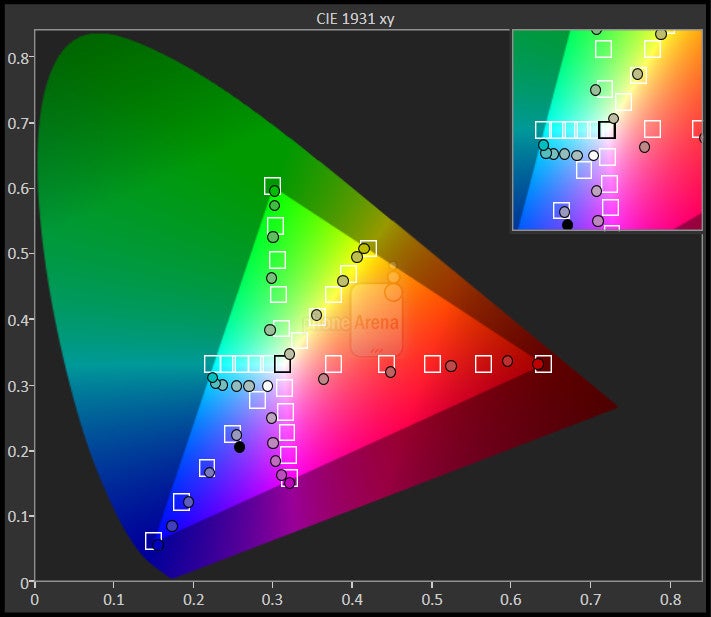
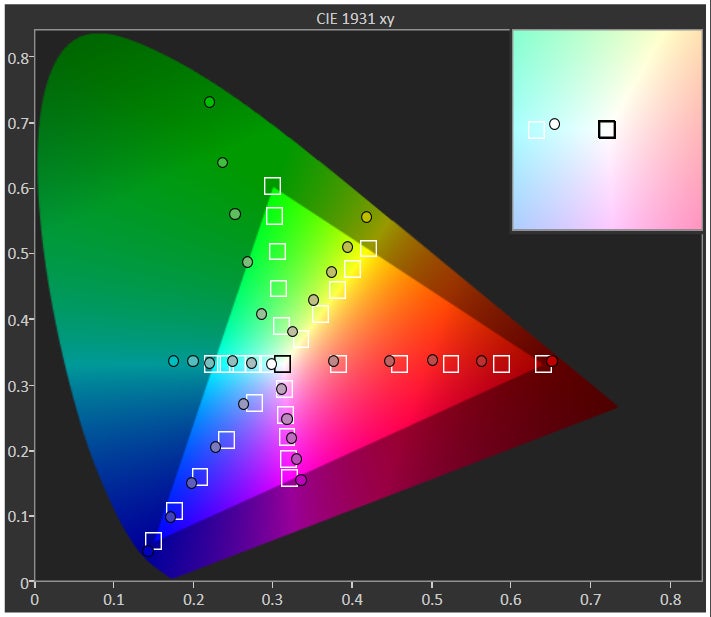
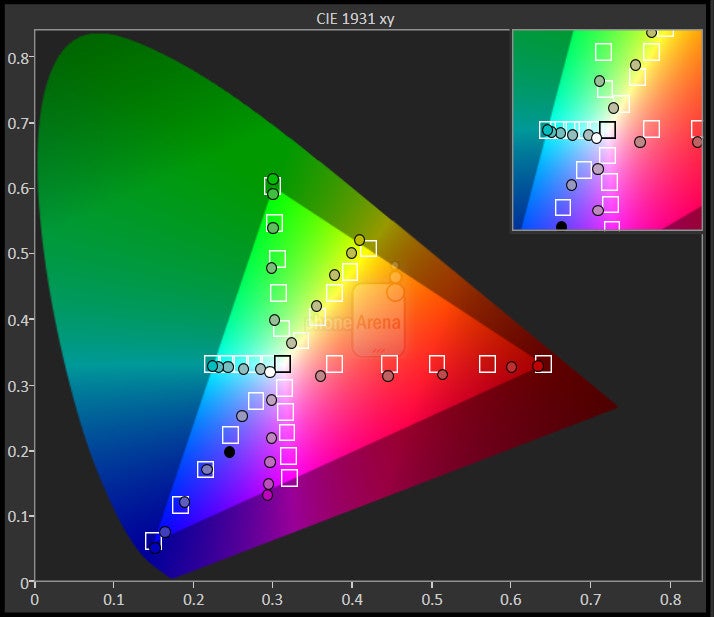
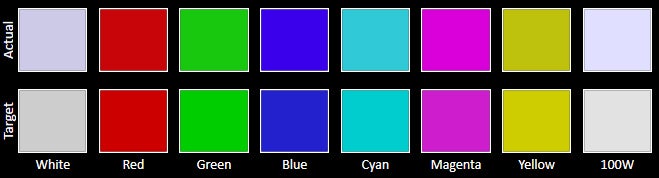
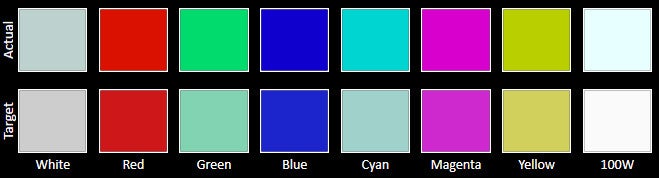
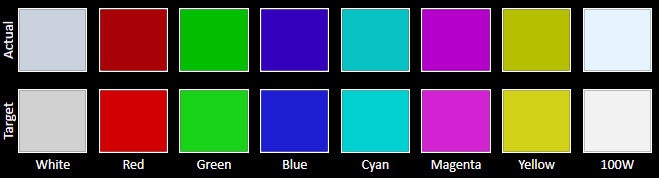
With a 5” 1080x1920 pixels display, Huawei Ascend P7 offers a good-looking screen that has very good 445ppi pixel density, making text appear crisp, and details smooth. The color representation is largely accurate but the screen's color temperature is way too cold on its default settings. We measured 8405 Kelvins, which is quite the deviation from the reference 6500K, making white actually blueish. The phone offers a slider to adjust the color temperature, too. The phone's 463 nits of peak brightness are at the mark for a good display, and the screen reflectance is kept in check, so we are pleased with the outdoor visibility of the Ascend P7. Viewing angles are rather good, too, with the vertical one a bit better than the horizontal, but that is only visible when looking at the panel from the extremes. The screen has a sensitive touch layer, which allows you to use it with gloves – an option that can be toggled on and off from the display settings.



Interface and functionality
Huawei's new Emotion UI is simple, customizable and easy to master, with a pinch of helpful features.
The first thing you notice about Huawei's new Emotion UI 2.3 overlay on top of Android 4.4.2 KitKat, is that it does away with the app drawer, and centers everything around the homescreens. The central one has a couple of widgets placed on it, which are very compact, with minimized border distance, and thus you can fit a bunch of them on one screen. Another homescreen offers the default apps, most of which are neatly laden into categorized folders, like Tools, or Google Services, and that's about it. The apps you download are added directly to the empty space on the homescreens, but, of course, you can move the app icons and widgets around the homescreens. Huawei spices the interface up with nine stock themes, which can be further tweaked down to the lock screen animation, or the respective ringtone. The lock screen offers four quick-access shortcuts, which appear when you swipe up from the bottom of the display. You can toggle the flashlight mode from here, enter directly in the calculator and the calendar, or set up the frame for a quick selfie.
Amongst all its connectivity and profile toggles, the notification bar also offers a dedicated screenshot button, so you don't have to hold down the lock and volume down keys that are placed on the same side. There is notification management in the settings menu, too, where you can set which app can post alerts in the status bar, and which is banned from doing so. Huawei offers an interesting take on easing one-handed operation and multitasking with the handset. You can enable the so-called Suspend button from the status bar, and a small circle will appear on the side of the screen. You can tap on it any time, and there will be home, back, lock and so on icons, arranged in a rotary manner, so you don't have to stretch your thumb all the way down to reach the on-screen navigational keys at the bottom of the display. Tap on the Suspend icon in that same rotary dialer, and a couple of apps will appear that you can “float” in small windows on top of anything else you are doing underneath. These include staples like a small messaging window, calculator, calendar, music player, and a notes app but you can only fire up one of those floating apps at a time.
The default Emotion UI keyboard is very well spaced and the symbols are big enough so you don't tap on the neighbor when trying to key something in quickly. At 5”, and with an elongated profile, the display is just right for one-handed pecking with a bit of a stretch, unless you have smaller hands. You can just slide your finger across the letters to form a word, too, as the keyboard is based on Swype's technology.
Processor and memory
The new Kirin processor of Huawei is an improvement over the one in the Ascend P6, but still churns out a midrange performance.
Huawei refuses to give in to the Snapdragon mania, and again offers a homebrew processor in the Ascend P7. The newest Hi-Silicon 1.8 GHz quad-core Kirin 910T CPU comes with Mali-450 graphics, built on the 28nm process. Looking at its dry benchmark results, this processor is nothing to write home about, roughly equal to Snapdragon 600 in performance, and a far cry from the 800/801 set. The Kirin processor is powering the handset relatively well, though, with no discernible lag in the interface, or problems with app performance, as even Asphalt 8 ran without hiccups. Huawei's browser, however, is marred by a choppy and lagging zoom and scroll, though it's not clear if it's the processor's fault, or the rendering engine optimizations.
Huawei has placed the typical for today's flagships 2 GB of RAM in the handset, so a serious active apps queue can be formed before you run out of it. There are 16 GB of internal storage (12 GB user-available), and a microSD card tray on the right side for expansion when needed.
Internet and connectivity
The default Ascend P7's browser is pretty barren as interface, and page rendering, as well as scrolling, zooming or panning around, feel a tad sluggish. The situation gets better in terms of scrolling and panning if you use Chrome, but zooming still lags a bit too much for the phone's category. The phone has a 4G LTE modem, and is a pentaband 42 Mbits HSPA+ handset, meaning that it supports all major frequency bands, so you can use it on both AT&T and T-Mobile in the US, for example, as well as in Europe and Asia for international travelers. There are also Wi-Fi, Bluetooth 4.0, and A-GPS radios, along with DLNA and NFC, while the wired connectivity is simply a regular microUSB port.
Camera
With a 13 MP Sony sensor on the rear, and an 8 MP wide-angle frontal camera, the phone can take anything life throws at it.
This time around, Huawei has placed a 13 MP camera in the Ascend P7, with a backside-illuminated Sony Exmor sensor, f/2.0 aperture, and five-element lens. The front-facing shooter is even more intriguing, with the generous 8 MP of resolution, wide five-elements lens.
Huawei Ascend P7 captures photos of decent quality, but results are rather inconsistent. Overall, they look good, but the color balance sometimes leans on the cold or warm side - nothing distracting, but not correct. Some of our sample photos came slightly underexposed too. The Ascend P7 captures enough detail to be worthy of a 13 MP camera status, but there is softness at the edges of the frame. Indoors, most photos came out perfectly acceptable, but the P7 sometimes threw a warmer, yellowish cast over the scene. The flash did a decent job of illuminating our test scene from about five feet (1.5m) distance, but the light was rather unevenly distributed, splashing the scene in the middle, while leaving the edges in the dark.
As mentioned, the front camera is 8 MP, and has a 720 HD video recording mode. However, we didn't notice the higher resolution to result in much higher pics or video quality than your average front shooter. It offers a 10-level beauty mode slider, which allegedly enhances your face by improving blemishes and skin tones, though it mostly smears the face detail as a result. Some of the shooting modes from the rear camera find its way into the frontal, too. You can do panoramas with it, as well as leave a custom water mark. The panorama function is pretty interesting, as it lets you take what Huawei calls a “groufie,” for group selfie. It snaps in the center, then you tilt the phone slightly to the left and right, and thus can capture many people in the frame at once, as the phone automatically merges the three snaps into a wider group selfie.
Sample Images
The phone is capable of shooting 1080p video with 30fps, and the resulting footage is pretty fluid, without lost frames or artifacts. It also adjusts the exposure quickly when panning around, but the overall impression is for a darker, underexposed scene, compared to what you see in reality, and the edges appear too soft The two microphones record excellent sound, so you can hear every bit and piece of the various street noises surrounding the footage.
Multimedia
The typical grid thumbnail view in the gallery is about all you get, with no fancy pinching rearrangements, for instance. The picture editing options are quite rich right out of the box, though, offering color and dimensional effect in addition to the usual cropping, resizing and adding filters.
The music player is pretty attractive visually, with the obligatory tune categorization by artists, albums and genres, as well as album art depiction. There are no built-in equalizer presets, but the DTS faux surround sound button makes a difference when turned on, and the loudspeaker churns out a very strong (we measured 79 dB), full and clear sound to boot. In fact, it's pretty rare that we encounter such a good speaker on a phone, let alone on one with a 6.5mm chassis.
In addition, the Ascend P7 plays most popular video formats thrown at it out of the box, including DivX/Xvid/MKV files up to 1080p resolution. The video player is rather barebones, though, with no loop function, or subtitle support.
Call quality
The earpiece of the Ascend P7 is rather strong, and emits a clean, full sound, with no audible distortion of the voice that was talking to us. The two noise-canceling mics at the top and bottom of the handset do their job exceptionally well, too, relaying our voice loud and clear to the other side, removing the ambient noises in the process.
Battery
The 2500mAh battery of the Ascend P7 might not sound like much in this day and age when some flagships hit the 3000 mAh mark, and phablets even surpass that, but Huawei's phone does pretty well. The company pegs the Ascend P7 as good for 14 hours of talk time, and we logged more than six and a half hours of screen-on time on our internal test, which is a very good achievement. The phone's interface also offers several power profiles, app consumption alerts, and an Ultra power saving mode, which displays only the basic functions as cards on the screen in black and white, so you can squeeze even more life out of the handset when the battery starts getting low.
Conclusion
The Ascend P7 is a great-looking handset with a premium feel and a nice specs sheet. Its eye-catching chassis design also makes it one of the thinnest and lightest Android 5-inchers out there, and an ambassador of Huawei's engineering prowess. The phone is a nice upgrade over its predecessor, as it offers a good 1080p display, and improves on the weakest spots of the P6, like the camera quality, and the 3D gaming performance.
Given the processing prowess, and the 450 EUR or USD introductory price, you are able to grab a number of other cool handsets as alternatives, such as last year's Samsung flagship, the Galaxy S4, or the Alcatel One Touch Idol X+. They both offer specs similar to the Ascend P7, but don't have its svelte, premium design. The HTC One will fit your need for better outer appearance, but its 4 MP camera leaves something to be desired in the detail department, plus the phone has a smaller display.
If you stand the Ascend P7 against the seasonal flagships, like the Galaxy S5, Xperia Z2, HTC One M8, or Oppo find 7a, the svelte handset can keep its own in most departments, save for the processing power, but those competitors are more expensive, too. Thus, if you are looking for a decent performer with great slim design, and very good screen, call and audio quality, the Ascend P7 should rank high on your list of desirables.
Software version: P7-L10V100R001C00B116SP03


Popular stories



![T-Mobile customers are losing more than they anticipated [UPDATED]](https://m-cdn.phonearena.com/images/article/181903-wide-two_350/T-Mobile-customers-are-losing-more-than-they-anticipated-UPDATED.webp)
Latest News

Things that are NOT allowed:
To help keep our community safe and free from spam, we apply temporary limits to newly created accounts: