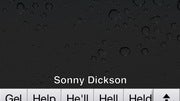
Autocorrect keyboard bar discovered in iOS 5, software tweak enables it

Share:
- Download iBackupBot
- Backup your iDevice by using iTunes
- Open iBackupBot, find the backup and load it
- Find Library/Preferences/com.apple.keyboard.plist and open the file. Press cancel if your software isn't registered and the file will open
- Add the following code:
KeyboardAutocorrectionLists YES - Save the changes and restore the backup using iBackupBot
Share:
9 Comments
1. Gemmol posted on 10 Nov 2011, 05:37 4
most likely they have features they saving for future updates, since apple always update their devices that they still produce and ship, still can not believe they still update the 3gs wish android was the same, but they are most likely testing what can work on the 3gs and what can not........I would go to apple, but the screen too small and the apps I have on my android is not free on apple, which are the two main reasons I stay away from apple, I have the same problem with windows too, not screen size, but not as much free apps plus I love the Amazon store app it gives a free app every day ,they be having some really good apps sometimes......
4. remixfa posted on 10 Nov 2011, 07:10 3
its new because apple hasnt had it.. lol. typing on iOS is about the worst experience you could have. a lot of basic things are not there.. like the autocorrect bar, straight from ANDROID... lol.
6. SuperAndroidEvo posted on 10 Nov 2011, 07:50 4
Imitation is the best form of flattering. Sometimes I think that iOS5 is more and more looking like Android 1.6. I guess Apple is now admitting their OS is just lacking on basic functions that us, the Android users have taken for granted since about 3 years ago. lol
But who says that Apple innovates......................?
3. iKingTrust (banned) posted on 10 Nov 2011, 07:02 1
This is activated on my internation keyboard. This is no secret.
5. nimo posted on 10 Nov 2011, 07:21 1
Your instructions are wrong, you have to add
< key >KeyboardAutocorrectionLists< /key >< string >YES < /string >
and its totally terrible at predicting what your typing, even when you spell it correctly
7. vette21man posted on 10 Nov 2011, 13:00 0
Not installing this. If this is as bad as the panorama "hidden feature" it will be absolutely terrible. There's a reason Apple hasn't allowed this feature people. It ain't fully baked yet.
I would argue it makes you slower at typing anyway...constantly looking up to see if your word is there, "t.....nope......h....nope......e.......nope.......s............nope......."
On the iKeyboard, type "thesau" then space to insert "thesaurus." I would argue it's faster just to type it out and if you see the moment to hit space, then it saves a couple taps, but nothing crazy.
Don't think that just because Android has a feature that iOS does not, that it makes Android's experience better.
And NOW, all the replies that say "I use the autocorrect bar all the time."................
9. sinzim posted on 14 Nov 2011, 11:40 0
Tried this, horrible stuff so far =)
Still, interesting read and was happy to test it.
Instructions were a bit incomplete tho and only saved by the helpful comments.
I'd like to know of any other hacks like these for my 4S =)