Apple has finally unveiled iOS 27 at WWDC. It doesn't just include bug fixes and improvements to Liquid Glass; it also brings several notable upgrades over iOS 26. However, one particular upgrade that I was eagerly waiting for wasn't showcased at the event.
The Camera app didn't receive the highly anticipated upgrade
Apple has always gone with a very minimalistic approach for its Camera app. Its interface shows very limited options, making it easier even for people who haven't used iOS ever before to open the app and capture an image. However, multiple reputable tipsters, including Mark Gurman from Bloomberg, confirmed before the WWDC that with the upcoming software update, the tech giant will be giving more control to users over what they want to appear on the interface.
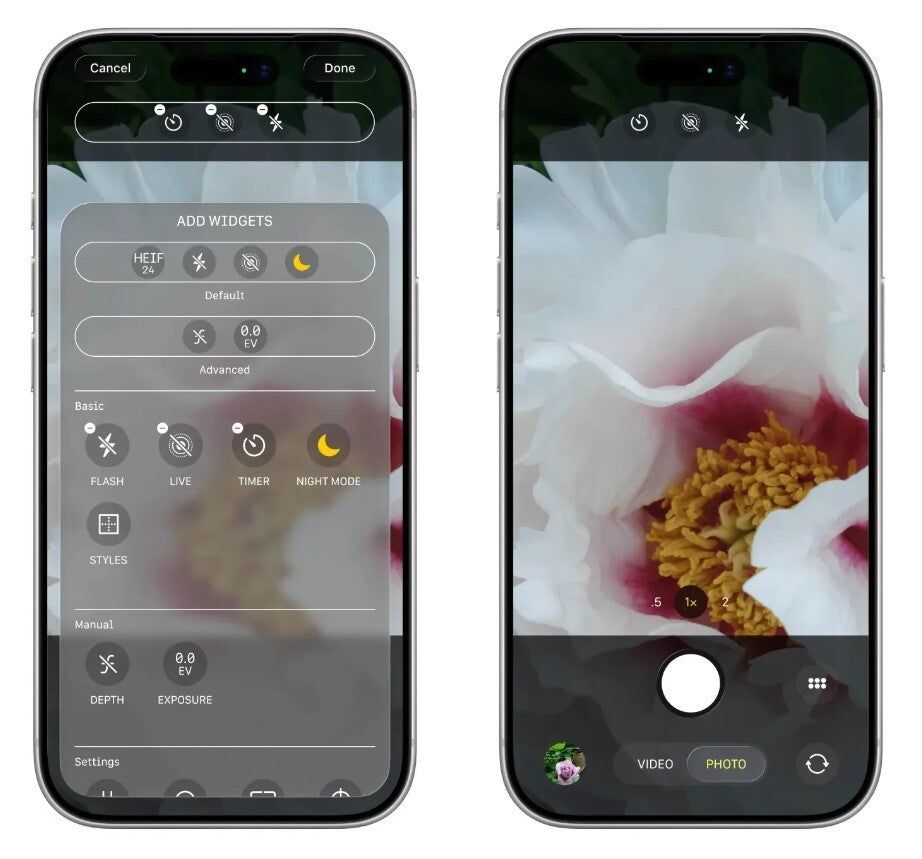
For reference, a new Add Widgets panel was said to be added to the Camera app in iOS 27. It would basically allow you to add and remove features, which would be labeled as widgets, to the interface. Both photo and video modes would have their own set of widgets and would be categorized between the Basic, Manual, and Settings sections based on their usage.
For instance, you will find the Flash widget under the Basic section. You would then simply need to tap on it to add it to your main camera interface. All the added widgets will then appear at the top of the UI.
Recommended For You
While the change sounds really exciting, for some reason it wasn't even mentioned, let alone showcased at the event. Well, I definitely don't know the exact reason behind this, but if you still ask me to take a guess, I would say that it's because Apple wanted this event to be solely focused on their AI upgrades. If you had watched the entire show, you would have gotten my point: the majority of it was filled with all the AI and Siri-related announcements.
It's not that the feature wasn't announced but was added directly to the first iOS 27 beta, which is already available to download. My colleagues who have installed the beta confirmed that the Camera app interface is similar to what it was in iOS 26. I guess the company would most likely announce this upgrade sometime later and make it available with the iOS 27.1 or 27.2 beta release.
Siri mode in the Camera app
Add Widgets feature in Camera app. | Image by Bloomberg
While there weren't any signs of the highly anticipated Add Widgets feature, Apple did announce that iOS 27 will add a new Siri mode in the Camera app. It will be available alongside the photo and video modes that you already have with iOS 26. However, unlike the other two modes, its camera shutter logo looks like the logo of Apple Intelligence.
For instance, you can switch to this mode and point your camera at a food item. You will be instantly shown the exact calorie and macronutrient data of that food, which you can use for tracking in the Apple Health app.
Similarly, the Visual Intelligence capabilities of this mode will allow you to instantly add a phone number and address to the Contacts app by simply scanning the information mentioned on a business card. It's also worth noting that with the latest update, the Camera Control button will continue to allow you to access Visual Intelligence, but going through this approach now will open the Siri mode in the Camera app instead of taking you to the standalone Visual Intelligence experience you have with iOS 26.
Which iOS 27 upgrade did you like the most?
20 Votes
Extend and Reframe feature in the Photos app.
10%
Standalone Siri app.
35%
Siri Mode in the Camera app.
5%
All the child protection related features.
10%
Safari upgrades.
5%
iOS 27 compatibility with older iPhones.
35%
Photo editing tools
The Photos app has also received two important features that you would definitely love if you are into photo editing. The first one is Extend, while the other one has been named Reframe.
The Extend feature uses AI to generate the missing part of an image. For instance, if you capture an image of a building, but you notice that its bottom part has been cut off, then you can use this capability to generate that missing part. The Reframe feature, on the other hand, changes the entire perspective of a captured image.
The Camera app now looks complete
Before switching to the Pixel 10 last year, I used the iPhone 15 as my daily driver. I still have the iPhone SE 2020 with the iOS 26 update installed. I have personally felt that the camera interface of the iPhone is very basic.
It's not that the required option is not there, but some are present inside the app, while others are hidden deep in the Camera app settings. But with the Add Widgets feature, Apple is finally addressing this shortcoming. Once it becomes available on my second‑generation SE, I'll add the filters and exposure widgets to the top of the camera interface.
Tello Halloween Promo: $10GB for $10/mo
Don’t miss this scary-good deal: 10 GB for $10/mo. Save $5/mo for your first 3 months. Offer valid now through November 9, 2026.
Aman Kumar is a news writer at PhoneArena covering Google Pixel phones, Android features, AI-powered smartphone tools, and mobile tech news. Before joining PhoneArena, he spent over five years writing about consumer technology for publications like MakeUseOf, How-To Geek, and Guiding Tech. His current daily drivers are the Pixel 10 and Samsung Galaxy S26 Plus, while his red iPhone SE (2nd gen) remains a personal favorite. Aman also appreciates bold smartphone experiments and still considers the Nokia N-Gage one of the industry’s most iconic designs.
A discussion is a place, where people can voice their opinion, no matter if it
is positive, neutral or negative. However, when posting, one must stay true to the topic, and not just share some
random thoughts, which are not directly related to the matter.
Things that are NOT allowed:
Off-topic talk - you must stick to the subject of discussion
Offensive, hate speech - if you want to say something, say it politely
Spam/Advertisements - these posts are deleted
Multiple accounts - one person can have only one account
Impersonations and offensive nicknames - these accounts get banned
To help keep our community safe and free from spam, we apply temporary limits to newly created accounts:
New accounts created within the last 24 hours may experience restrictions on how frequently they can
post or comment.
These limits are in place as a precaution and will automatically lift.
Moderation is done by humans. We try to be as objective as possible and moderate with zero bias. If you think a
post should be moderated - please, report it.
Have a question about the rules or why you have been moderated/limited/banned? Please,
contact us.














Things that are NOT allowed:
To help keep our community safe and free from spam, we apply temporary limits to newly created accounts: