Secret Android tool could help you improve your phone's battery life and have it run smoother
Set up this tool and you'll know which apps you need to delete immediately.

Secret Android tool can help you extend your phone's battery life. | Image by PhoneArena
The function of Random Access Memory (RAM) on your Android phone is to store, on a short-term basis, data from the operating system and active apps. This data is available for the processor to access immediately and also helps users multitask faster by making it possible to switch between apps without having to close and reload them.
Android phones have seen the amount of RAM inside soar by roughly 48 times since 2009
To show you how far we've come, the original Motorola DROID hit the market in 2009 with 256 MB of RAM. Today's phones sporting 12 GB of memory have roughly 48 times the RAM that the OG DROID featured.
Maybe it is me, or perhaps it is me and I blame it on this job, but I have 334 apps on my Pixel 6 Pro compared to the average range of 40-100. The Pixel 6 Pro sports 12 GB of RAM, and the unit I purchased has 512 GB of storage. With 334 apps on my phone (Ok, call me an app hoarder), some of these are using RAM and tying up the system simply by running in the background.
Hidden Android tool allows you to discover which of your apps are RAM hogs
This will result in less than optimal performance for your phone as it might seem sluggish and slow. If you're like me and have a smartphone full of apps, you might want a way to find out which apps are using so much of your memory. Deleting the offenders might make your handset young and responsive again.
Would you set this up to find apps that are draining the battery on your Android phone?
Android Police discovered a hidden tool on Android phones that will allow you to see which apps are your offenders. Reducing the demand for the amount of RAM you have on your phone will prevent it from the battery drain that occurs when your device uses extra processing power to continuously clear and reload data into RAM. This generates heat, which usually leads to faster battery drainage.
The first thing you will need to do to find your RAM hogs is enable Developer Options. If you've done this already, move ahead. If not, go to Settings > About phone and tap on the Build number seven times.
If you've already enabled Developer options on your Android phone, you're nearly there
After you do this, a Genie will not appear, nor will Beetlejuice. But you will have unlocked a ton of system-level settings used by developers for testing Android applications. To get back to Developer Options once you've accessed it, toggle on Enable memory usage profiling and let the phone reboot.
Once you are back up and running, return to Developer options, tap Memory used by apps. This will show you how much memory your apps have used over the last three hours. The latter is the default setting, and you can change it by tapping the lozenge showing the time and changing the setting.
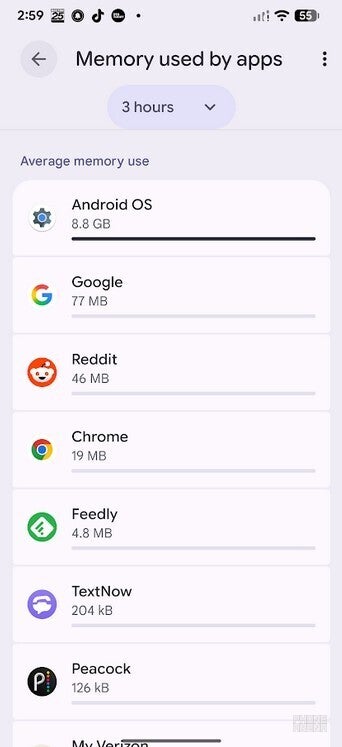
Average amount of memory used by the apps on my Pixel 6 Pro over the previous three hours. | Image by PhoneArena
Android was my largest RAM hog using an average of 8.8 GB of memory over the last three hours. Google was next with an average of 77 MB of memory used, followed by Reddit (46 MB), Chrome (19MB), Feedly (4.8 MB), TextNow (204 kB), and Peacock (43kB).
While 8.8 GB of RAM for Android seems high, newer versions of the OS (I'm currently running the Android 17 Beta) use more RAM than needed to allow AI features to launch instantly.
What you should be looking for
You should move to the 12-hour and 1-day options to get a better look at what is happening behind the scenes. What you want to find is an app that you aren't using but uses a lot of memory. That is an app that you might consider deleting if it is not important.
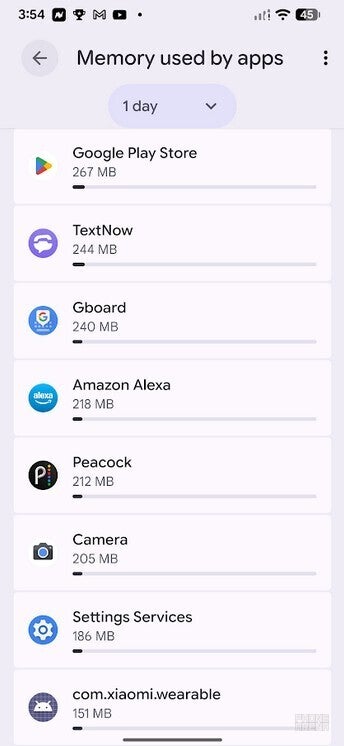
Some of the results for memory usage by my apps during 1-day. | Image by PhoneArena
For example, when I checked out the results for a full day, I noticed that the Mi Fitness app used 51MB of memory. I used this app when I was wearing a Mi Band years ago and now that I no longer wear it, I will delete the app.
When looking at the rankings, you can tap the three-dot icon in the upper right corner and switch from "sort by average use" to "sort by maximum use." The latter might be more useful as it showed me that TextNow, an app I never open, used as much as 244 MB of memory in one day.
When you are using an older phone, as I am, you need to do things like this to extend your phone's battery life.


Popular stories






Latest News





Things that are NOT allowed:
To help keep our community safe and free from spam, we apply temporary limits to newly created accounts: