Pixel users running Android 16 QPR3 Beta 2 have a revised version of a feature called Adaptive Connectivity that "Extends battery life and improves device performance by automatically managing your network connections." The stable Android 16 QPR2 build added Adaptive Connectivity, which you can find by going to Settings > Network & internet > Adaptive connectivity. In the stable Android 16 QPR2 build, Adaptive Connectivity just has an on and off switch allowing you to disable and enable the feature, which is enabled by default.
What Adaptive Connectivity does for your Pixel
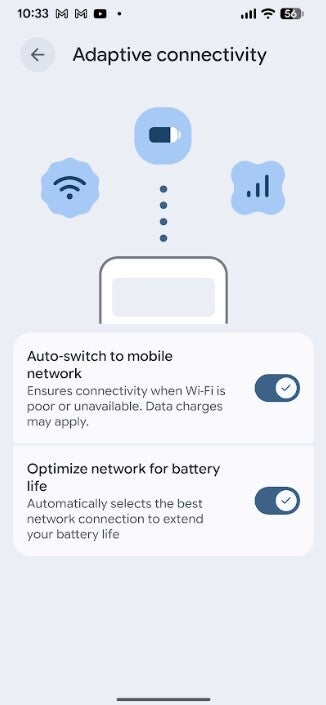
The feature automatically manages your network connections. In the latest Android 16 QPR3 Beta 2 release, Google took Adaptive Connectivity and changed the design of the page and how it works by adding a couple of toggles to the page. Both toggles are enabled by default. The toggles say:
Auto-switch to mobile network-Ensures connectivity when Wi-Fi is poor or unavailable. Data charges may apply.
Optimize network for battery network-Automatically selects the best network connection to extend your battery life.
The first toggle will automatically switch you from Wi-Fi to your mobile network when the Wi-Fi signal you have is not strong enough to give you a good quality connection or even keep you connected. The problem with this is that by switching to mobile data, it could eat up the amount of premium data you are allowed on your plan each month. Thus, Google added the toggle to allow you to disable the feature if you'd rather go Wi-Fi or bust.
The new Adaptive Connectivity page with two toggles allowing you to disable one or both features. | Image credit-PhoneArena
The new version of the feature is available now on Android 16 QPR3 Beta 2
The second option really doesn't have a downside to it, which means you're probably likely to keep this setting enabled at all times. It looks for the best network connection that is likely to extend your battery life. What smartphone user wouldn't want to extend his battery life?
Recommended For You
Is this a feature you are happy to have on your Pixel?
65 Votes
Yes. I'm always up for a feature that extends battery life.
93.85%
No. I wouldn't count on a huge battery improvement.
6.15%
I can tell you that the updated version of Adaptive Connectivity has appeared on my Pixel 6 Pro running Android 16 QPR3 Beta 2. If you are running this version of Android on your Pixel, you will have the version of Adaptive Connectivity with the two toggles. Both will be toggled on by default. To reiterate, if you do have a limited amount of premium data each month, you might want to consider disabling the first toggle.
There should be just one last beta version of Android 16 QPR3 before the stable version is released sometime next month.
Alan, an ardent smartphone enthusiast and a veteran writer at PhoneArena since 2009, has witnessed and chronicled the transformative years of mobile technology. Owning iconic phones from the original iPhone to the iPhone 15 Pro Max, he has seen smartphones evolve into a global phenomenon. Beyond smartphones, Alan has covered the emergence of tablets, smartwatches, and smart speakers.
A discussion is a place, where people can voice their opinion, no matter if it
is positive, neutral or negative. However, when posting, one must stay true to the topic, and not just share some
random thoughts, which are not directly related to the matter.
Things that are NOT allowed:
Off-topic talk - you must stick to the subject of discussion
Offensive, hate speech - if you want to say something, say it politely
Spam/Advertisements - these posts are deleted
Multiple accounts - one person can have only one account
Impersonations and offensive nicknames - these accounts get banned
To help keep our community safe and free from spam, we apply temporary limits to newly created accounts:
New accounts created within the last 24 hours may experience restrictions on how frequently they can
post or comment.
These limits are in place as a precaution and will automatically lift.
Moderation is done by humans. We try to be as objective as possible and moderate with zero bias. If you think a
post should be moderated - please, report it.
Have a question about the rules or why you have been moderated/limited/banned? Please,
contact us.











![Another batch of Galaxy S26 series users in the US are getting a nice surprise today [UPDATED]](https://m-cdn.phonearena.com/images/article/183643-wide-two_350/Another-batch-of-Galaxy-S26-series-users-in-the-US-are-getting-a-nice-surprise-today-UPDATED.webp)
Things that are NOT allowed:
To help keep our community safe and free from spam, we apply temporary limits to newly created accounts: