There probably was a time when you wanted to uninstall a system app on your Android phone only to realize that you can't totally delete system apps and can only uninstall updates to those apps. This was done through the Google Play Store where you could find an uninstall button on the listing of a system app that would delete previous updates downloaded to system apps. But you know Google. Sometimes they make apps easier and more convenient to use, while other times Google makes things more inconvenient. Why Google feels the need to do this, no one knows for sure.
Google makes it a little harder to uninstall past updates from system apps
If you checkout the system app listings in the Play Store now, you might notice that the uninstall button is gone, replaced with a button that opens the app. This also impacts system apps not found in the app drawer such as Android Auto and Pixel Camera Services. I am seeing the change in version 49.1.32-31 of the Play Store which is the version of the Play Store on my Pixel 6 Pro.
Do you ever uninstall updates on Android system apps?
340 Votes
Nope. Never.
35.59%
Yes, and I hate this change since it takes more time.
64.41%
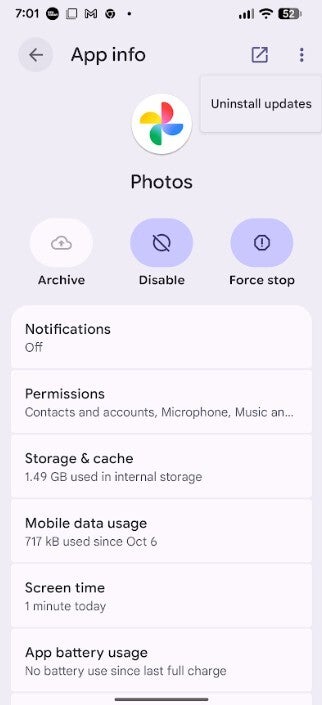
Now, when you want to uninstall updates on the system apps installed on your Android handset, you have to go to Settings > Apps > See all xxx apps and find the system app you want to uninstall updates from. For example, let's say you select the Photos app. You'll be on that app's App info page. In the upper right is a three-dot icon for the overflow menu. Tap on it and you'll see an option to Uninstall Updates. Press it to remove previous updates sent to that specific system app.
This how you will now uninstall previous updates from the Google Photos app. | Image credit-PhoneArena
Why might you want to remove a previous update for a system app you installed in the past? To get rid of bugs is one good reason, or you might be unhappy with a system app's new UI or any other change made to the app.
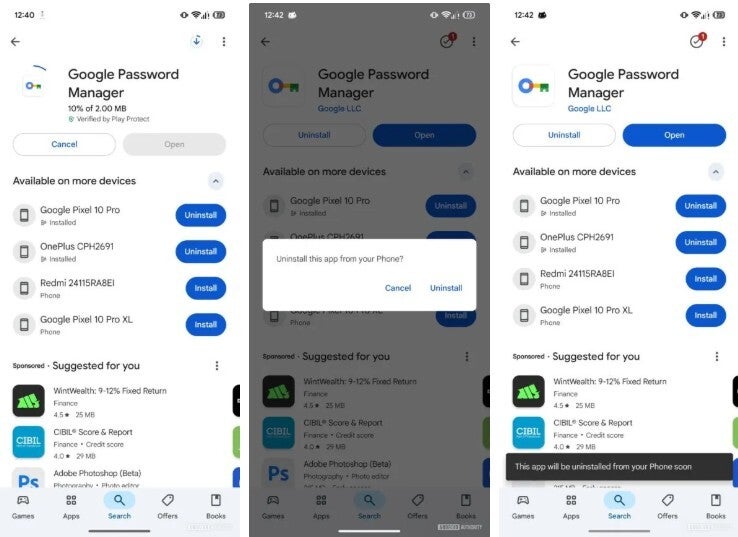
Google is allowing Android users to remotely install and uninstall apps from their Android phones. | Image credit-Android Authority
Google will soon allow you to install or delete apps remotely from Android phones
All we can say is that like God, Google works in mysterious ways. For example, soon Google will make it possible for you to remotely uninstall or install an app from its listing in the Play Store. Soon, Play Store listings for non-system apps will include a list of all Android devices you have signed into Google. Next to each device listed is a button that says Uninstall or Install. Tap the former and the app will be removed from the specific Android device that lines up with the button you pressed. Tap on Install, and the app will be downloaded on the device that lines up with the button you pressed. Now that is a great idea from Google.
Six-month unlimited plan is now 57% off
$90
$210
$120 off (57%)
Mint Mobile is now allowing you to get whichever plan you like for either three, six, or 12 months for just $15/mo. If you go for the six-month unlimited service, for instance, you'll now have to pay just $90 upfront instead of $210.
Alan, an ardent smartphone enthusiast and a veteran writer at PhoneArena since 2009, has witnessed and chronicled the transformative years of mobile technology. Owning iconic phones from the original iPhone to the iPhone 15 Pro Max, he has seen smartphones evolve into a global phenomenon. Beyond smartphones, Alan has covered the emergence of tablets, smartwatches, and smart speakers.
A discussion is a place, where people can voice their opinion, no matter if it
is positive, neutral or negative. However, when posting, one must stay true to the topic, and not just share some
random thoughts, which are not directly related to the matter.
Things that are NOT allowed:
Off-topic talk - you must stick to the subject of discussion
Offensive, hate speech - if you want to say something, say it politely
Spam/Advertisements - these posts are deleted
Multiple accounts - one person can have only one account
Impersonations and offensive nicknames - these accounts get banned
To help keep our community safe and free from spam, we apply temporary limits to newly created accounts:
New accounts created within the last 24 hours may experience restrictions on how frequently they can
post or comment.
These limits are in place as a precaution and will automatically lift.
Moderation is done by humans. We try to be as objective as possible and moderate with zero bias. If you think a
post should be moderated - please, report it.
Have a question about the rules or why you have been moderated/limited/banned? Please,
contact us.













Things that are NOT allowed:
To help keep our community safe and free from spam, we apply temporary limits to newly created accounts: