With more than 1 billion downloads on the Play Store alone, Google Translate is probably one of the most popular translation apps. I personally use it regularly to convert texts to different languages on my Pixel 10.
While it checks all the boxes of an ideal translation app, its UI hasn't been updated for a long time. Fortunately, that could change very soon.
Google Translate to get a modern UI
If you use multiple Google applications on your device, then you must have realized that Google Translate looks really outdated compared to all the other applications. Its home screen and other elements have barely changed in recent years.
However, the tech giant seems to be now finally giving attention to its translation application as well. The updated modern look of the app has reportedly been spotted in version 10.25.
Home screen changes
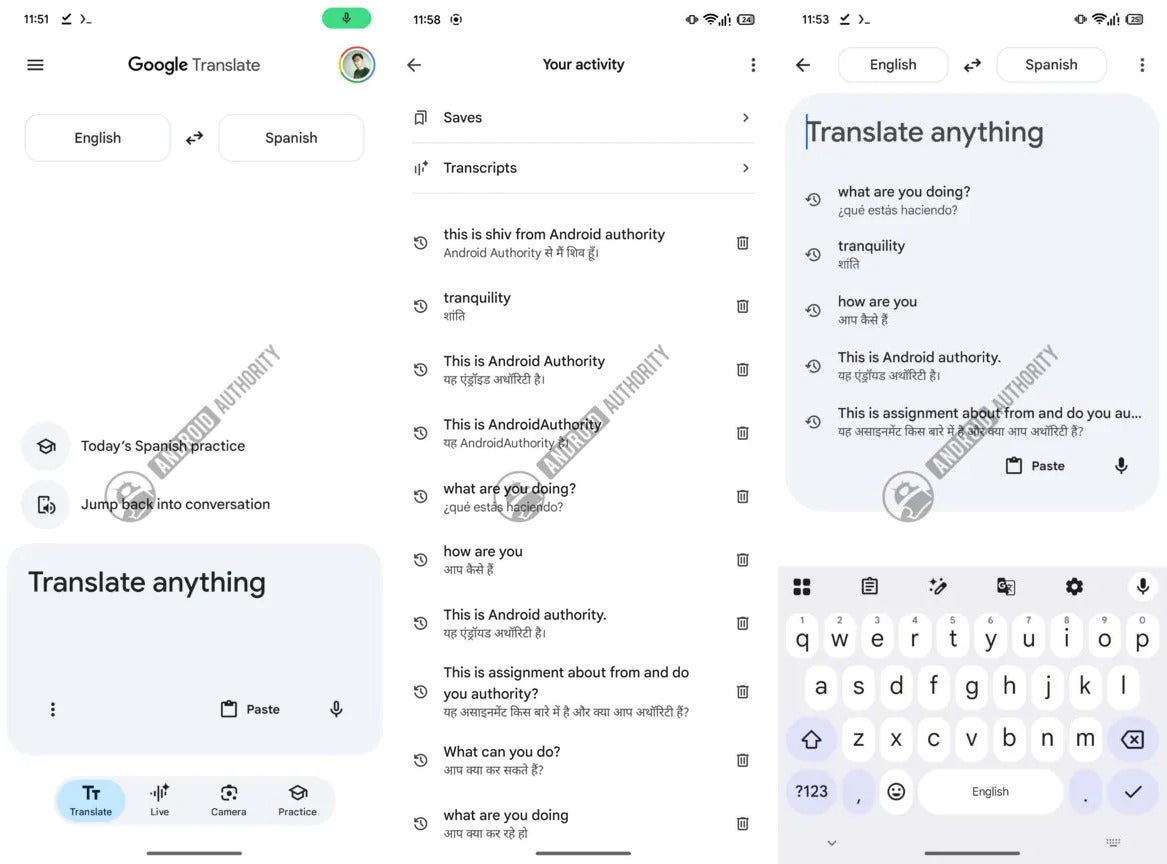
New look of Google Translate app. | Image by Android Authority
The first thing you notice when you open the current Google Translate app is a big input field, the language selector box at the bottom, and four tabs under it, each having different functionalities. All these elements have reportedly been revamped.
Starting with the text input field: in the new version, it doesn't take up almost the entire screen; instead, it has been allocated a small box at the bottom. This apparently has been done to give space to other important elements. You will also see two contextual shortcuts above the input window, with one allowing you to directly jump into your ongoing language practice, while the other lets you resume your previous conversation.
Recommended For You
Next, the language selector box has been moved to the top of the window. The four tabs are still at the same location, but now instead of them taking up the full space at the bottom, they have been moved inside a pill-shaped bar. If you have a Pixel phone, then you will find the bar very similar to what you have in the Now Playing app.
The names of the tabs have also been updated. Currently, it's Conversation, Practice, and Camera. But in the new look, it's Translate, Live, Camera, and Practice.
Other small but important changes
While the things I mentioned above were the ones you will notice instantly in the new app, there have reportedly been a few small but very important upgrades here and there as well. Unlike the current version, the input box contains three elements: a three-dots menu, a paste button, and a mic icon. The latter two are self-explanatory.
Tapping the three-dot icon gives you two options: a translation model and handwriting. Selecting the first option allows you to choose between the Advanced and the Classic translation models. The handwriting option, as you can guess, allows you to draw the text on the screen that you want to be translated into your chosen language.
The star icon that you find at the top-left corner of the home screen, which basically shows saved translations, has reportedly been replaced by a hamburger icon in the new version. Tapping the new icon not only shows the saved translations but also your translation history and saved transcripts.
The interface that appears when you start typing in the input field has also been slightly updated. The language selector box remains pinned at the top, and you also see some of your recent translations. This appears very similar to how recent searches appear upon tapping the input field in a browser like Google Chrome.
Are you in favor of having your sentences translated by AI in Google Translate?
3 Votes
I enjoy it because it improves sentence structure.
66.67%
I don't like it because it often alter the original meaning.
33.33%
I use some other translation app.
0%
Google really needs to ameliorate its translation app
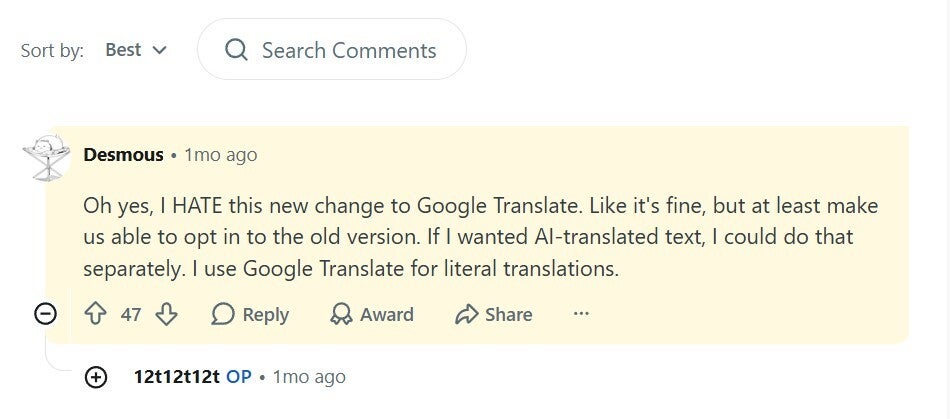
Complaints about AI translation by Google Translate. | Image by Reddit
You see, Google's AI was recently added to the translation app so that it can provide better sentence structure and natural phrasing. However, users have found that because of this, Google Translate no longer does rigid, word-for-word translation; instead, it goes for an AI-generated, prose-style translation. A manual switch is what most users are demanding, which will allow them to choose whether they want an AI-backed translation or not.
It's time for Google Translate
Google Translate is really a great app, and I personally really like its new Practice feature, which allows you to practice real-life conversations in your selected language. For instance, you can use it to ask about the price of a croissant in a French restaurant. However, the look of the app was one thing that I always felt was a bit outdated compared to other Google applications.
That said, there is no confirmation on when this cleaner and more modern look will be rolled out to the Google Translate app. Furthermore, I also want the company to fulfill users' demands of having a manual switch to enable or disable translation done by AI.
Mint Mobile's 6-month plans now cost $10/mo
$10
/mo
$35
$25 off (71%)
Mint Mobile is celebrating its 10-year anniversary with a special offer on its six-month subscription plans. For a limited time, you can get your preferred tier (6GB, 17GB, 23GB or unlimited) for just $10/mo. That saves you between 50% and 71% on the carrier's mobile plans, making it way easier to recommend.
Aman Kumar is a news writer at PhoneArena covering Google Pixel phones, Android features, AI-powered smartphone tools, and mobile tech news. Before joining PhoneArena, he spent over five years writing about consumer technology for publications like MakeUseOf, How-To Geek, and Guiding Tech. His current daily drivers are the Pixel 10 and Samsung Galaxy S26 Plus, while his red iPhone SE (2nd gen) remains a personal favorite. Aman also appreciates bold smartphone experiments and still considers the Nokia N-Gage one of the industry’s most iconic designs.
A discussion is a place, where people can voice their opinion, no matter if it
is positive, neutral or negative. However, when posting, one must stay true to the topic, and not just share some
random thoughts, which are not directly related to the matter.
Things that are NOT allowed:
Off-topic talk - you must stick to the subject of discussion
Offensive, hate speech - if you want to say something, say it politely
Spam/Advertisements - these posts are deleted
Multiple accounts - one person can have only one account
Impersonations and offensive nicknames - these accounts get banned
To help keep our community safe and free from spam, we apply temporary limits to newly created accounts:
New accounts created within the last 24 hours may experience restrictions on how frequently they can
post or comment.
These limits are in place as a precaution and will automatically lift.
Moderation is done by humans. We try to be as objective as possible and moderate with zero bias. If you think a
post should be moderated - please, report it.
Have a question about the rules or why you have been moderated/limited/banned? Please,
contact us.










Things that are NOT allowed:
To help keep our community safe and free from spam, we apply temporary limits to newly created accounts: