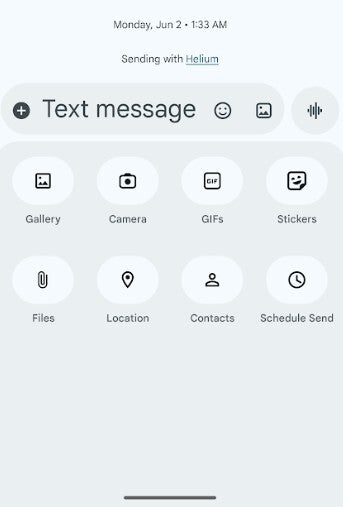
Accessing your photos from the Google Messages app for Android is relatively easy, but it could be easier. Open Google Messages and tap on any previous message. On the left of the text field is a round button with a "plus sign [+]" inside it. Tap on the button and you'll see ovals with icons inside. There are eight options:
Gallery
Camera
GIFs
Stickers
Fles
Location
Contacts
Schedule Send
Tap on Gallery and you'll see the most recent locally stored images and videos from the Google Photos custom media picker. But if you want to access your photos from the Google Photos app using the Android System photo picker, you'll have to tap the Folders button at the bottom of the screen. Unfortunately, this forces you to make an extra step if you want to see what photos are stored in the cloud instead of just on your phone.
Google is working to eliminate an extra step required to access your photos from the Google Photo app for Google Messages
Making this extra step might be considered a big deal to some, but more importantly, there is a security issue. Google's custom picker needs access to your complete media gallery in order to work. Android's photo picker allows apps to access only those photos and videos you select. But there's good news on the horizon. Google is reportedly working on a way for users to access their photos from the Photos app using Google Messages without having to make that extra tap of the Folders button.
You can save time when accessing your photos and videos from the Google Photos app via Google Messages. | Image credit-PhoneArena
Android 16 unveils a new embedded photo picker that features its own APIs that allow apps to integrate this photo picker directly into their interface. This gives app developers a media gallery that feels native to their app while also delivering the security and privacy found on the Android system photo picker. since broad media permissions no longer need to be requested. Android Authority's Mishaal Rahman found the embedded photo picker on his OnePlus 13 running OxygenOS 16.
Android 16 is needed to use the embedded photo picker
When Rahman presses the Gallery button, his cloud-hosted photos and videos show up right next to the photos and videos stored locally on his phone. Before Android 16 gave us the embedded photo picker, Rahman would have had to make that extra move and tap on the Folders button in order to see his cloud-hosted photos and videos from the Google Photos app.
Recommended For You
Will you access your photos from the Google Photos app via Google Messages?
129 Votes
Yes, especially since I can now save a step.
83.72%
No, I never did so before so why should I now?
16.28%
Once the embedded photo picker rolls out, you will no longer need to give the Google Messages app the "Photos and videos" permission to share photos or videos. In fact, once the embedded photo picker surfaces, you can revoke the "Photos and videos" permission.
Even though the embedded photo picker is supported on Android 14, you won't see it on your Android device until it's running Android 16.
Get iPhone 18 Pro with Visible, get $480 off!
$719
/mo
$1199
$480 off (40%)
On the Visible+ Pro plan, you get access to 5G Ultra Wideband data on Verizon's fastest network. Along with unlimited roaming across Mexico and Canada, 2 days of Global Pass per month, 3x hotspot speeds, 4K streaming, and Smartwatch service.
Alan, an ardent smartphone enthusiast and a veteran writer at PhoneArena since 2009, has witnessed and chronicled the transformative years of mobile technology. Owning iconic phones from the original iPhone to the iPhone 15 Pro Max, he has seen smartphones evolve into a global phenomenon. Beyond smartphones, Alan has covered the emergence of tablets, smartwatches, and smart speakers.
A discussion is a place, where people can voice their opinion, no matter if it
is positive, neutral or negative. However, when posting, one must stay true to the topic, and not just share some
random thoughts, which are not directly related to the matter.
Things that are NOT allowed:
Off-topic talk - you must stick to the subject of discussion
Offensive, hate speech - if you want to say something, say it politely
Spam/Advertisements - these posts are deleted
Multiple accounts - one person can have only one account
Impersonations and offensive nicknames - these accounts get banned
To help keep our community safe and free from spam, we apply temporary limits to newly created accounts:
New accounts created within the last 24 hours may experience restrictions on how frequently they can
post or comment.
These limits are in place as a precaution and will automatically lift.
Moderation is done by humans. We try to be as objective as possible and moderate with zero bias. If you think a
post should be moderated - please, report it.
Have a question about the rules or why you have been moderated/limited/banned? Please,
contact us.













Things that are NOT allowed:
To help keep our community safe and free from spam, we apply temporary limits to newly created accounts: