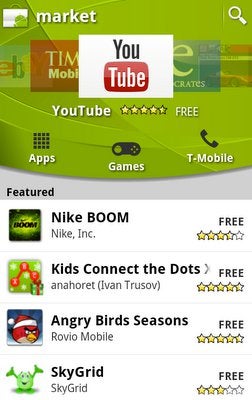
Google announced that an Android Market update will roll out over the next two weeks (starting today) for all handsets powered by Android 1.6 or above. It is set to bring some goodies like more intuitive app searching and two new categories - Widgets and Live Wallpapers - along with some dev-related perks.
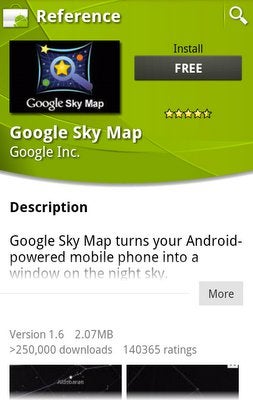
The new UI allows you to see all the relevant information about a certain app in only one screen together with a "related apps" category in its detail page. It also facilitates the process of exploring and downloading "featured apps" thanks to the carousel interface. Along with the arrival of Widgets and Live Wallpapers, more categories - for popular apps and games - are on the horizon too.
We told you about the Android developers fiasco, but in truth this is going to be a dev-friendly update. First of all, the refund period comes down from 24 hours to 15 mins. That's a consequence of the fact that developers often raise objections that people download their games, complete them and then use the refund option. Furthermore, according to the official Android Developers Blog, stats prove that most of the app refundment happen in the first few minutes after the purchase.
Until now, developers were limited to uploading files with a maximum size of 25MB, but that number is now doubled to 50MB. As Gingerbread is more game-oriented, this comes as a good news for both devs and end consumers.
Recommended For You
It seems that a few Androiders are already enjoying the new Android Marketplace. If you are very eager to taste it, but haven't received the update yet, you can try to force an update if you go to Settings > Applications > Manage Applications > All > Market > Clear data, which worked for us just fine, although some of our readers reported that it didn't have any effect with them. If this happens to be the case with you too, remember that patience is a virtue and bear in mind that it should come soon. But if you are one of these guys who are already enjoying the new Android Market, tell us with your comments your first impressions.
Get Visible as low as $20/mo for 1 year. Limited time offer with code: FRESHSTART
$20
/mo
$25
$5 off (20%)
Offer Ends 6.1.2026 at 11.59pm ET. New members get $5/mo off the $25/mg Visible plan, $35/mo Visible+ plan, or $45/mo Visible+ Pro plan for the first 12 months. Promo code FRESHSTART required at checkout.
Alex I. is a former technology news writer at PhoneArena. His content contribution took place between 2010-2011, and touched on various devices from the mobile tech industry, such as the iPhone 4s, HTC Sensation and LG Optimus Black.
Recommended For You
COMMENTS (20)
COMMENTS (20)
All comments need to comply with our
Community Guidelines
PhoneArena Community Rules
A discussion is a place, where people can voice their opinion, no matter if it
is positive, neutral or negative. However, when posting, one must stay true to the topic, and not just share some
random thoughts, which are not directly related to the matter.
Things that are NOT allowed:
Off-topic talk - you must stick to the subject of discussion
Offensive, hate speech - if you want to say something, say it politely
Spam/Advertisements - these posts are deleted
Multiple accounts - one person can have only one account
Impersonations and offensive nicknames - these accounts get banned
To help keep our community safe and free from spam, we apply temporary limits to newly created accounts:
New accounts created within the last 24 hours may experience restrictions on how frequently they can
post or comment.
These limits are in place as a precaution and will automatically lift.
Moderation is done by humans. We try to be as objective as possible and moderate with zero bias. If you think a
post should be moderated - please, report it.
Have a question about the rules or why you have been moderated/limited/banned? Please,
contact us.









Things that are NOT allowed:
To help keep our community safe and free from spam, we apply temporary limits to newly created accounts: