Android's September Drop is here, and it spreads five new features across Gemini, Find Hub and Google Messages. Most of them reach further back than the Pixel 11 Pro or a Galaxy S26 Ultra, so this isn't another drop written only for the newest Android phones.
Find Hub can now remember where you put things
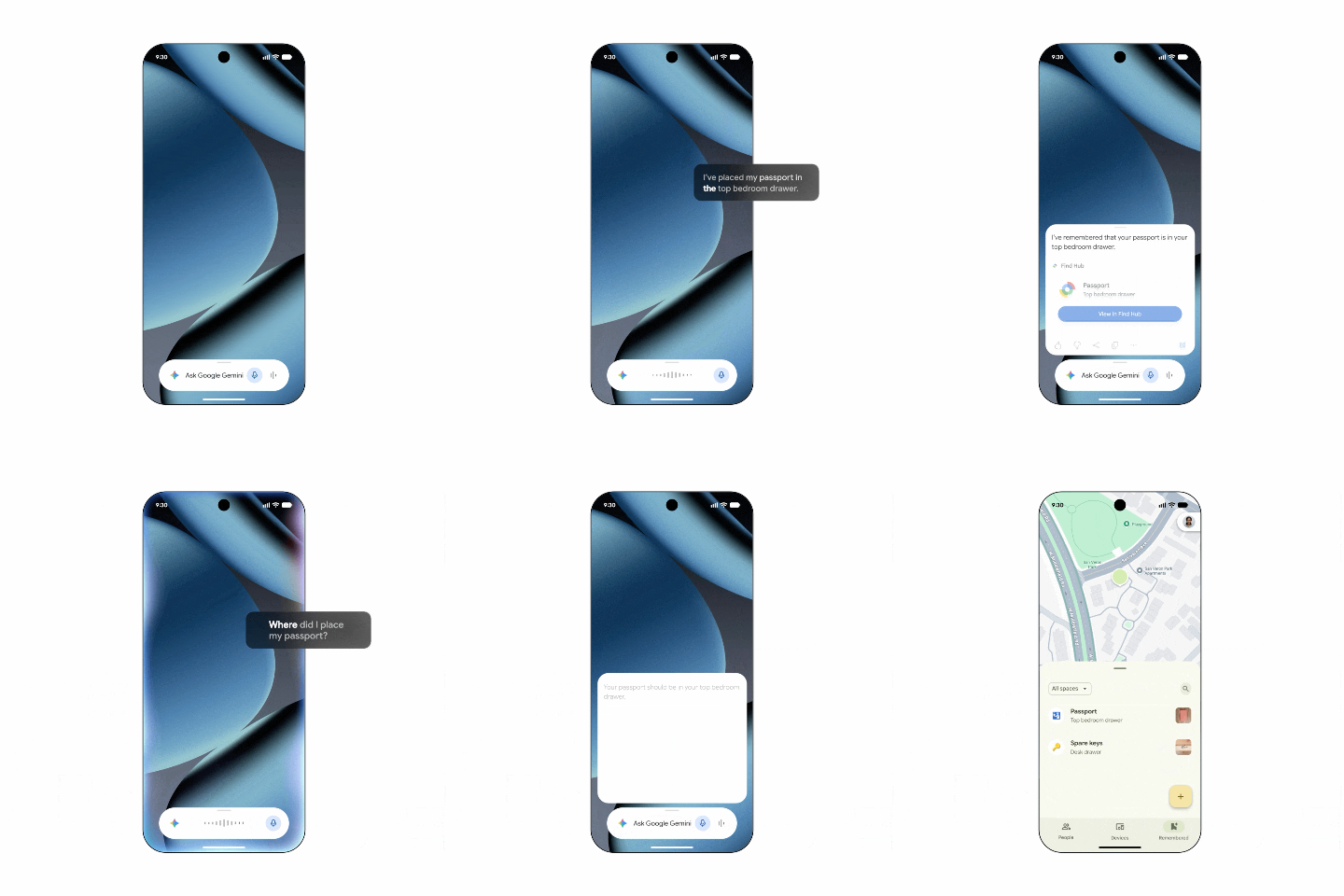
Google announced the September Android Drop on its Android blog this morning, and the opening feature is the one I didn't see coming. You can now tell Gemini to remember where you physically put something, and it files that location away in Find Hub for you.
Gemini can now save where you left an untracked item and keep it in Find Hub. | Image by Google
Google's own example is saying "Hey Google, remember in Find Hub that I put my passport in my bedroom drawer," with an optional photo attached. When you need it back, you either ask Gemini or open the new remembered items tab in the app, and the whole thing is pointed at the objects you'd never stick a tracker tag on.
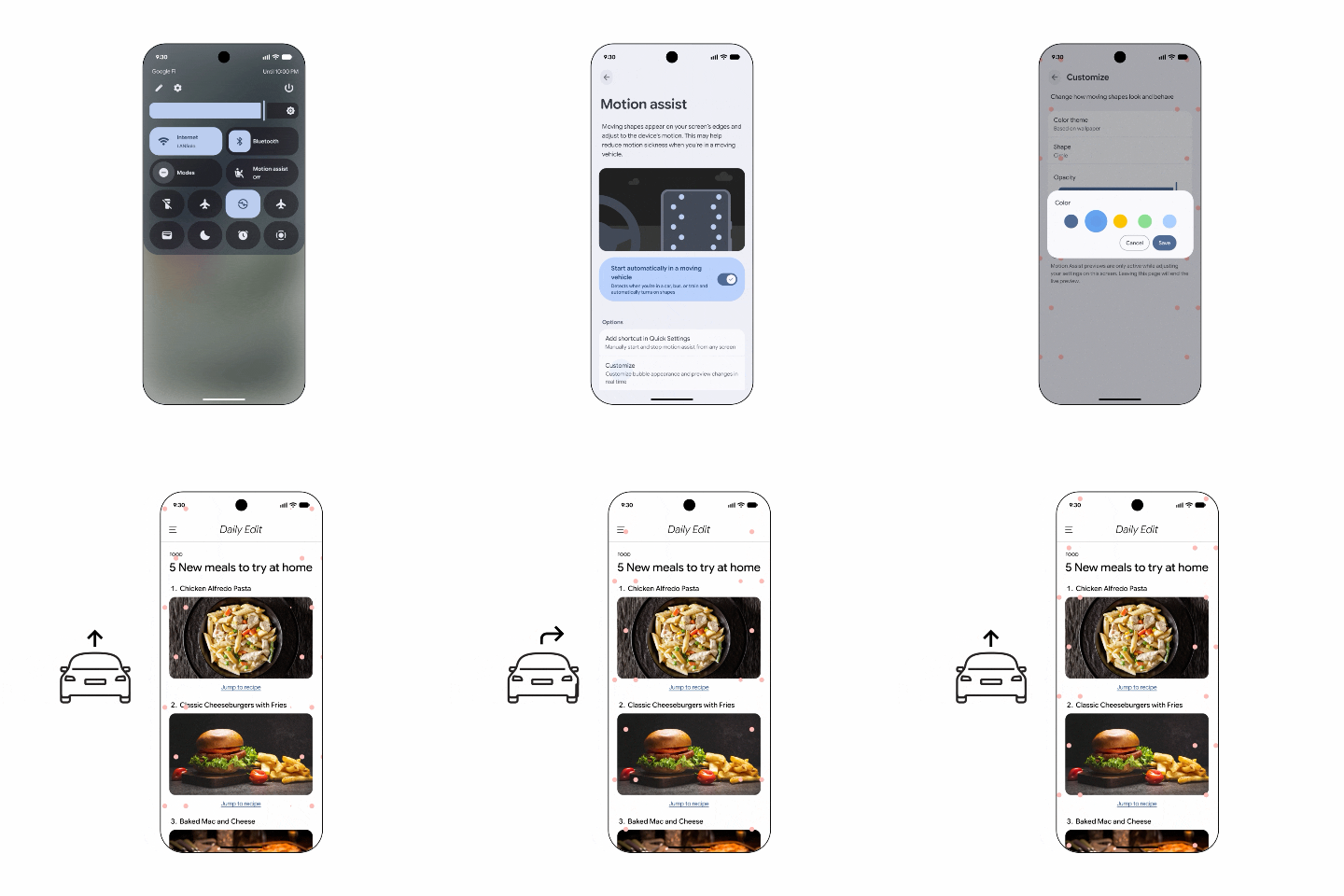
Second up is Motion Assist, which lays a subtle bubble overlay over your screen that moves along with the vehicle you're riding in. It's built to close the gap between what your eyes are reading and what your inner ear is feeling, and you can set it to switch on by itself, drop it into Quick Settings, and change the bubble's shape, color and opacity.
Recommended For You
Which September Android Drop feature are you reaching for first?
231 Votes
Motion Assist, I get carsick as a passenger
25.11%
Find Hub remembering where I left things
42.42%
Guided vision in Gemini Live
7.36%
Chat theme for my group chats
9.09%
Google Keep inside Google Messages
16.02%
How Motion Assist compares to Apple's Vehicle Motion Cues
The practical effect of a Drop like this is that the features arrive through Google's own apps and services rather than a full platform update, so the version requirements land all over the place.
Motion Assist adds a bubble overlay that tracks the vehicle's movement. | Image by Google
Motion Assist is not new ground, though, and it's fair to say Google is arriving late. Apple shipped Vehicle Motion Cues back in iOS 18, doing the same job with animated dots along the screen edges, and Oppo and Vivo have carried their own Motion Cues implementations for a while now.
More on Motion Assist and the Pixel it's landing on:
Guided vision, Google Keep and Chat theme round out the Drop
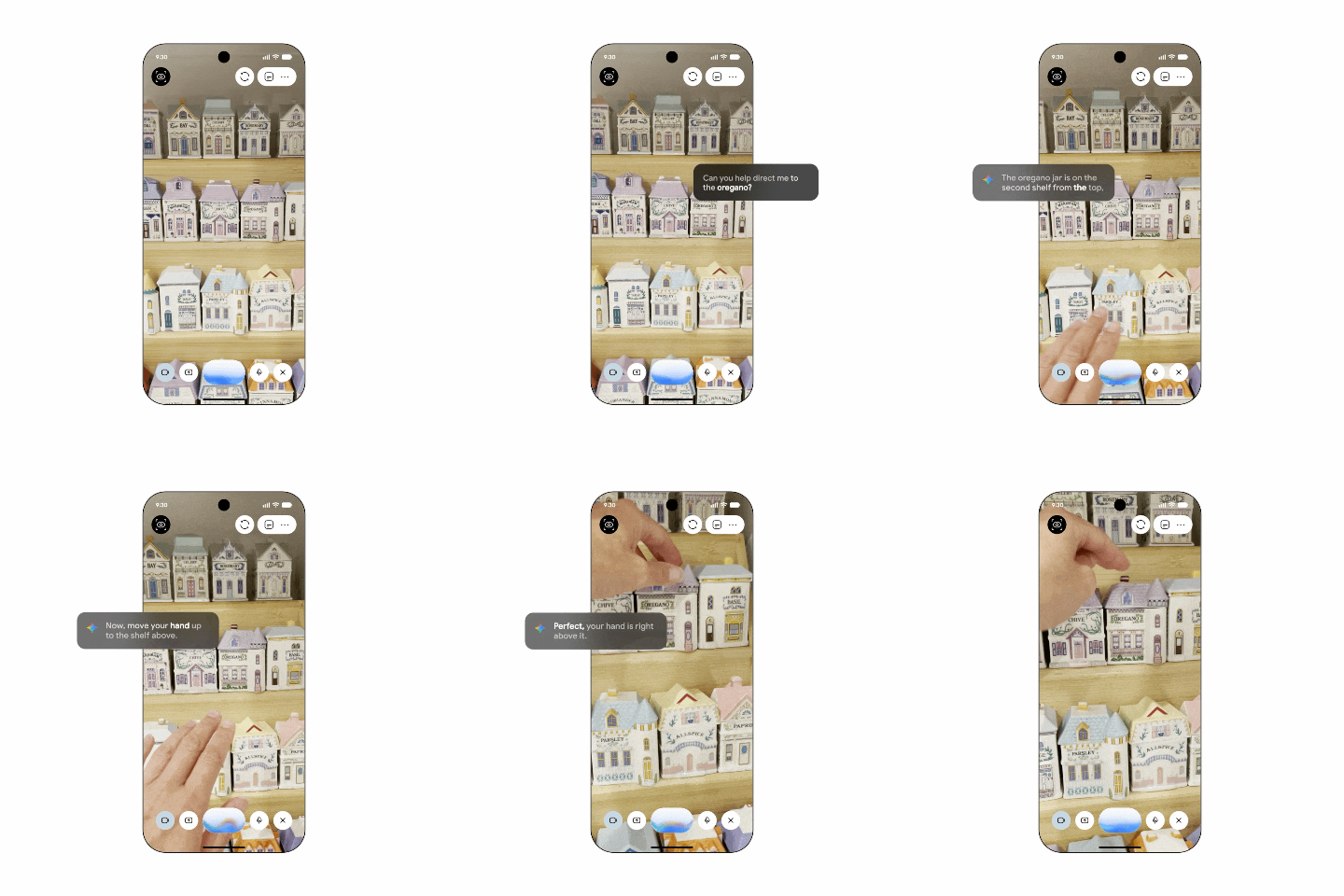
Guided vision is the accessibility piece, and it lets you share your camera in Gemini Live and hear descriptions of whatever is in front of you. Google points at reading fine print on a food label, ordering from a menu in a dim restaurant, or tracking down a household object, and if your camera isn't lined up, voice feedback talks you through reframing or panning across the room.
Guided vision describes what your camera sees and tells you how to reframe. | Image by Google
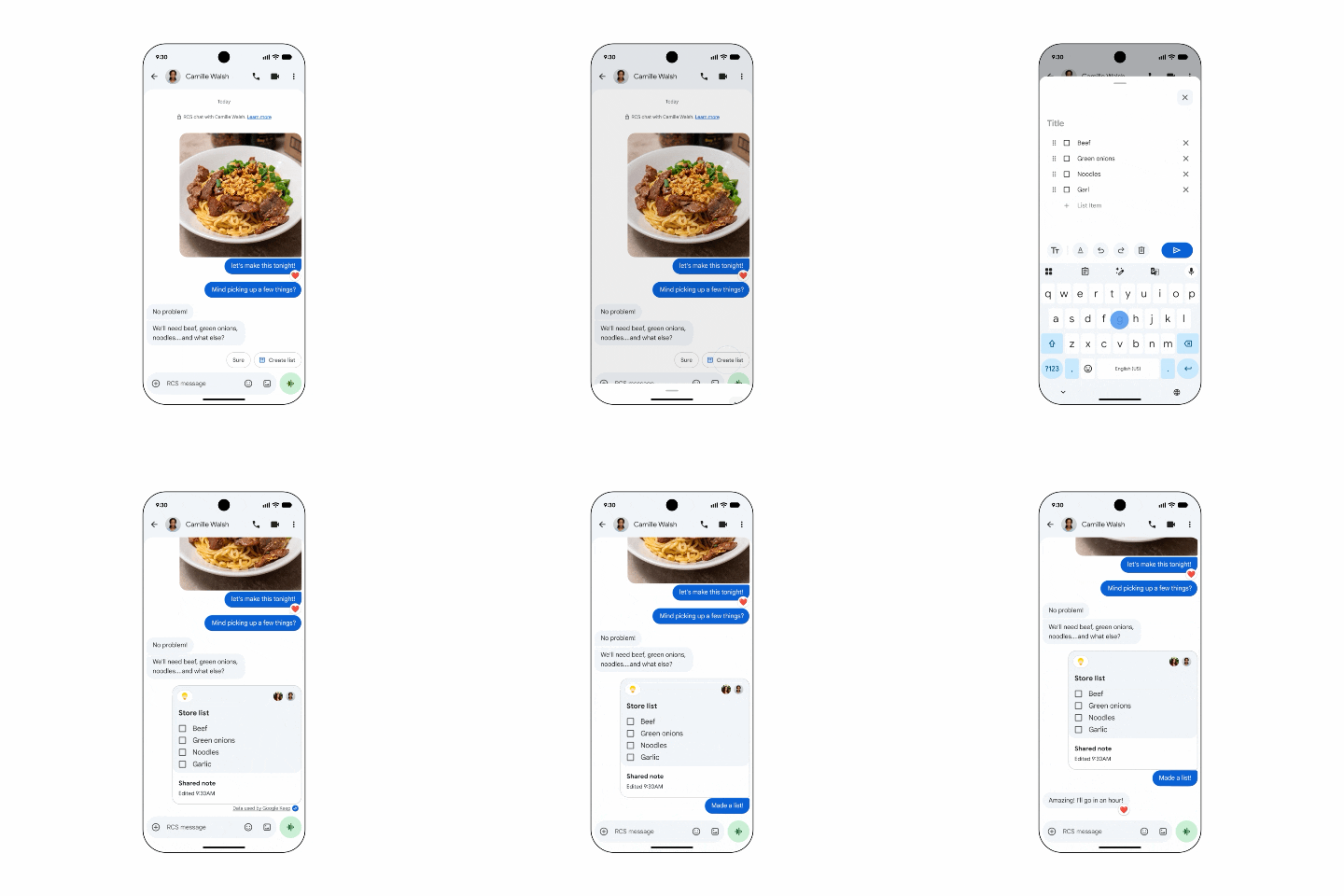
You can reach it from your Accessibility shortcuts or launch it straight out of the TalkBack menu, which is a sensible place to put it. On the Messages side, Google Keep now works inside your conversations, so a grocery list or a set of vacation notes can be viewed, edited and added to by everyone in the thread without anyone leaving the app.
Google Keep notes and lists can now be edited by everyone in a Messages thread. | Image by Google
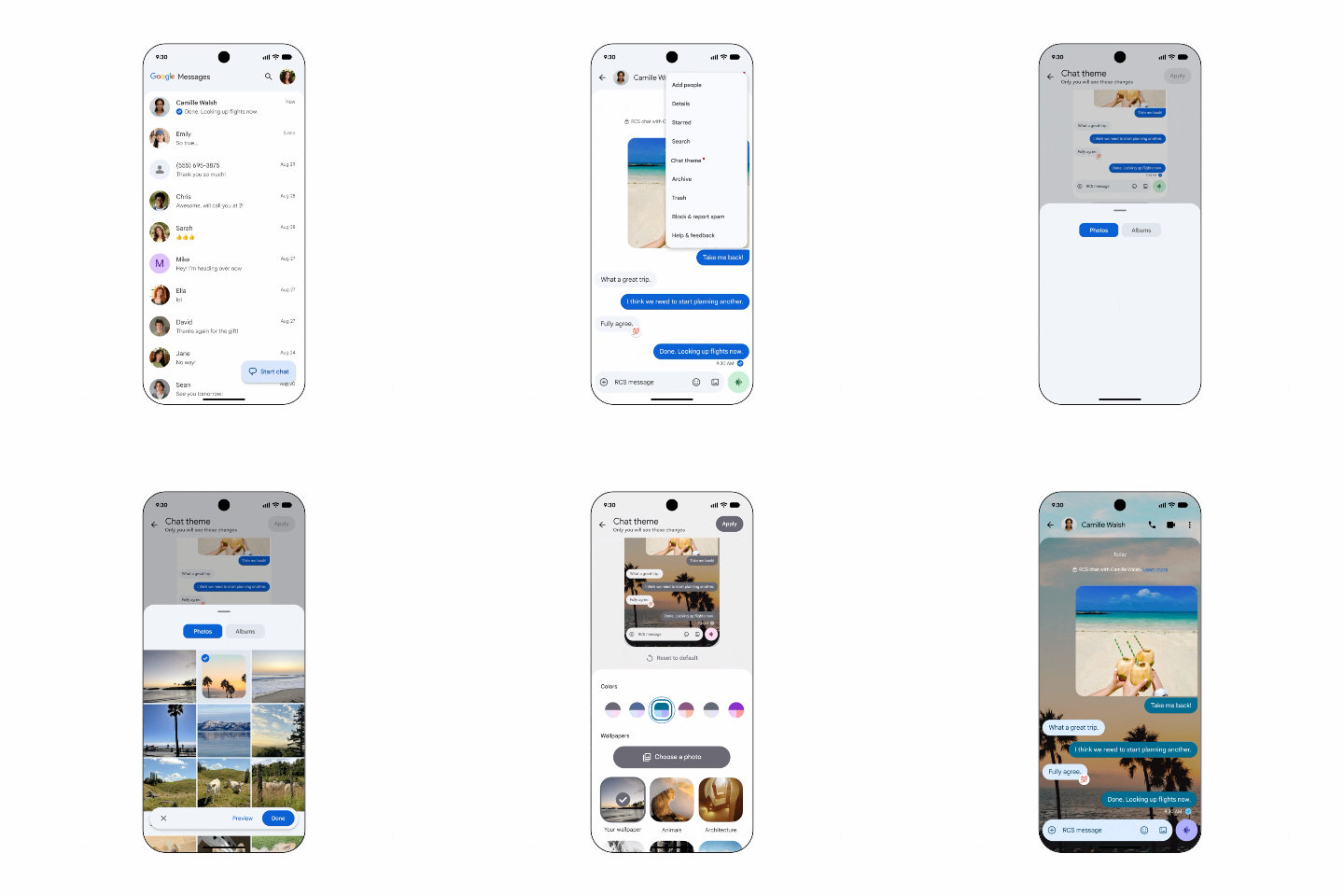
It's the + icon in Google Messages that pulls Keep in. The last one is Chat theme, which lets you give each conversation its own background, either a supplied wallpaper or one of your own photos, with the text bubbles either matching automatically or set to colors you pick.
Chat theme gives each conversation its own background and bubble colors. | Image by Google
Rollout: what each Android version gets
The availability is scattered enough to be worth spelling out plainly:
Chat theme in Google Messages is live now.
Google Keep inside Google Messages starts rolling out today.
Find Hub remembered items works on Android 16 and up, in countries where Gemini and Find Hub are both supported.
Guided vision is still coming soon, for Android 9 and up wherever Gemini is available.
The Find Hub change is the one I needed
Motion Assist will get the headlines here, and I understand why, but the remembered items tab is the one solving an actual problem in my house. I have exactly two tracker tags and roughly forty things I lose, and my passport has never once been on the tagged list.
Being able to say where I put something out loud and have it saved somewhere I'd actually think to look is a small change with a lot of daily mileage in it. Hopefully the photo attachment sticks around and doesn't quietly become a Pixel exclusive, because that's the part that'll save me from second-guessing which drawer I meant.
Get a free Galaxy A17 with Straight Talk. To claim this deal, you need to pair the phone with activation on a Silver Unlimited Plan or higher. This tier costs $45 per month. Offer valid through 01/10/27 while supplies last online.
Johanna Romero is a Senior News Writer at PhoneArena, covering mobile technology news across Android, iOS, wearables, and the Google ecosystem she knows best. Drawing on 15 years in IT and tech support from 2007 to 2022, she brings a user-friendly eye for the practical features and lesser-known tricks readers care about. Google named her an official #TeamPixel member in 2022, and she also reviews the latest devices on her YouTube channel, JoJo the Techie.
A discussion is a place, where people can voice their opinion, no matter if it
is positive, neutral or negative. However, when posting, one must stay true to the topic, and not just share some
random thoughts, which are not directly related to the matter.
Things that are NOT allowed:
Off-topic talk - you must stick to the subject of discussion
Offensive, hate speech - if you want to say something, say it politely
Spam/Advertisements - these posts are deleted
Multiple accounts - one person can have only one account
Impersonations and offensive nicknames - these accounts get banned
To help keep our community safe and free from spam, we apply temporary limits to newly created accounts:
New accounts created within the last 24 hours may experience restrictions on how frequently they can
post or comment.
These limits are in place as a precaution and will automatically lift.
Moderation is done by humans. We try to be as objective as possible and moderate with zero bias. If you think a
post should be moderated - please, report it.
Have a question about the rules or why you have been moderated/limited/banned? Please,
contact us.





Things that are NOT allowed:
To help keep our community safe and free from spam, we apply temporary limits to newly created accounts: