Android or iOS? This is one of those questions that will never have a definitive answer, yet it's been answered by billions of people with their phones of choice.
Soon, we'll all be getting Android 17 and iOS 27 in their stable releases (for eligible devices). The next version of Google's mobile operating system could arrive with something that could be a game changer for you.
Say, do you get sick while looking at your phone when you're traveling with a car or a bus?
Android 17 and its Motion Assist feature
It's a clever little feature. | Image by Android Authority
Right now, only a handful of devices—like the new Pixel 11 family—operate with Android 17 on board. In this version, there's a feature called Motion Assist and it's, well, about assisting you with motion sickness. Some people really don't care whether they're looking at their phone or through the window and enjoying the landscape.
But some people have no choice and are only left with the second option, as reading or watching their phone causes dizziness or nausea.
Motion sickness sounds funny only if you haven't experienced it and it's about time that Google made something about it.
Per the latest reports, Google starts with its own Pixel phones. Some users say their Pixel 11 Pro XL units have the Motion Assist already on board, but owners of the Pixel 10 Pro XL—which has also received Android 17—haven't received the new feature yet.
Recommended For You
That's not unusual. New features are almost always being rolled out in phases.
If you're a fan of exotic brands like Oppo or Vivo, you know that these OEMs have Motion Cues and it does pretty much the same thing as Motion Assist—there are several interactive elements on the screen that react to the phone's movement and minimize your motion sickness feelings.
Apple also has its own take on it. In iOS 18, Cupertino introduced Vehicle Motion Cues. It's the same: animated dots appear on the edges of the screen to represent changes in vehicle motion.
How to access it?
The new Motion Assist feature should be located in Google Play Settings. Users should look for it in Settings > Your profile > All services > Personal & device safety section. Then select Motion Assist.
Once enabled, the Motion Assist feature should start automatically when your Android 17 device detects that you're in a moving vehicle and using the phone.
What I, personally, find of great help is that there's a Motion Assist Quick Settings icon. This way, you can turn the feature on or off in no time and there's no need to dig in Settings.
Customization is paramount
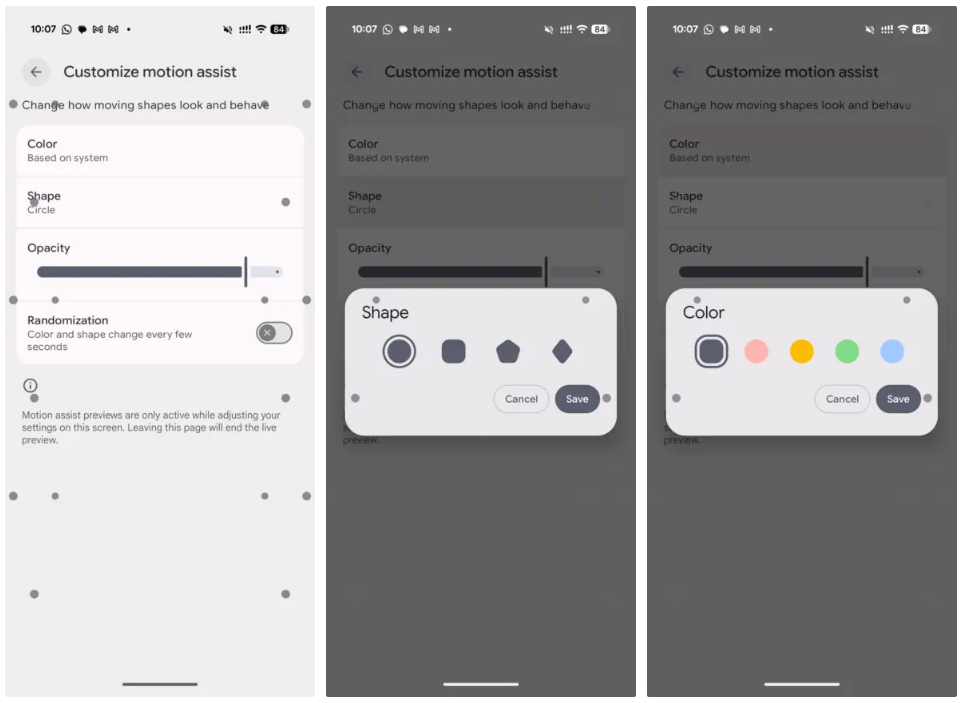
I love features that are customizable and Motion Assist seems to be one of these. Once we get it, we'll be able to pick the shape, color and opacity of the small elements that'd appear on the screen. There's also a Randomization option available.
How come this works?
It's about perception. Motion Assist works by giving your brain visual cues that match the movement your body is feeling. The animated elements on the edges of the screen move with you, helping your eyes and inner ear receive more consistent signals and reducing the mismatch that causes motion sickness.
It's a pretty clever idea.
What was the main reason you switched from Android to iOS?
62 Votes
Better build quality
14.52%
Better camera
14.52%
Longer battery life
9.68%
Better UI
30.65%
Something else
30.65%
Mint Mobile's 6-month plans now cost $10/mo
$10
/mo
$35
$25 off (71%)
Mint Mobile is celebrating its 10-year anniversary with a special offer on its six-month subscription plans. For a limited time, you can get your preferred tier (6GB, 17GB, 23GB or unlimited) for just $10/mo. That saves you between 50% and 71% on the carrier's mobile plans, making it way easier to recommend.
Sebastian is one of PhoneArena’s senior opinionators. A veteran news writer with almost 20 years of experience in media and technology, he not only covers all the hot news about Galaxies and iPhones, but often provides hot takes on industry trends. He’s fascinated with camera-focused flagships from the likes of Oppo and Vivo, as well as foldable phones.
A discussion is a place, where people can voice their opinion, no matter if it
is positive, neutral or negative. However, when posting, one must stay true to the topic, and not just share some
random thoughts, which are not directly related to the matter.
Things that are NOT allowed:
Off-topic talk - you must stick to the subject of discussion
Offensive, hate speech - if you want to say something, say it politely
Spam/Advertisements - these posts are deleted
Multiple accounts - one person can have only one account
Impersonations and offensive nicknames - these accounts get banned
To help keep our community safe and free from spam, we apply temporary limits to newly created accounts:
New accounts created within the last 24 hours may experience restrictions on how frequently they can
post or comment.
These limits are in place as a precaution and will automatically lift.
Moderation is done by humans. We try to be as objective as possible and moderate with zero bias. If you think a
post should be moderated - please, report it.
Have a question about the rules or why you have been moderated/limited/banned? Please,
contact us.














Things that are NOT allowed:
To help keep our community safe and free from spam, we apply temporary limits to newly created accounts: