After officially getting unveiled in September this year, Samsung has been gradually rolling out the stable One UI 9 update to all the eligible Galaxy devices. While most users must be enjoying the new features, such as Now Nudge, Now Brief, and more, on some devices, it is causing serious connectivity issues.
Galaxy phones showing the "Connection failed" error
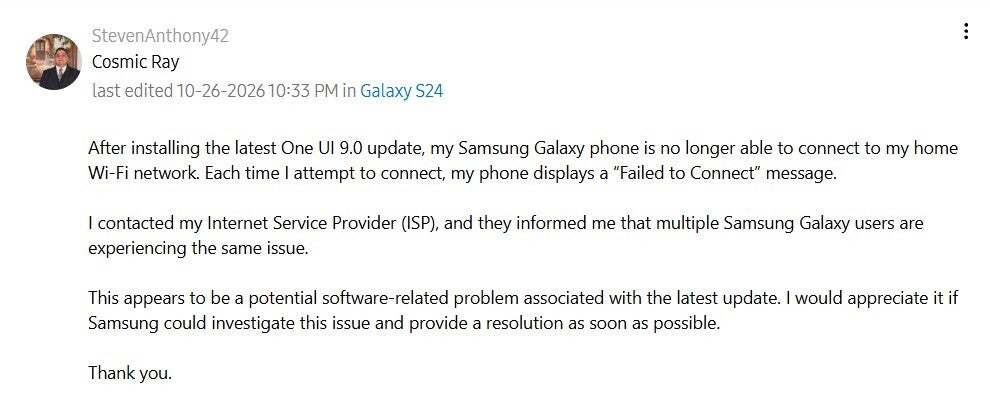
Some Galaxy users who have the stable One UI 9 update installed reports that they are experiencing Wi-Fi issues on their device. Once they enable Wi-Fi on their phone, it gets connected to it, but after some time, it automatically gets disconnected and shows the "Connection failed" error.
The universal fix—restarting the phone—isn't helping in resolving the problem, as a Galaxy S24 user posted on the Samsung Community forum that the device gets connected to the Wi-Fi after restart, but then it automatically disconnects with the same error again.
Poll
1 Votes
Have you faced any issues after installing the One UI 9 update?
Other issues with Wi-Fi connectivity
Wi-Fi issue after installing the One UI 9 update. | Image by Samsung Community forum
The connection failed error isn't the only Wi-Fi-related problem Galaxy users are reportedly experiencing. A user commented under a relevant post on the Samsung Community forum that their Galaxy Z Fold 7 is failing to connect to their home T-Mobile 5G router after installing the latest One UI update. Another Z Fold 7 user mentioned that they don't have any issue connecting to the Wi-Fi, but Wi-Fi calling with T-Mobile hasn't been functioning for them.
Recommended For You
A Galaxy S24 Ultra owner commented that the mobile can connect to the 2.4 GHz network but fails to join the 5 GHz band. They even clarified that the problem isn't with the Wi-Fi, as their other devices are able to connect with both bands.
All that said, you might be wondering, is there any fix available for the issue? There is, but it is apparently not working for all.
One user also advised turning off the Wi-Fi 7 mode by navigating to Developer Options and then Connectivity Labs. But interestingly, this particular option is reportedly not available on all devices, like the Galaxy S24 Plus.
There's more
That's all the Wi-Fi-related complaints Galaxy users have with the One UI 9 update. There are also some reports concerning the mobile data. Users report that their smartphone is not connecting to the mobile data.
Affected users have reportedly tried all the basic solutions, like toggling airplane mode, resetting network, and removing and reinserting the SIM, but unfortunately, nothing has worked, and they continue to face the problem. A Samsung Community moderator recommends things like booting a device into safe mode and performing a data reset. However, none of the solutions worked according to one user.
Well, you are wrong if you think that's the end of all the reported problems. A Galaxy A36 user reports that the device is failing to detect the installed SIM card after updating to One UI 9. Users are experiencing a similar problem on some other devices as well, which includes the Galaxy A56, Galaxy A52s, and the Galaxy S24.
One UI isn't very stable
The one main thing you expect from a stable upgrade is for it to remain stable, but that doesn't seem to be the case with One UI 9, as some users are facing frustrating Wi-Fi-related issues after installing it on their Galaxy smartphones.
Unfortunately, that's not the only problem Galaxy users are experiencing after installing the latest One UI update. The update has also been reported to cause a serious battery drain in some Galaxy S24 Ultra units. I really hope that Samsung comes up with a permanent solution for all the problems very soon.
Get a free Galaxy A17 with Straight Talk. To claim this deal, you need to pair the phone with activation on a Silver Unlimited Plan or higher. This tier costs $45 per month. Offer valid through 01/10/27 while supplies last online.
Aman Kumar is a news writer at PhoneArena covering Google Pixel phones, Android features, AI-powered smartphone tools, and mobile tech news. Before joining PhoneArena, he spent over five years writing about consumer technology for publications like MakeUseOf, How-To Geek, and Guiding Tech. His current daily drivers are the Pixel 10 and Samsung Galaxy S26 Plus, while his red iPhone SE (2nd gen) remains a personal favorite. Aman also appreciates bold smartphone experiments and still considers the Nokia N-Gage one of the industry’s most iconic designs.
A discussion is a place, where people can voice their opinion, no matter if it
is positive, neutral or negative. However, when posting, one must stay true to the topic, and not just share some
random thoughts, which are not directly related to the matter.
Things that are NOT allowed:
Off-topic talk - you must stick to the subject of discussion
Offensive, hate speech - if you want to say something, say it politely
Spam/Advertisements - these posts are deleted
Multiple accounts - one person can have only one account
Impersonations and offensive nicknames - these accounts get banned
To help keep our community safe and free from spam, we apply temporary limits to newly created accounts:
New accounts created within the last 24 hours may experience restrictions on how frequently they can
post or comment.
These limits are in place as a precaution and will automatically lift.
Moderation is done by humans. We try to be as objective as possible and moderate with zero bias. If you think a
post should be moderated - please, report it.
Have a question about the rules or why you have been moderated/limited/banned? Please,
contact us.






Things that are NOT allowed:
To help keep our community safe and free from spam, we apply temporary limits to newly created accounts: