Apple has released the stable version of iOS 26.2, which includes several new features. If you haven't yet, you can install the update by going to Settings > General > Software Updates. When you see the prompt to download and install the update, tap it and away you go. If you've been hanging out in the iOS 26 beta program and you're ready to ditch it, now is the time to do so by installing the stable version of the operating system on your iPhone.
How to install iOS 26.2 and get ready for the iOS 26.3 beta
Depending on how you feel about beta software, you might stay away from the iOS 26.3 beta and re-enter the program for iOS 26.4 when personal and AI Siri are supposed to be arriving. However, if you are curious about all of the new things that Apple will be adding to the iPhone in iOS 26.3, and you've already updated to the stable iOS 26.2 release, you'll probably be able to install iOS 26.3 beta as soon as this coming week. Just make sure that when you go to Settings > General > Software Update, the Beta Updates bar on top of the page is set to iOS 26 Developer Beta or iOS 26 Public Beta. Selecting the Developer Betas will give you first crack at receiving the update.
Have you installed iOS 26.2 yet?
95 Votes
Yes. I did this right away.
69.47%
No. I haven't updated my iPhone yet.
21.05%
I don't have an iPhone.
9.47%
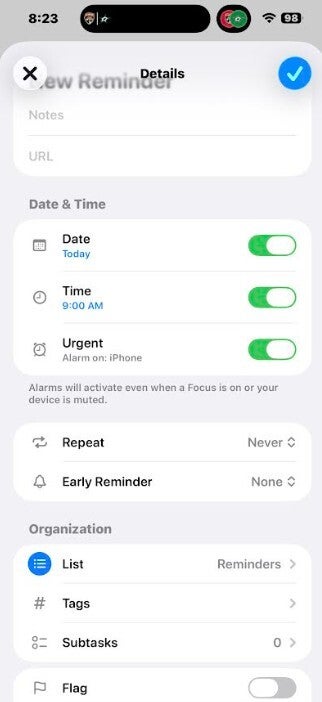
Among the new features in iOS 26.2 is one that will allow you to pair an alarm with a reminder. The first time you go to the Reminders app after the update you will see a page that tells you about this new feature, designed to prevent you from missing an alarm. Apple says, "To get alarms for reminders you mark as urgent allow Reminders to schedule alarms. Urgent reminders will activate an alarm even when your device is silenced or a Focus is on."
With iOS 26.2, you can set an alarm to go off to remind you about that reminder you created. | Image credit-PhoneArena
Recommended For You
When you set a new Reminder, under the Date & Time heading, underneath the toggles for date and time, you'll see one that is called Urgent. Toggle it on to make sure that the alarm sounds when you are supposed to be reminded by the app.
A useful new feature is available for the Apple News app
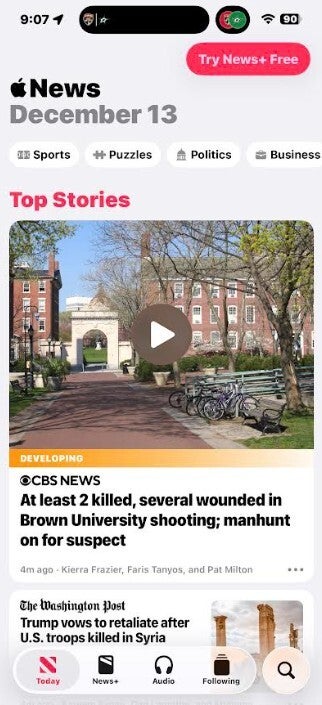
Another new feature that might make life a little easier is the addition of shortcuts at the top of the Apple News app. These shortcuts include"
Sports
Puzzles
Politics
Business
Tap on the one you want to read about, and the app will show you the appropriate headlines for that category.
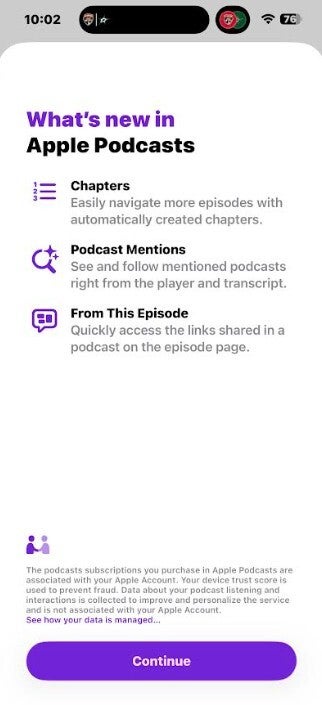
There have been some changes made to the Apple Podcast app. First, if a podcast episode doesn't have individual chapters, the app will create chapters automatically. In addition, the app will also include links to other podcasts listed during the one you're listening to. Lastly, any links mentioned in a podcast can be found on the episode page.
Shortcuts have been added to the Apple News app. | Image credit-PhoneArena
Apple makes changes to the Sleep Score feature in the Health app
Not thrilled with Liquid Glass? A slider is now available that will allow you to change the level of transparency. When you see the lockscreen, a long press on some empty real estate will take you to the screen where you can customize your lockscreen. Tap on the clock at the top of the screen and you'll see the slider near the bottom of the display.
Some changes have been made to the Apple Podcast app. | Image credit-PhoneArena
Lastly, Apple has made some changes to the Sleep Scores as some users were waking up to high scores but felt like they had a poor night's sleep. Apple has changed the top ranking from "Very High" to "Excellent," and a higher score is necessary to obtain that rating. Any score under 40 will be considered "Very Low." Previously, a score under 29 would be given the latter designation.
The Sleep Score feature can be found in the Health app. Open the app and scroll down to Sleep Score. Your score is calculated by adding together your Duration ranking, your Bedtime ranking, and your Interruptions ranking. An Apple Watch, or another compatible device, is needed to measure your sleep so that the iPhone can compute your overall Sleep Score.
Trade in your old phone for cash at ecoATM!
Recycle your used phone and get instant cash. Find out how at ecoATM!
Alan, an ardent smartphone enthusiast and a veteran writer at PhoneArena since 2009, has witnessed and chronicled the transformative years of mobile technology. Owning iconic phones from the original iPhone to the iPhone 15 Pro Max, he has seen smartphones evolve into a global phenomenon. Beyond smartphones, Alan has covered the emergence of tablets, smartwatches, and smart speakers.
A discussion is a place, where people can voice their opinion, no matter if it
is positive, neutral or negative. However, when posting, one must stay true to the topic, and not just share some
random thoughts, which are not directly related to the matter.
Things that are NOT allowed:
Off-topic talk - you must stick to the subject of discussion
Offensive, hate speech - if you want to say something, say it politely
Spam/Advertisements - these posts are deleted
Multiple accounts - one person can have only one account
Impersonations and offensive nicknames - these accounts get banned
To help keep our community safe and free from spam, we apply temporary limits to newly created accounts:
New accounts created within the last 24 hours may experience restrictions on how frequently they can
post or comment.
These limits are in place as a precaution and will automatically lift.
Moderation is done by humans. We try to be as objective as possible and moderate with zero bias. If you think a
post should be moderated - please, report it.
Have a question about the rules or why you have been moderated/limited/banned? Please,
contact us.












![Another batch of Galaxy S26 series users in the US are getting a nice surprise today [UPDATED]](https://m-cdn.phonearena.com/images/article/183643-wide-two_350/Another-batch-of-Galaxy-S26-series-users-in-the-US-are-getting-a-nice-surprise-today-UPDATED.webp)
Things that are NOT allowed:
To help keep our community safe and free from spam, we apply temporary limits to newly created accounts: