How to wake up your iPhone Air from "Black screen of death" bug
If your iPhone Air doesn't boot up after the battery has been completely drained, try this fix.
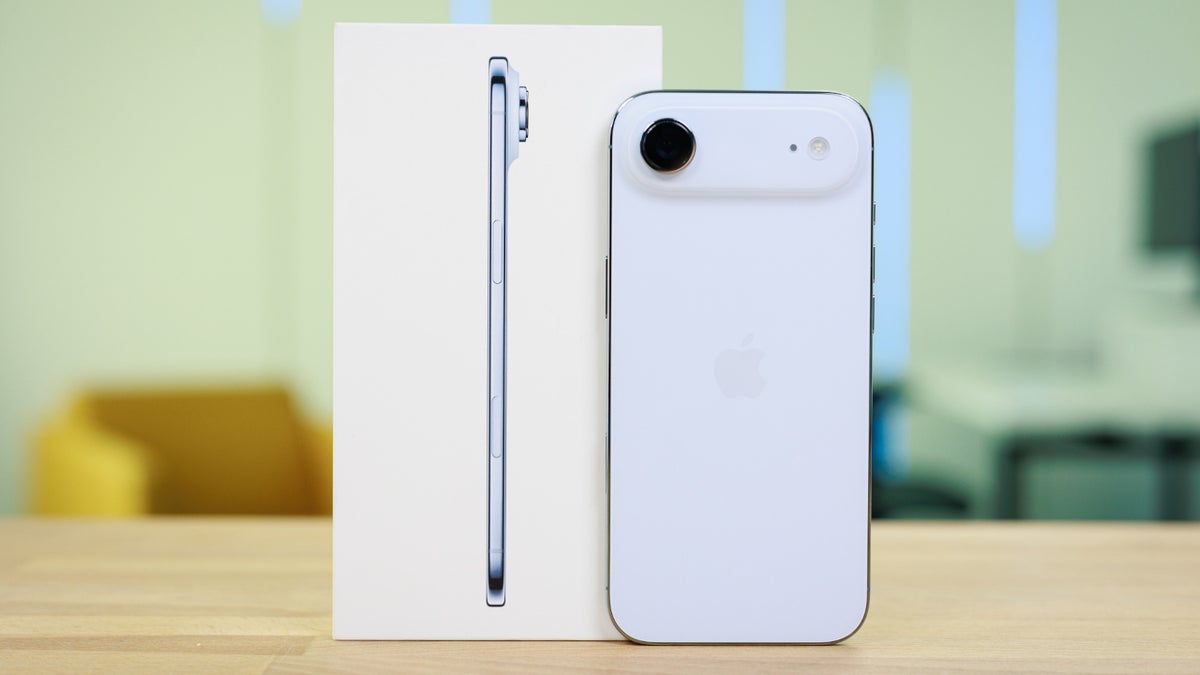
Bug prevents iPhone Air units from booting up. | Image by PhoneArena
Just last week we told you about a serious security flaw that Apple patched with the release of iOS 26.4.2. The flaw, CVE-2026-28950, leaves notifications on your device even when they are supposed to be deleted.
Some iPhone Air users have been left with an expensive paperweight
This is considered to be a logging error that can lead to security issues because even if you deleted a notification, the message could remain stored in your phone's system files. These files can be accessed by attackers using malware or a forensic tool like Cellebrite machines.
Now it appears that the iPhone Air is having an issue that takes place once the user has drawn down his battery life to 0%. What happens is that the phone fails to power on even if the phone is plugged into the wall and is supposed to be charging. No indicator light is glowing, and the display is completely black leaving an expensive paperweight in the hand of the user.
The initial complaint on Reddit was posted by a subscriber with the username "_noreasontolive," which hopefully isn't how he feels with his iPhone Air not booting up. Some of the suggestions, such as leaving the phone plugged in for several hours, were not helping users with this problem.
One suggestion was to use a cable with a USB-A plug instead of one with a USB-C Power Delivery (PD) plug. The former has only one way to connect to the outlet in the wall, while the latter is reversible and plugs in either way. As one Redditor noted, sometimes USB-C PD plugs are too smart for their own good when it comes to charging devices that are completely dead.
This fix seems to be the best option thus far
Another iPhone Air user posted on Reddit that this issue just happened to him today. What he did to get his phone running again was use a wireless charger, which he claims brought his phone back to life. He added that iPhone Air units should not be acting like this, which is obvious.
Which premium iPhone do you want to buy?
41 Votes
iPhone 18 Pro
26.83%
iPhone 18 Pro Max
34.15%
iPhone Fold/Ultra
39.02%
When using a wireless charger, such as a MagSafe accessory, leaving it on for 15 minutes seems to do the trick. This is also what Apple Store employees also did when someone brought in a dead iPhone Air in an attempt to revive it.
Keep in mind that for this specific fix, you do need to use a wireless charger. One Redditor said that he had his iPhone Air plugged in for 45 minutes, and it was still in a coma.
This issue is happening to other iPhone models besides the Air
What is unknown is how often this is happening to iPhone Air users. On one hand, it doesn't seem to occur every time a user lets the battery powering the super-thin iPhone model run down to 0%.
Some have noticed this issue only since they updated their iPhone Air to the recent iOS 26.4 or iOS 26.5 Beta releases. In addition, this problem doesn't seem limited to the iPhone Air and has also affected other iPhone 17 series models like the iPhone 17, iPhone 17 Pro and iPhone 17 Pro Max. Some have even complained about this very thing happening to their iPhone 16 series handset.
Let me know if the MagSafe fix worked for you
It isn't clear whether Apple is working on a fix for this, but until it does release an update, you can try the fix that we've mentioned in this article. To reiterate, use a wireless charger like a MagSafe accessory and let it charge for at least 15 minutes (personally, I'd go as long as 30 minutes just to be sure) and then see whether you can boot up the phone.
Let us know whether this has worked for you. It's not just because I'm interested in hearing if it works, but also your response could give someone else with a dead iPhone Air the confidence to try this out themselves. Place your comment in the box below.


Popular stories





Latest News




Things that are NOT allowed:
To help keep our community safe and free from spam, we apply temporary limits to newly created accounts: