One of the features that I really like about Pixel phones is the At a Glance widget. Truthfully, there are many who agree with me and many who find it to be waste of screen space. At a Glance will show you how much time remains on a timer you've set, expected temperature changes for the next day, how many minutes until your rideshare or food delivery arrives, an image of who is at your Nest or Ring doorbell camera, whether your flashlight is on and a way to turn it off with a tap, and much more.
Did you know that the At a Glance widget does so many things?
If you own a Pixel and have always wondered about all the things you can monitor with the widget, long press on some empty homescreen real estate and a popup menu appears with three options:
Dismiss
Settings
About this content
Select Settings and you'll see a menu that allows you to toggle on or off certain At a Glance features such as the one that shows an earthquake warning whenever a quake measuring 4.5 or higher on the Richter scale is detected nearby. One cool feature that is available with the widget is one that suggests a specific departure time so you can arrive at an appointment or event on time. And Google has made an improvement to At a Glance that should improve how the information looks on your Pixel's screen.
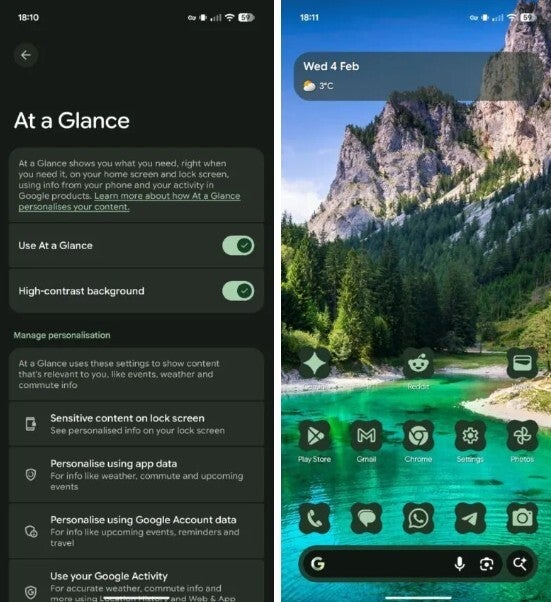
The new high-contrast toggle for the At a Glance widget on Pixel phones. | Image credit-PhoneArena
Google adds a new At a Glance feature that many have asked for
Because the At a Glance widget is transparent, the information being shown can sometimes blend in with light wallpaper making it hard to read. As a result, Google has added a new "high-contrast" toggle. When enabled, it adds a translucent dark background with rounded corners behind the widget, and it runs the entire width of the homescreen. This toggle shows up when you long press the empty space on your homescreen and press Settings on the popup menu. At the top, you'll see two toggles.
Recommended For You
Do you like the At a Glance widget?
102 Votes
Yes! It's a great feature.
59.8%
No! It's a waste of screen space.
30.39%
I have no opinion.
9.8%
The first toggle allows you to enable or disable At a Glance and the one underneath it is for the high-contrast background. If you don't see that second toggle, it is because you haven't had the update hit your phone yet. You need to be running the latest version of the Android 16 QPR3 Beta release and install a 90MB Google Play update. However, I have this on my Pixel 6 Pro but do not have the high-contrast toggle on my phone yet.
Apparently, many Pixel users have requested such a feature from Google and this time, the company listened.
Mint Mobile's 6-month plans now cost $10/mo
$10
/mo
$35
$25 off (71%)
Mint Mobile is celebrating its 10-year anniversary with a special offer on its six-month subscription plans. For a limited time, you can get your preferred tier (6GB, 17GB, 23GB or unlimited) for just $10/mo. That saves you between 50% and 71% on the carrier's mobile plans, making it way easier to recommend.
Alan, an ardent smartphone enthusiast and a veteran writer at PhoneArena since 2009, has witnessed and chronicled the transformative years of mobile technology. Owning iconic phones from the original iPhone to the iPhone 15 Pro Max, he has seen smartphones evolve into a global phenomenon. Beyond smartphones, Alan has covered the emergence of tablets, smartwatches, and smart speakers.
A discussion is a place, where people can voice their opinion, no matter if it
is positive, neutral or negative. However, when posting, one must stay true to the topic, and not just share some
random thoughts, which are not directly related to the matter.
Things that are NOT allowed:
Off-topic talk - you must stick to the subject of discussion
Offensive, hate speech - if you want to say something, say it politely
Spam/Advertisements - these posts are deleted
Multiple accounts - one person can have only one account
Impersonations and offensive nicknames - these accounts get banned
To help keep our community safe and free from spam, we apply temporary limits to newly created accounts:
New accounts created within the last 24 hours may experience restrictions on how frequently they can
post or comment.
These limits are in place as a precaution and will automatically lift.
Moderation is done by humans. We try to be as objective as possible and moderate with zero bias. If you think a
post should be moderated - please, report it.
Have a question about the rules or why you have been moderated/limited/banned? Please,
contact us.









Things that are NOT allowed:
To help keep our community safe and free from spam, we apply temporary limits to newly created accounts: