Washington Post reporter Hannah Natanson's home was raided by the FBI last month and her laptop and phone were seized. The raid and the seizure of her devices were related to a government contractor who was alleged to have kept classified information. As it turns out, the government was unable to get any information out of Natanson's iPhone thanks to an iPhone feature that is not exactly well known.
The iOS Lockdown Mode was created to protect iPhone users from malicious attacks
Around since iOS 16 in 2022, the iPhone's Lockdown Mode prevented the FBI from examining Natanson's handset. The FBI's Computer Analysis Response Team (CART) was unable to break into the phone according to the official court records, which stated, "The iPhone was found powered on and charging, and its display noted that the phone was in 'Lockdown' mode," the court record says. "Because the iPhone was in Lockdown mode, CART could not extract that device."
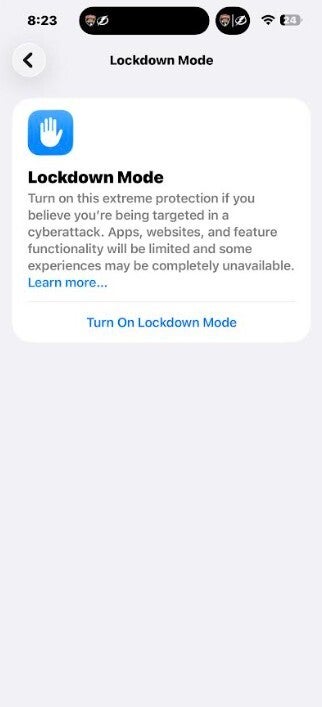
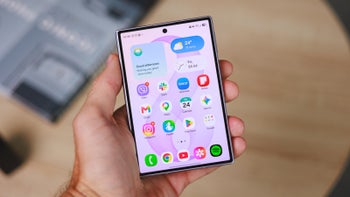
Apple's Lockdown Mode protects iPhones from malicious attacks from hackers. | Image credit-PhoneArena
The original intention of the Lockdown was to prevent an iPhone from getting infected by malware after an attack. But according to David Huerta, senior digital security trainer at Freedom of the Press Foundation, Apple made the feature so aggressive that it also prevented the FBI, with all of its tools, from breaking into Natanson's phone.
To turn on Lockdown Mode, go to Settings > Privacy & Security. Scroll down and press on "Lockdown Mode." Follow the instructions on the screen. In Lockdown Mode:
Apps, websites and features are limited for security reason.
Message attachments are blocked.
Incoming FaceTime calls from people you never called before are blocked. SharePlay and Live Photos are disabled.
Some web browsing features are blocked.
Location is excluded when sharing photos and Shared Albums are removed from the Photos app.
While your iPhone is Locked Down, wired connections with another device or accessory is blocked.
You cannot automatically join non-secure Wi-Fi networks and 2G/3G cellular connectivity is blocked.
Incoming invitations for Apple Services from people you have not previously invited are blocked.
Configuration profiles, like the ones for school or work cannot be installed.
Turning Lockdown Mode on will keep the contents of your iPhone out of the prying eyes of federal agents. But Lockdown Mode does shutdown many features. Lockdown Mode, says Apple, offers "extreme protection" to iPhone users and apparently this is very true. However, you can still make phone calls, send basic texts, and make SOS Emergency calls. If you enable Lockdown Mode on your iPhone, your paired Apple Watch will also be Locked Down.
Apple says that most iPhone users are never targeted to the point they need Lockdown Mode
If you think that your phone might be under attack often, you might want to know how to turn on Lockdown Mode and how it affects your iPhone. Lockdown Mode locks down the ways that malware can get into your phone. Besides blocking the FBI from getting into Hannah Natanson's phone, back in 2022 Lockdown Mode also stopped a human rights defender’s iPhone from getting broken into by hackers.
Recommended For You
Apple, as noted, said that Lockdown Mode offers "extreme protection" for the very small number of individuals who, "because of who they are or what they do, might be personally targeted by some of the most sophisticated digital threats." To keep you from needlessly worrying, Apple points out that "Most people are never targeted by attacks of this nature."
If you have enabled Lockdown Mode, you can disable it by going to Settings > Privacy & Security > Lockdown Mode (scrolling down to the very bottom) > Turn off Lockdown Mode.
Android's Advanced Protection
In Android 16, Google added one-tap protection to Android. Enabling this feature blocks sideloading and forces always-on Google Play Protect scanning. If the phone is untouched and locked for 72 hours, it will automatically reboot. This moves data from "After First Unlock" state to a "Before First Unlock" state. As a result, law enforcement cannot use boxes like Cellebrite machines to crack open an Android phone.
On Chrome, HTTPS is used on all websites encrypting the data between your computer and website. The JavaScript JIT (Just-In-Time) Optimizer in your browser is disabled preventing hackers from tricking the browser into running malicious code. Advanced Protection disables 2G radio hardware preventing the Android phone from being tricked by a fake 2G Stingray signal.
Between Lockdown Mode and Android Advanced Protection, smartphones owners can give their phones a degree of protection from hackers and the FBI.
MacBook Pro (M1 series) flash sale! Limited time offer!
Save $40 on MacBook Pro (M1 series) from Back Market. Discount automatically applied at checkout. Offer ends 25 October 2026 at 23:59.
Alan, an ardent smartphone enthusiast and a veteran writer at PhoneArena since 2009, has witnessed and chronicled the transformative years of mobile technology. Owning iconic phones from the original iPhone to the iPhone 15 Pro Max, he has seen smartphones evolve into a global phenomenon. Beyond smartphones, Alan has covered the emergence of tablets, smartwatches, and smart speakers.
A discussion is a place, where people can voice their opinion, no matter if it
is positive, neutral or negative. However, when posting, one must stay true to the topic, and not just share some
random thoughts, which are not directly related to the matter.
Things that are NOT allowed:
Off-topic talk - you must stick to the subject of discussion
Offensive, hate speech - if you want to say something, say it politely
Spam/Advertisements - these posts are deleted
Multiple accounts - one person can have only one account
Impersonations and offensive nicknames - these accounts get banned
To help keep our community safe and free from spam, we apply temporary limits to newly created accounts:
New accounts created within the last 24 hours may experience restrictions on how frequently they can
post or comment.
These limits are in place as a precaution and will automatically lift.
Moderation is done by humans. We try to be as objective as possible and moderate with zero bias. If you think a
post should be moderated - please, report it.
Have a question about the rules or why you have been moderated/limited/banned? Please,
contact us.











Things that are NOT allowed:
To help keep our community safe and free from spam, we apply temporary limits to newly created accounts: