Pixel users might want to hold off updating to Android 17 after touchscreen problems surface
The latest bug linked to the Android 17 update messes up some Pixel phones.
Android 17 update causes more Pixel bugs | Image by PhoneArena
Pixel users who have updated their phones to Android 17 are having even more problems than we originally thought. Just this past week, some Pixel users running Android 17 have had several issues that we've already told you about:
Pixel users are getting a headache from Android 17
With Wi-Fi enabled, some Google apps are not running on Pixel phones powered by Android 17. That's because the new build of Android requires the use of the IPv6 protocol. Pixel users without this protocol enabled will not be able to use apps like YouTube, Gmail, Google Play Store, Google Keep, Google Photos, and the Google Messages website.
Affected Pixel users who can enable IPv6 on their router should do so to run the aforementioned apps. If they are using mobile data with Wi-Fi disabled, there should be no problem.
The latest bug is affecting the touchscreens of some Pixel phones with Android 17 installed
Then the second domino fell. Yesterday, we told you that some Pixel models were losing their 5G connection. Once again, this happened after Android 17 was downloaded on these Pixel units. There is a possible fix for this issue. Go to Settings > System > Repair mode > Enter repair mode > Restart.
If you haven't installed Android 17 yet on your Pixel, what will you do?
149 Votes
Continue to wait for a later version of Android 17
60.4%
Install it now anyway
27.52%
Keep Android 16 installed forever
12.08%
Today, there is another Android 17 bug to report as users post on social media about issues they have experienced with their Pixels' touchscreens after installing Android 17. For some, they could be swiping up to go through their X feed and all of a sudden the UI sends them flying in the wrong direction. For others, their touch inputs are not registering at all.
Some fixes to try if your touchscreen has been messed up by the Android 17 update
This appears to be more serious than being forced to enable a protocol on your router, or losing 5G connectivity. However, some have suggested trying out this fix: Settings > Apps > See all apps > Pixel Launcher app > Storage & cache > Clear cache. Most of the Pixel users who have tried this found that it has not fixed the issue at all.
Another option is to reboot your phone in Safe mode. If the touchscreen then works without a problem, it means that a third-party app is responsible. One by one, temporarily uninstall each app until the screen starts working correctly.
To enter Safe mode on a Pixel 6 or later, if the phone is on follow these directions:
- Press and hold the Power and Volume up buttons simultaneously for a few seconds.
- On the display, press and hold either the Power off or Restart buttons.
- Tap OK.
If the phone is off, follow these directions:
- Press the power button on your phone.
- When the animation starts, press and hold the volume down button on your phone until the animation ends and your phone starts in safe mode.
- You'll see 'Safe mode' at the bottom of your screen.
And there is still another thing you can try. Go to Settings > Display & touch > Smooth display and toggle off the latter. Smooth display raises the refresh rate up to 120Hz for some content. Turning off Smooth display drops the screen's refresh rate to an old-school 60Hz.
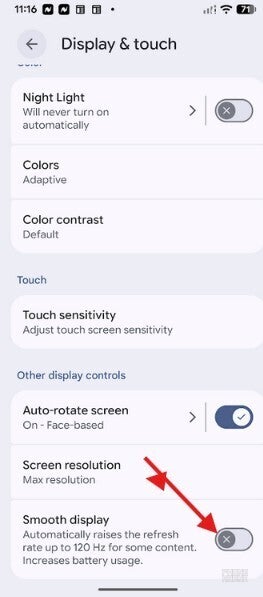
Turning off Smooth Display has been suggested to fix the Android 17 touchscreen bug. | Image by PhoneArena
Complaints have been submitted to the Google IssueTracker
This is such a serious matter and a number of complaints have already been submitted to the Google IssueTracker. Affected models include the Pixel 10, 9, 8, and 7 series. The Pixel 6 line has also received Android 17, but apparently this bug has not affected any Pixel 6 series phones. My Pixel 6 Pro hasn't been negatively impacted after installing Android 17.
Google might not be working on all the issues right now, and if you haven't installed Android 17 on your Pixel yet, you might want to wait for the next version of Android 17 to be released.
There have been some other bugs that haven't been as widely reported, such as one that has made home screen widgets disappear. As for battery life, Pixel 10 series users have mostly reported a drop in battery life after installing Android 17. Those with a Pixel 7 to Pixel 9 series model are mostly noticing an improvement in battery life after updating to Android 17.


Popular stories




Latest News




![Another batch of Galaxy S26 series users in the US are getting a nice surprise today [UPDATED]](https://m-cdn.phonearena.com/images/article/183643-wide-two_350/Another-batch-of-Galaxy-S26-series-users-in-the-US-are-getting-a-nice-surprise-today-UPDATED.webp)
Things that are NOT allowed:
To help keep our community safe and free from spam, we apply temporary limits to newly created accounts: