Samsung recently announced that it will soon discontinue its messaging application and has asked users to switch to Google Messages. Here's how you can make the switch without losing any of your text messages.
How to switch from Samsung Messages to Google Messages
If you have any of the Galaxy S25 or S26 series phones, you don't have to worry about switching your messaging app, as all the devices in these Galaxy lineups come with Google Messages as the default messaging app. In fact, you can't download the Samsung Messages app on any Galaxy S26 family phones from the Galaxy Store.
If you have any other Galaxy smartphone, here's what you need to do to switch to Google Messages:
Launch the app, and then choose the "Set default SMS app" option that appears on the screen
Tap the Google Messages option, and then choose Set as default
That's about it. The Google Messages app is now the default messaging app on your Samsung smartphone, meaning from now on it'll be used to send and receive messages.
All your conversations will also be automatically transferred to the new app. However, in some cases it may take some time, like a couple of days, depending on the size of your conversations database.
Try the Backup & Restore method
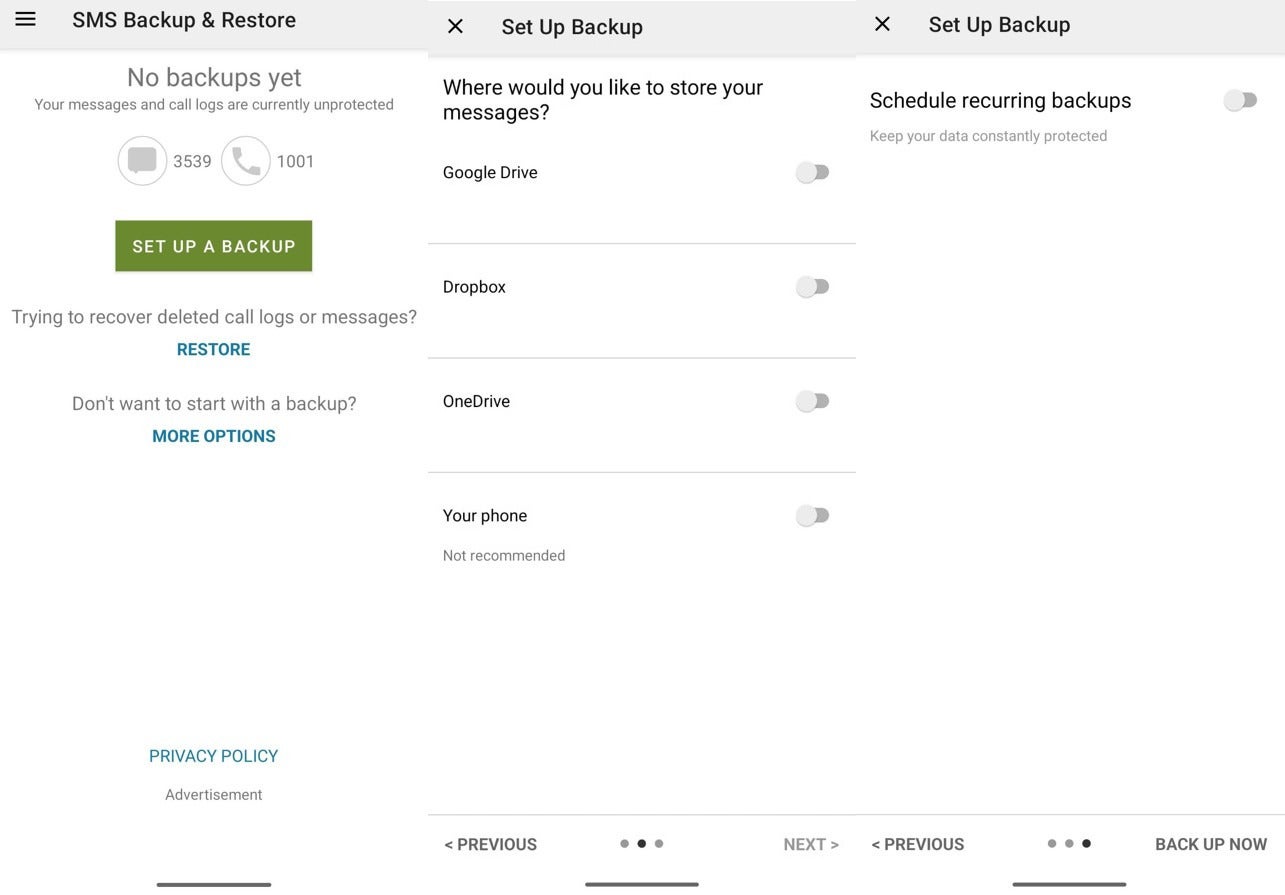
Creating a backup of messages using SMS Backup & Restore app. | Image by PhoneArena
The above-mentioned method will work in most cases, but I have found multiple reports online where users complain that certain messages or entire chats went missing when they switched to Google Messages. If you're also facing the same problem, then you can try the solution that has worked for me.
Recommended For You
To begin with, you need to make sure Samsung Messages is currently the default messaging app. Then, you need to install the SMS Backup & Restore app from the Google Play Store. It is worth mentioning that this isn't a sponsored post; I'm suggesting this application because it has worked for me and many others.
Once the app is installed, you have to use it to create a backup of all your current conversations. For that, launch the app and tap the "Set Up a Backup" option that appears on the home page. Enable the "Messages" toggle and tap Next. Now, you have to select the location where you want to create the backup of the messages.
You can choose any cloud platform, but I went ahead with the "Your Phone" option since I was going to use the backup only once. After that, you need to configure whether you want the app to back up your messages automatically on a regular basis. Since I was going to use the app only once, I disabled this toggle and hit the "Back Up Now" button.
Restore all your messages
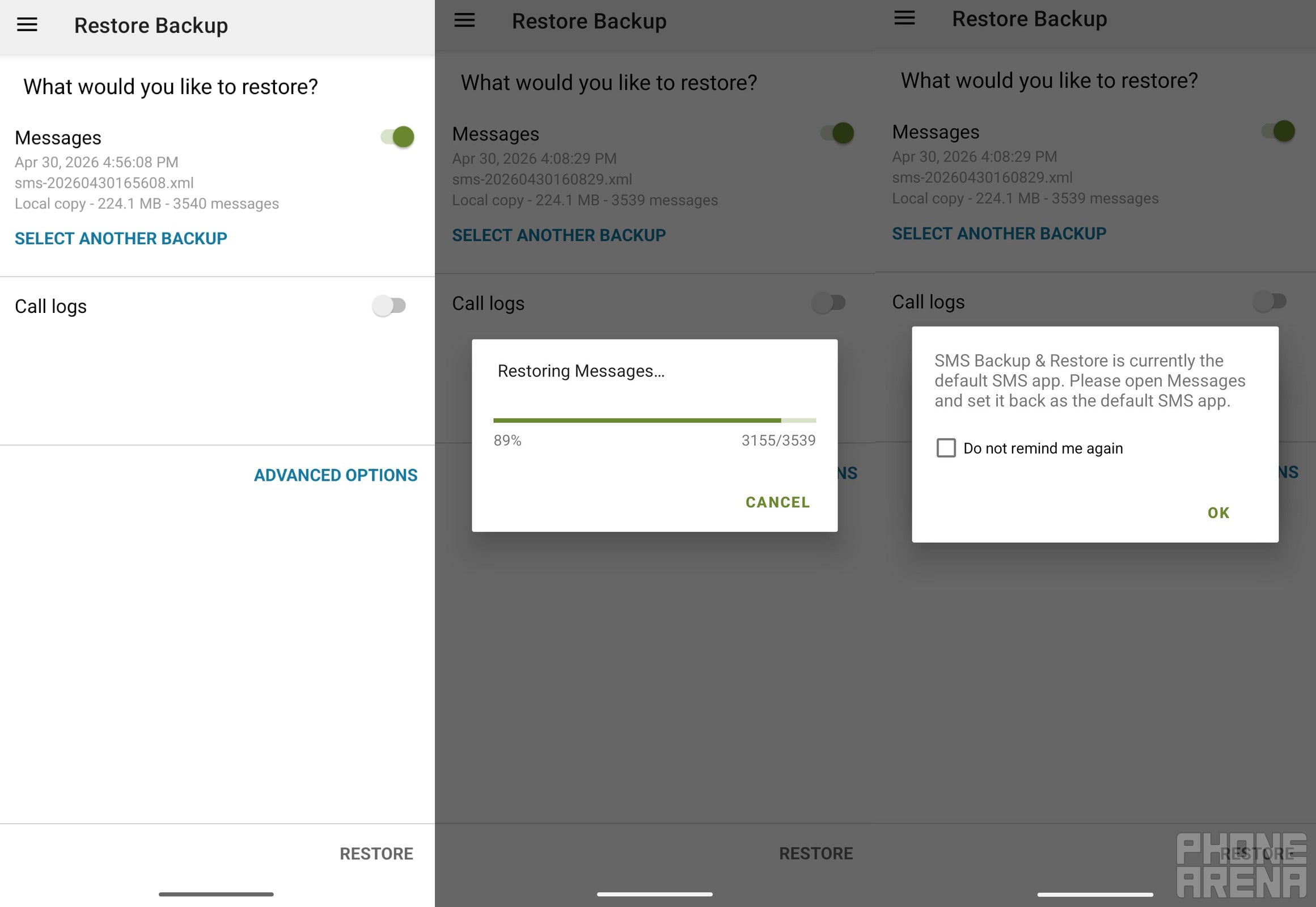
Restoring backup of messages using SMS Backup & Restore app. | Image by PhoneArena
Once the backup is complete, tap the hamburger icon in the top-left corner and choose Restore. Enable the Messages toggle and then tap Restore at the bottom-right corner. You'll see a prompt that the SMS Backup & Restore app needs to become the default messaging app in order for the restoration process to complete.
Tap "OK" and then make it the default app on your phone. This will start the restoration process. Once it's done, go to your phone's "Installed Apps" settings window and clear the data of the Google Messages app.
Then, make Google Messages the default SMS app on your phone, and you will find that all your messages are now available there.
Were you successfully able to transfer all your messages from Samsung Messages to Google Messages?
14 Votes
Yes, simply by switching the apps.
71.43%
I had to use the SMS Backup & Restore app.
21.43%
Messages are missing even after using the backup app.
7.14%
Don't lose even a single chat
That is how you can migrate from Samsung Messages to Google Messages without losing any of your important conversations. However, if you find that some of your messages are still missing, you can reach out to the Google support team or submit feedback through Google Messages.
Six-month unlimited plan is now 57% off
$90
$210
$120 off (57%)
Mint Mobile is now allowing you to get whichever plan you like for either three, six, or 12 months for just $15/mo. If you go for the six-month unlimited service, for instance, you'll now have to pay just $90 upfront instead of $210.
Aman Kumar is a news writer at PhoneArena covering Google Pixel phones, Android features, AI-powered smartphone tools, and mobile tech news. Before joining PhoneArena, he spent over five years writing about consumer technology for publications like MakeUseOf, How-To Geek, and Guiding Tech. His current daily drivers are the Pixel 10 and Samsung Galaxy S26 Plus, while his red iPhone SE (2nd gen) remains a personal favorite. Aman also appreciates bold smartphone experiments and still considers the Nokia N-Gage one of the industry’s most iconic designs.
A discussion is a place, where people can voice their opinion, no matter if it
is positive, neutral or negative. However, when posting, one must stay true to the topic, and not just share some
random thoughts, which are not directly related to the matter.
Things that are NOT allowed:
Off-topic talk - you must stick to the subject of discussion
Offensive, hate speech - if you want to say something, say it politely
Spam/Advertisements - these posts are deleted
Multiple accounts - one person can have only one account
Impersonations and offensive nicknames - these accounts get banned
To help keep our community safe and free from spam, we apply temporary limits to newly created accounts:
New accounts created within the last 24 hours may experience restrictions on how frequently they can
post or comment.
These limits are in place as a precaution and will automatically lift.
Moderation is done by humans. We try to be as objective as possible and moderate with zero bias. If you think a
post should be moderated - please, report it.
Have a question about the rules or why you have been moderated/limited/banned? Please,
contact us.












Things that are NOT allowed:
To help keep our community safe and free from spam, we apply temporary limits to newly created accounts: