Floating toolbar surfaces on Google Photos app
One of Google's most popular apps has upgraded the toolbar on the app and is now more than just a gallery of photos.
Google continues to play around with its apps like a mad scientist trying to make the perfect chemical compound. Between UI changes and Material 3 Expressive improvements, Google has been hard at work with apps like Google Photos and Google Messages being the subject of all this attention. The latest change to the Google Photos app adds a floating toolbar replacing the bar that is currently at the bottom of the app.
As is the case occasionally, the new-look debuts on the iOS version of the Google Photos app with the Android app getting the new look later. This has been confirmed on my phones, as the floating toolbar appears on my iPhone 15 Pro Max running iOS 26.3, but it is not on the Google Photos app installed on my Pixel 6 Pro running Android 16 QPR3 Beta 2.1. The toolbar contains options like Photos, Collections, and Create with the AI Mode icon in a separate container on the right.
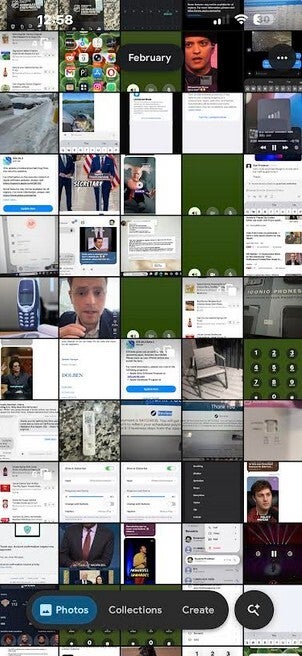
The new look Pxel Launcher Google Search Bar. | Image by PhoneArena
With AI Mode, Google Photos makes the transition from a photo gallery app to one that understands conversations such as "Where did we go for dinner on my anniversary last year?" or "Show me the 5 best pictures from my birthday party last year." You can even ask, "Create a photo album of my pug's first year."
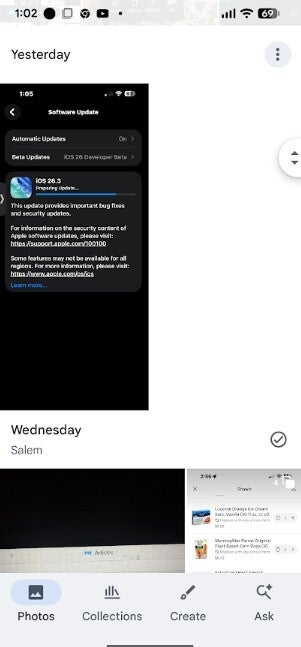
Check out the previous look for the Google Photo toolbar on the bottom of the display. | Image by PhoneArea
The previous bottom bar on Google Photos comprised a solid white bar at the bottom of the screen with Photos, Collections, Create, and AI Mode in one box. The new-look divides this into two separate containers, one pill shaped with rounded edges and the other is a round ball. The latter contains the AI Mode icon.
Do you like the new look of the floating toolbar?
22 Votes
Yes. It looks better than the previous block at the bottom.
45.45%
No. These toolbars with containers are too much.
54.55%
The floating toolbar stays on the screen at all times, unlike some floating toolbars that disappear when you scroll on the screen. Google says that "toolbars are used to display frequently used actions relevant to the current page." The floating toolbar and the AI Mode circle are placed off the bottom of the display, leaving some room for the user to figure out what content is underneath and behind the bar.
The floating toolbar is found in version 7.63 of the Google Photos app in iOS.


Popular stories






Latest News





![Another batch of Galaxy S26 series users in the US are getting a nice surprise today [UPDATED]](https://m-cdn.phonearena.com/images/article/183643-wide-two_350/Another-batch-of-Galaxy-S26-series-users-in-the-US-are-getting-a-nice-surprise-today-UPDATED.webp)
Things that are NOT allowed:
To help keep our community safe and free from spam, we apply temporary limits to newly created accounts: