Motorola is trying to change its reputation as a laggard when it comes to Android updates. It recently matched Google and Samsung by offering seven years of OS updates for the Motorola Signature and the Razr Fold. The latter is the Lenovo unit’s first book-style foldable.
Motorola tries to catch up to Samsung and Google when it comes to Android updates
Other less expensive models are promised fewer years of major Android OS updates. For example, even the Motorola Razr Ultra (2026), the manufacturer’s top-of-the-line smartphone flipper, receives only three Android updates.
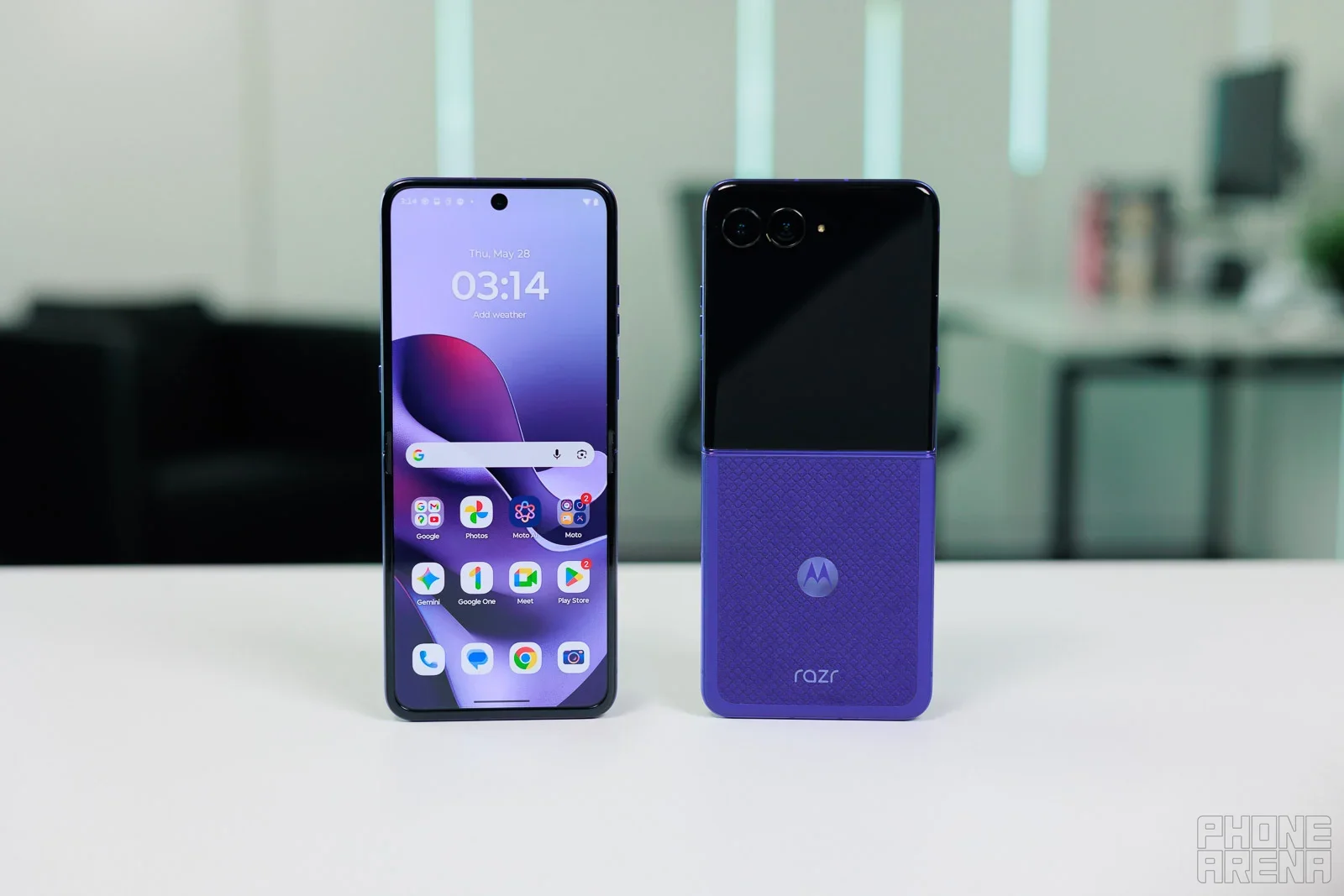
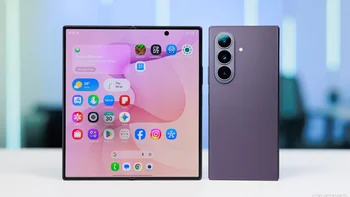
The front and back of the unfolded Motorola Razr Ultra 2026. | Image by PhoneArena
The update is sent out in stages so don't lose your mind if it hasn't arrived yet
If you own one of these models and have yet to receive the update, there is no reason to mope around the house and act really moody and distant. Be assured that Motorola didn’t forget about you. It just likes to send updates out to its phones in stages, as many phone manufacturers do.
Which Motorola phone do you want the most?
1 Votes
Just be patient, and if you own one of the four aforementioned Motorola phones, soon you’ll be enjoying the Android 17 experience. And just what are some of these changes that you will experience?
The update for the Razr Ultra (2026) is a hefty 4.1GB
Looking at the Motorola Razr Ultra (2026) as an example, the update that includes Android 17 weighs in at a hefty 4.1GB. Quick Settings were given larger touch targets. Controls for the display and home screen have been improved.
Say hello to "Stackable Widgets"
Other improvements that some of the updated Motorola phones will receive include Stackable Widgets, which allow you to combine multiple widgets (Weather, Calendar, Battery, Music, etc.) into a single block on your home screen that you swipe through to save your grid space.
Recommended For You
Real-time tracking “snippets” appear in your phone’s status bar or notification shade, tracking the arrival of your ride-share or delivery and sports scores. One-sentence AI summaries of lengthy group text exchanges will also appear after your Motorola handset is updated to Android 17.
The update will also add an enhanced HDR brightness control that limits the intensity of HDR photos and videos to reduce glare when viewing at night. Touching devices together results in proximity sharing with Tap to Share. With Quick Drop, found under Settings > Connected devices, users can broadcast and share photos, files, and documents to multiple recipients at once instead of individually.
Some new AI features are coming with the Android 17 update to specific models. For example, with the Razr Ultra (2026), you can customize what happens when you double-press the dedicated hardware AI Key.
Dynamic, compact widgets will be available for the large cover screen on the Razr Ultra (2026). On the Motorola Signature, AI models remove noise from ambient wind and background noises on phone calls.
With the Edge 60 Series, Android 17 will bring upgraded image processing that restores fine detail, adjusts dynamic range in extreme low light, and auto-corrects motion blur on moving targets.
To check for an update on your Motorola phone, go to Settings > System > Software updates > System update. If an update is available, follow the directions to download and install it. Back in August, we passed along a list of 50 Motorola devices that are expected to receive Android 17.
If you don't remember or are too young to know, Motorola helped kick off Androidmania in late 2009 with the release of the Motorola DROID. This was not only the first Android phone to launch with Android 2.0, but it was also considered the first real challenger to the iPhone.
Alan, an ardent smartphone enthusiast and a veteran writer at PhoneArena since 2009, has witnessed and chronicled the transformative years of mobile technology. Owning iconic phones from the original iPhone to the iPhone 15 Pro Max, he has seen smartphones evolve into a global phenomenon. Beyond smartphones, Alan has covered the emergence of tablets, smartwatches, and smart speakers.
A discussion is a place, where people can voice their opinion, no matter if it
is positive, neutral or negative. However, when posting, one must stay true to the topic, and not just share some
random thoughts, which are not directly related to the matter.
Things that are NOT allowed:
Off-topic talk - you must stick to the subject of discussion
Offensive, hate speech - if you want to say something, say it politely
Spam/Advertisements - these posts are deleted
Multiple accounts - one person can have only one account
Impersonations and offensive nicknames - these accounts get banned
To help keep our community safe and free from spam, we apply temporary limits to newly created accounts:
New accounts created within the last 24 hours may experience restrictions on how frequently they can
post or comment.
These limits are in place as a precaution and will automatically lift.
Moderation is done by humans. We try to be as objective as possible and moderate with zero bias. If you think a
post should be moderated - please, report it.
Have a question about the rules or why you have been moderated/limited/banned? Please,
contact us.




Things that are NOT allowed:
To help keep our community safe and free from spam, we apply temporary limits to newly created accounts: