Gboard from Google is undoubtedly one of the best keyboards for Android. The Big G is working to make it even better, as two important new features have reportedly been spotted in its beta build.
Preserve the text formatting
Whenever you copy text on your Android smartphone, Gboard automatically displays a clipboard shortcut on its top bar, tapping which instantly pastes the copied text. This capability is surely convenient, as it lets you quickly paste the copied item, but at the same time, using it removes all the formatting from the content. For example, if you copy a paragraph containing bold, italicized, or any other type of styled text and paste it using this Gboard shortcut, the resulting output will be converted into plain text.
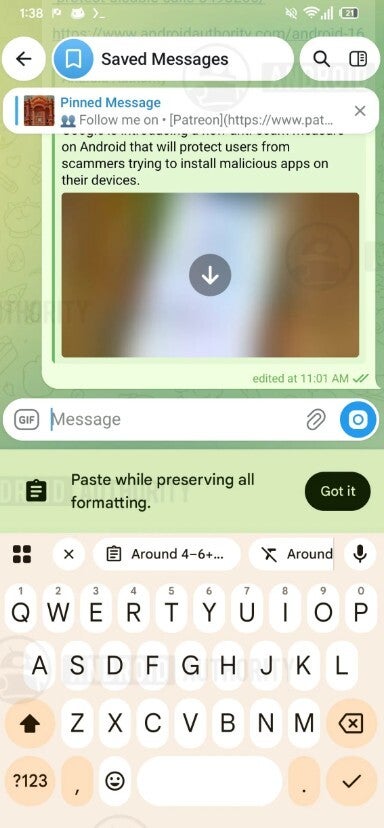
Reportedly, Google is working on giving users more control on this particular front. In the 18.8.0.10 beta update of the keyboard app, an additional toolbar shortcut has been spotted along with the current one that appears automatically upon copying any content. Gboard reportedly displays an introductory message that reads "Paste while preserving all formatting" to the first-time users.
New clipboard shortcut in Gboard toolbar. | Image by Android Authority
You'll basically see two options: the original clipboard shortcut and the second new option, denoted by the letter T with a diagonal line cutting it. Choosing the former retains all the text format, whereas the latter pastes the copied content in plain format. So basically, Gboard is working on giving users the choice on whether they want the content to be pasted in plain format or to preserve its formatting.
Recommended For You
That said, on Android smartphones, you already have the choice to paste the copied content with its original formatting preserved. But that requires you to long-press the text field and then choose between the "Paste" or "Paste as plain text" options. The new Gboard feature is all but going to save you from a few extra steps.
Poll
6 Votes
Which of the following do you think is the best keyboard for Android?
New clipboard history setting
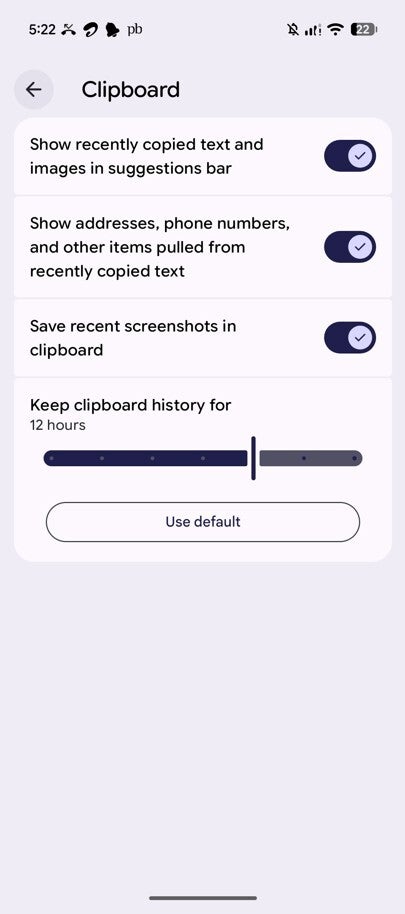
Clipboard settings page in Android. | Image by PhoneArena
Gboard automatically clears the copied item from the clipboard after an hour. If you want to keep copied content for more than an hour in the clipboard, the only option you currently have is to pin it. That could, fortunately, change very soon, as in the beta update of the keyboard app, a new "Keep clipboard history for" option has been spotted under clipboard settings.
It lets you manually decide for how long you want the copied item to remain in the clipboard. There are seven time frames to choose from: one hour, two hours, three hours, six hours, twelve hours, eighteen hours, and twenty-four hours. There's even a "Use Default" button, which you can tap to return to the original clipboard behavior, i.e., to save the copied items for only one hour.
It is worth noting, though, that there isn't going to be any change in the pinned content behavior. They will remain stored indefinitely until you manually remove them.
Gboard has become a lot better recently
From Microsoft SwiftKey to Samsung Keyboard, I have used plenty of keyboards on Android smartphones, and I can confidently say that Gboard is best overall, especially if you are into voice typing. The thing that impresses me the most is that Google keeps adding new capabilities to it. In addition to the two of the above-mentioned features, the app has received plenty of new powers in recent times.
All that said, the two changes I talked about in this story have been spotted in the beta build, and if nothing goes wrong in their testing, they will soon make their way to the stable version of the Gboard app.
Aman Kumar is a news writer at PhoneArena covering Google Pixel phones, Android features, AI-powered smartphone tools, and mobile tech news. Before joining PhoneArena, he spent over five years writing about consumer technology for publications like MakeUseOf, How-To Geek, and Guiding Tech. His current daily drivers are the Pixel 10 and Samsung Galaxy S26 Plus, while his red iPhone SE (2nd gen) remains a personal favorite. Aman also appreciates bold smartphone experiments and still considers the Nokia N-Gage one of the industry’s most iconic designs.
A discussion is a place, where people can voice their opinion, no matter if it
is positive, neutral or negative. However, when posting, one must stay true to the topic, and not just share some
random thoughts, which are not directly related to the matter.
Things that are NOT allowed:
Off-topic talk - you must stick to the subject of discussion
Offensive, hate speech - if you want to say something, say it politely
Spam/Advertisements - these posts are deleted
Multiple accounts - one person can have only one account
Impersonations and offensive nicknames - these accounts get banned
To help keep our community safe and free from spam, we apply temporary limits to newly created accounts:
New accounts created within the last 24 hours may experience restrictions on how frequently they can
post or comment.
These limits are in place as a precaution and will automatically lift.
Moderation is done by humans. We try to be as objective as possible and moderate with zero bias. If you think a
post should be moderated - please, report it.
Have a question about the rules or why you have been moderated/limited/banned? Please,
contact us.









Things that are NOT allowed:
To help keep our community safe and free from spam, we apply temporary limits to newly created accounts: