Apple Music is one of the top music streaming apps available for both Android and iOS. I, personally, have it installed on my Pixel 10 as well as on the iPhone 17. However, there is a very frustrating issue many users have been facing with it for a long time.
Users on public forums like Reddit and the Apple Community page report that the moment they get into their car, their iPhone automatically gets connected to the Bluetooth, and Apple Music starts playing songs on it automatically. While Apple has yet to address this officially, the good news is that I have figured out a couple of solutions that can actually help resolve this irritating issue.
Uninstall Apple Music
If you are not a music person, then you can definitely follow this workaround. You simply need to uninstall Apple Music from your iPhone, and your problem will be gone forever. In case you don't know how to uninstall apps on an iPhone: tap and hold the Apple Music app, choose "Remove App" from the context menu, and then choose "Delete App."
Enable Face ID for Apple Music
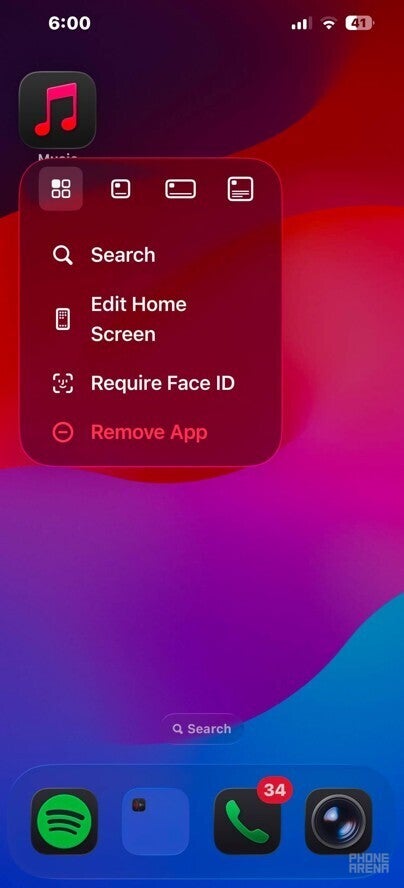
Require Face ID option in an iPhone. | Image by PhoneArena
If you're a melophile, then getting rid of the music app permanently is definitely not the ideal solution for you. What you can do instead is enable Face ID for Apple Music. Doing this will ensure that the app requires you to look at your phone to authenticate your identity before it can start playing music.
So you simply need to get inside your car and keep the phone aside without looking at it, and ta-da, you will notice that Apple Music doesn't play. To turn on Face ID, tap and hold the Apple Music app, choose "Require Face ID," and "Require Face ID" again from the pop-up window that appears.
In case you have devices like the iPhone SE 2 that don't support Face ID, then you can configure the app to use Touch ID using the method mentioned above.
Which music streaming service do you use?
22 Votes
Apple Music.
36.36%
YouTube Music.
36.36%
Spotify.
27.27%
Amazon Music.
0%
Use the Shortcuts app
Shortcut to stop Apple Music from playing music automatically. | Images by Image by PhoneArena
While the above-mentioned trick will do the job, many users on Reddit have suggested using the Shortcuts app to stop the music app from automatically playing in the car. Here's what you need to do:
Recommended For You
Open the Shortcuts app, and tap Automation.
Choose New Automation, and then select Bluetooth.
Tap Device, and select your car's Bluetooth from the list.
Make sure the Is Connected and Run Immediately options are selected.
Hit the Next button at the top-right corner.
Select Create New Shortcut.
In the search field, type and choose Play/Pause.
Tap the Play/Pause action, choose Pause, and then press the check icon at the top.
That's about it. The moment your iPhone gets connected to the selected Bluetooth device, it will automatically pause the music. You will have to manually open the app and resume to continue listening to the track.
Apple needs to release a permanent solution
Everything that I mentioned above definitely works, but these are all ultimately workarounds, not a permanent fix. Apple users have been suffering from this infuriating behavior for many years, and no permanent solution has been rolled out yet, even after many online reports. I really hope that the tech giant addresses this problem in the upcoming iOS update.
Apple Watch Series 10 flash sale! Limited time offer!
Save $20 on Apple Watch Series 10 from Back Market. Discount automatically applied at checkout. Offer ends 1 November 2026 at 23:59.
Aman Kumar is a news writer at PhoneArena covering Google Pixel phones, Android features, AI-powered smartphone tools, and mobile tech news. Before joining PhoneArena, he spent over five years writing about consumer technology for publications like MakeUseOf, How-To Geek, and Guiding Tech. His current daily drivers are the Pixel 10 and Samsung Galaxy S26 Plus, while his red iPhone SE (2nd gen) remains a personal favorite. Aman also appreciates bold smartphone experiments and still considers the Nokia N-Gage one of the industry’s most iconic designs.
A discussion is a place, where people can voice their opinion, no matter if it
is positive, neutral or negative. However, when posting, one must stay true to the topic, and not just share some
random thoughts, which are not directly related to the matter.
Things that are NOT allowed:
Off-topic talk - you must stick to the subject of discussion
Offensive, hate speech - if you want to say something, say it politely
Spam/Advertisements - these posts are deleted
Multiple accounts - one person can have only one account
Impersonations and offensive nicknames - these accounts get banned
To help keep our community safe and free from spam, we apply temporary limits to newly created accounts:
New accounts created within the last 24 hours may experience restrictions on how frequently they can
post or comment.
These limits are in place as a precaution and will automatically lift.
Moderation is done by humans. We try to be as objective as possible and moderate with zero bias. If you think a
post should be moderated - please, report it.
Have a question about the rules or why you have been moderated/limited/banned? Please,
contact us.





Things that are NOT allowed:
To help keep our community safe and free from spam, we apply temporary limits to newly created accounts: