This is the next Pixel pain point Google needs to fix
This might not be a problem for every Pixel user, but it certainly is one that affects me!
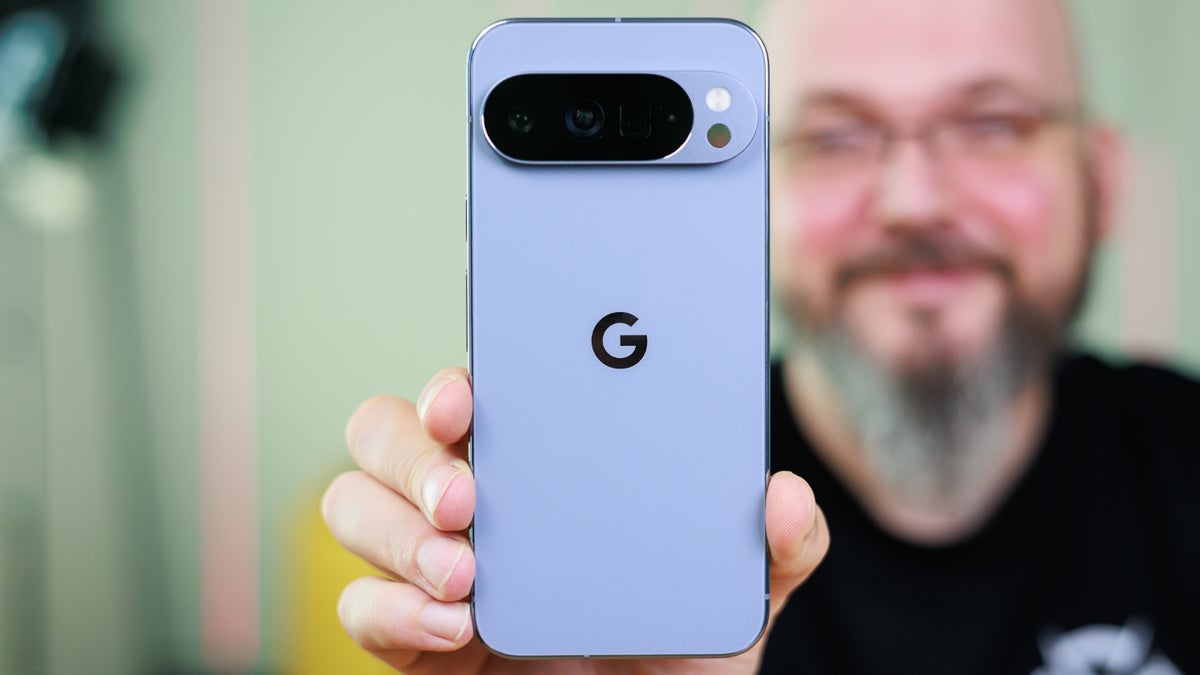
Google needs to solve a Pixel pain point | Image by PhoneArena
Since Google likes to make changes to its apps in order to improve the user experience, there is one pain point on Pixel phones that has been the topic of discussion on Reddit this fine, penultimate Sunday in July 2026. The problem is with a feature that, due to my job, I use quite often, and that is snapping a screenshot.
There are different ways to take a screenshot using a Pixel
On Android, you can take a screenshot by pressing the power and volume down buttons at the same time. That's actually easier said than done due to the layout of the Pixel. On the latter, these buttons are on the right side of the phone, which makes it more difficult to activate. Even as a lefty, I find myself having a hard time taking a one-handed screenshot this way.
I always have to put my phone down on a table or desk whenever I want to take a screenshot on my Pixel 6 Pro. And if I don't press the buttons correctly, I accidentally turn the phone off or surface the vertical volume bar.
Quick Tap, when it works, might be the best way to take a screenshot on your Pixel
There are some alternatives, including Quick Tap. With this feature enabled, a couple of quick taps on the rear panel will activate a screenshot. To set up Quick Tap, go to Settings > System > Gestures > Quick Tap to start actions. Toggle on "Use Quick Tap," and then you can choose what action the double tap will lead to. There are several options, and you can choose to use Quick Tap to open any app.
What is the next Pixel pain point Google should fix?
67 Votes
Easier screenshots
8.96%
Longer battery life
71.64%
Improve the power and volume keys
4.48%
Make the build quality better
14.93%
Obviously, in this case, you'll choose "Take screenshot." To prevent accidental activation, you can even require stronger taps by enabling the toggle at the bottom of the screen that says, "Require stronger taps." The problem is that Quick Tap doesn't always register your taps, and the screenshot doesn't always get taken. If you have your phone in a case, Quick Tap might not always work right away.
By the way, the iPhone has a very similar feature called Back Tap. To set this up for screenshots on iOS, go to Settings > Accessibility > Touch > Back Tap. You can set up a double tap or even a triple tap to activate a screenshot.
If quality matters, avoid using this method to generate a screenshot
OK, back to the Pixel. You can go to the Recents (App Switcher) screen. Find the app you want to take a screenshot of, and press the screenshot button on the bottom left of the display. This sounds so easy that there has to be an issue-and there is. For some reason, the screenshots taken in this fashion do not look as good as the screenshots taken via other methods.
Additionally, screenshots captured in this manner do not allow the user to tap the "Capture more" button. This button is found next to the preview of the screenshot that appears in the lower left corner of the display after one is captured using one of the other methods. What it does is allow you to drag a window downward to take a scrolling screenshot of a full web page or settings menu.
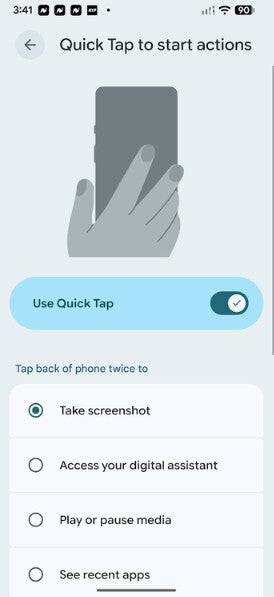
Quick Tap might be the easiest way to create a screenshot on a Pixel. | Image by PhoneArena
Coming up with a new way to take a Pixel screenshot is right down Google's alley
As we've said, Google is very good at coming up with ways to improve interface issues, and perhaps the company can come up with something that is easier to use and works all the time. Most of the comments on Reddit were not negative about the current options for taking screenshots on their Pixel. But as someone who takes screenshots quite often, I would favor something new and easy to activate.
Right now, Quick Tap would seem to be the easiest way to generate a screenshot. But as noted above, this method doesn't always work. This might not be the top priority for Google, but I'd bet that there are plenty of Pixel users who would love to see a new and easier way to take a screenshot.


Popular stories


Latest News


Things that are NOT allowed:
To help keep our community safe and free from spam, we apply temporary limits to newly created accounts: