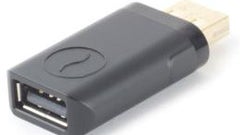
Charging a tablet from a USB port made possible with the ChargeDr

Share:
Share:
9 Comments
1. timtimity posted on 10 Jan 2013, 07:58 0 1
Whenever I plug my iPad into my PC, a message on the screen appears saying it isn't charging but when it's unplugged it'll show that it has charged while plugged in.
2. NiCE2012 posted on 10 Jan 2013, 08:02 0 0
I have been able to charge my android tablet from PC/laptop from long time :)
3. ajac09 posted on 10 Jan 2013, 08:15 0 0
Something similar have been on ebay for a long time. Even wall chargers to.
4. ehaus81 posted on 10 Jan 2013, 08:36 1 0
There's also a piece of software that'll boost the output of your USB ports to charge iPads and other tablets: Ai Charger by ASUS. I think it was made specifically for ASUS motherboards but I've used it with Dell desktops and laptops with no problems along with a home built PC that uses an ASUS motherboard. Of course your experience may vary from mine and I'm not sure of the long term effects of it on the USB ports as I've only been using it for a little under a year but so far it has been working great.
5. buccob posted on 10 Jan 2013, 09:45 0 0
I have used this feature and it also allows to charge when the laptop is sleep or even powered off (similar to Toshiba's solution)
But a few days ago, I tried that port with an external USB 3.0 HDD and the nano transceiver from Microsoft Arc Touch Mouse, plugged next to it started to get interference and did not behave properly until I changed it to the USB port on the other side...
6. ehaus81 posted on 10 Jan 2013, 10:55 0 0
Is there a certain port dedicated to that function on your laptop? With the software installed on my computers, it sits in the system tray with a red "x" until I plug something in that requires more juice. If I plug in an external HDD or anything else that doesn't require more power, it just sits there and doesn't do anything. When I plug in an iPad, the red "x" goes away to signify that it's charging the device. I don't think it'll work with the PC off since it's a Windows application and not built into the hardware.
7. buccob posted on 10 Jan 2013, 11:15 0 0
Well, Are you referring to the Asus USB Charger Plus software? if so, there is a dedicated port in my laptop. It is one of the 2 USB 3.0 ports... And I really don't know if a device is using more power... But they do charge while the laptop is off and I can set it to stop charging if battery drops under a certain threshold. But I tent to use that port for charging, since it seem to be design for that purpose...
Maybe the issue was related to the use of the USB 3.0 device... or maybe the cable had no filter... I can remember
8. dgreekstallion posted on 10 Jan 2013, 17:39 0 0
This is quite useless to anyone with a decent computer. Many, many motherboard manufacturers these days boast the fact that their motherboards have specific ports/hardware design meant to quickly charge USB devices.