YouTube Music is now getting a useful feature if you're using the streaming service on more than one device (which is probably most people). The service will now be syncing your queue between your signed-in devices seamlessly, so you can continue listening.
YouTube Music gets a queue sync feature across devices
The "Now Playing" queue that you could have on your Android or iOS phone was previously independent. Of course, the browser version of the streaming service was able to pull on mobile.
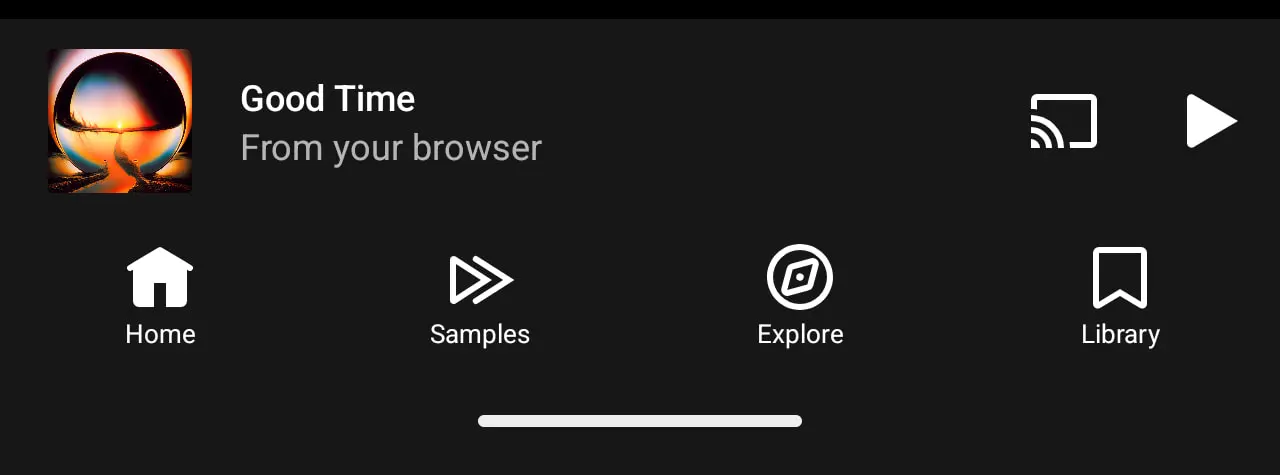
Now, Google is improving this capability. A new change will show you the last played song on any device in the miniplayer. That would be shown if you opened the mobile app. You will now have a new "From your iPhone" or "From your browser" window that will replace the artist information temporarily. This is until you start playback.
Image Credit - 9to5Google
YouTube Music will keep your queues in sync. It also seems that the service is now prioritizing the last play session you've had on any device. That appears to update or override any existing queues on your current device.
This new feature is especially useful if you're using a tablet and your phone, and you listen to a lot of music from the web browser. It's a good quality-of-life improvement. Of course, it would've been even better if Google included a setting to keep your listening habits separated by device, if that's what you wish, but hey, this change is already a step in the right direction.
Do you want your music queue synced across all your devices?
26 Votes
Yes, absolutely – this is how it should work
57.69%
Sometimes, but I'd like a toggle
23.08%
No, I prefer separate queues per device
15.38%
I only use one device anyway
3.85%
Here's what the competition is doing
That little tweak has been essential for people enjoying music on more than one device.
Recommended For You
When it comes to cross-device playback and queue handling, rivals have taken different approaches. For example, Spotify offers (and has been offering for a long time) Spotify Connect. This feature allows you to remote control playback on other devices. It also lets you transfer where your music plays. An absolutely amazing and super useful feature, if you ask me.
Spotify Connect keeps your listening experience unified. And the feature is supported on phones, computers, speakers, and even smart TVs.
Meanwhile, Apple Music has also seen some changes in its queue system. Recent updates that Apple brought improved how songs are added and reordered. The service can also sync your last-played music across devices. Of course, here the devices need to be linked to your Apple ID. Some users still notice limitations with Apple Music's take, though, and Spotify's seems more evolved.
Tidal doesn't offer fully synced queues across devices. Instead, the service has Tidal Connect, which lets you switch playback to supported devices like speakers and smart systems without interrupting the music. Well, here we don't get the "Now playing" list synced though, and listening history stays separate per device.
I'm all about syncing the queue
I, personally, prefer having the ability to sync my devices, so I'm glad YouTube Music is adding this feature. Not only that, but I listen on the browser when I'm on the computer and would love to continue where I left off with my music on my phone. So, I'm welcoming this feature with excitement.
Of course, I can understand if someone would want to keep different devices listening history separate. Maybe YouTube Music can add a setting to allow for this option in the future. But I feel like most people would just want to enjoy the same music on their other devices as well.
Only if YouTube Music could resolve its problem with AI-generated songs... because this is currently my main issue with the platform, and a serious one at that, which may cause me to seek another streaming service.
Six-month unlimited plan is now 57% off
$90
$210
$120 off (57%)
Mint Mobile is now allowing you to get whichever plan you like for either three, six, or 12 months for just $15/mo. If you go for the six-month unlimited service, for instance, you'll now have to pay just $90 upfront instead of $210.
Iskra Petrova is a news writer at PhoneArena, where she covers mobile tech news and maintains the site’s device hubs with the latest leaked specs, rumors, and official details for upcoming phones. She joined PhoneArena in 2020 after three years in technical support for Microsoft Exchange, giving her practical experience with software infrastructure and troubleshooting. Iskra holds a Master’s Degree in Literature, which helps her translate complex tech details into clear, reader-friendly coverage. She is a daily Apple ecosystem user, while also closely following Sony Xperia’s camera-focused phones and Samsung’s Galaxy Z Flip series.
A discussion is a place, where people can voice their opinion, no matter if it
is positive, neutral or negative. However, when posting, one must stay true to the topic, and not just share some
random thoughts, which are not directly related to the matter.
Things that are NOT allowed:
Off-topic talk - you must stick to the subject of discussion
Offensive, hate speech - if you want to say something, say it politely
Spam/Advertisements - these posts are deleted
Multiple accounts - one person can have only one account
Impersonations and offensive nicknames - these accounts get banned
To help keep our community safe and free from spam, we apply temporary limits to newly created accounts:
New accounts created within the last 24 hours may experience restrictions on how frequently they can
post or comment.
These limits are in place as a precaution and will automatically lift.
Moderation is done by humans. We try to be as objective as possible and moderate with zero bias. If you think a
post should be moderated - please, report it.
Have a question about the rules or why you have been moderated/limited/banned? Please,
contact us.














Things that are NOT allowed:
To help keep our community safe and free from spam, we apply temporary limits to newly created accounts: