That 'Apple Pay' notification on your lock screen might look official, but clicking it could be the most expensive mistake you make this year.
New phishing campaign targets Apple users with fake fraud warnings
The messages pretend to come from Apple Pay and claim that a transaction was blocked. They can also claim that an appointment was made or suspicious activity was detected on a specific Apple ID.
This approach is intended to create urgency. This way, the victim is directed towards a fake support app controlled by scammers.
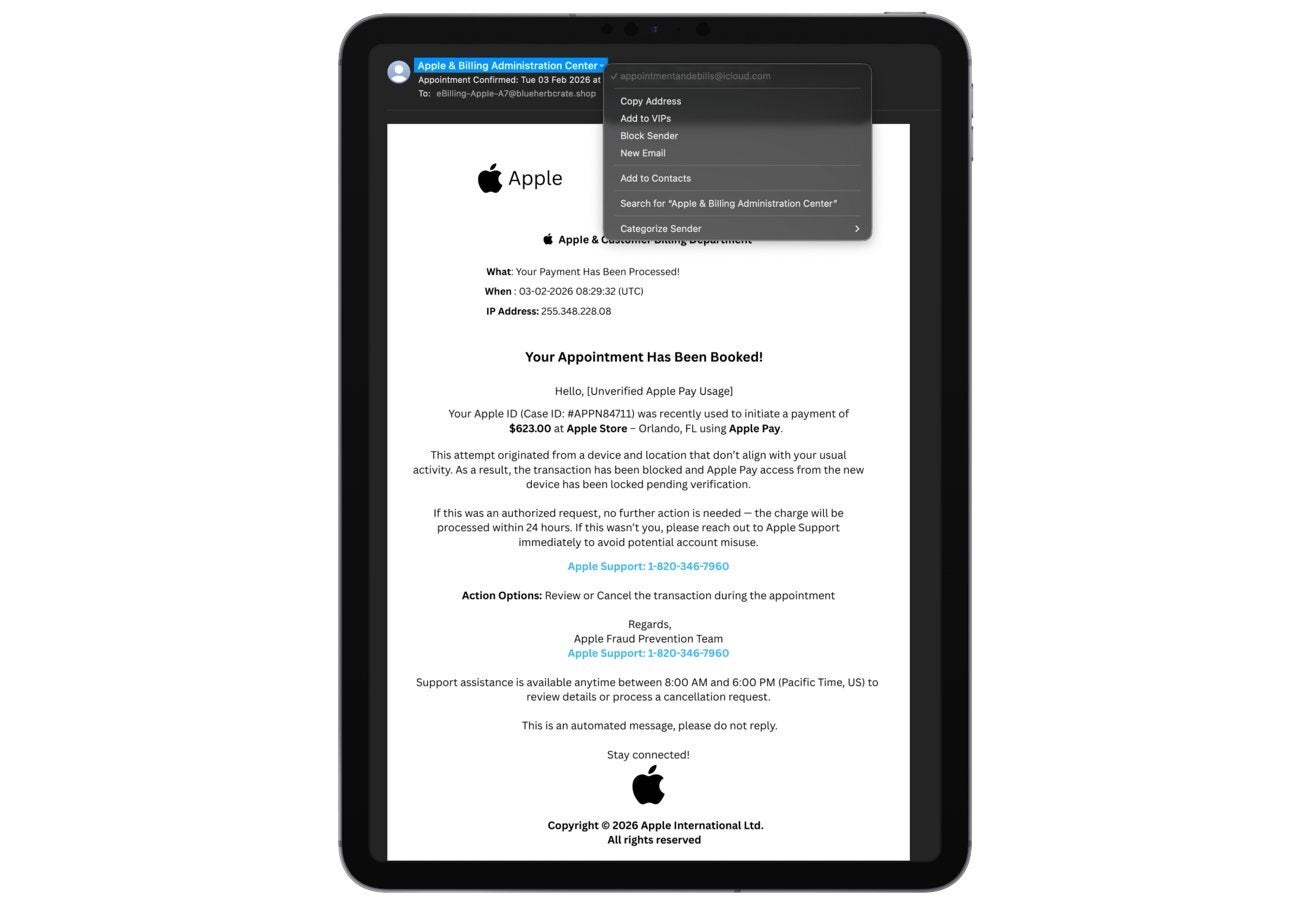
Example fraud email. | Image Credit - AppleInsider
These emails are obviously not sent by the Cupertino tech giant. However, they may contain Apple’s logos, formatting, and sender names in an attempt to look more convincing to victims.
Typically, these phishing emails impersonate Apple billing or fraud teams. These emails often include a case ID, a timestamp, and some details that sound technical to convince unsuspecting users.
The messages urge users to call a number immediately or show up for an appointment to fix the “problem.” When you call, you are speaking with scammers pretending to be Apple Support. The malicious users try to get your Apple ID, verification codes, or payment info.
Recommended For You
How do you handle "urgent" security emails?
20 Votes
I ignore the email and go to my Settings or bank app
25%
I check, but nervous it could be real
5%
Instant Panic
0%
Delete & Block
70%
How to protect yourself
It’s important to know that Apple doesn’t set up fraud appointments via email. The tech giant also doesn’t require you to fix any billing issues by calling numbers in random messages.
There are also several other ways that you can notice the email is fraudulent.
First off, the sender’s address doesn’t come from an official Apple domain. The display name may make it appear so, but the email address itself won’t be official.
Other small details would also show inconsistencies if you look. For example, there could be an impossible IP address or strange phrasing such as “Hello {Name}."
Then, we have the phone number in the email. If you do a quick online search for the phone number, you’ll see unrelated and incorrect results, including links to addiction support pages or public health organizations and not Apple’s support.
Obviously, these little details would indicate (if you look for them) that this is not a legitimate email but rather a scam. Apple support numbers always lead to domains that Apple owns or official support pages, and searching for them never gives you unrelated results.
To make people ignore these details, the emails rely on setting the feeling of urgency. Those emails would often indicate that you should do something “immediately” to prevent a bad consequence.
Apple’s real communications don’t threaten sudden account lockout or pressure you into acting immediately.
Scammers understand there’s a huge number of people using Apple Pay and that fraud warnings related to Apple Pay would make people scared or concerned. After all, we’re talking about money.
If you receive a strange email looking like it's from Apple without you requesting the company contact you, make sure not to click on any links, call any numbers, or download any attachments.
To verify if it’s legitimate, you can also open the Settings app on your iPhone or Mac or go to Apple’s official website.
Check your Apple Pay transactions manually, as well as your Apple ID purchase history. If something is wrong, it’s going to show up there without requiring Apple to email you.
You can report suspicious emails by forwarding them to Apple’s address against abuse. Then, delete them.
Good practices are also using two-factor authentication for your accounts, using unique passwords, and assuming that anything “urgent” about a billing issue is fake.
I just assume any email about a billing issue is fraud
If you ask me, anything that says something bad will happen to my account if I don't react immediately raises some red flags in my head. I always make sure to check manually instead of reacting to emails.
Trade in your old phone for cash at ecoATM!
Recycle your used phone and get instant cash. Find out how at ecoATM!
Iskra Petrova is a news writer at PhoneArena, where she covers mobile tech news and maintains the site’s device hubs with the latest leaked specs, rumors, and official details for upcoming phones. She joined PhoneArena in 2020 after three years in technical support for Microsoft Exchange, giving her practical experience with software infrastructure and troubleshooting. Iskra holds a Master’s Degree in Literature, which helps her translate complex tech details into clear, reader-friendly coverage. She is a daily Apple ecosystem user, while also closely following Sony Xperia’s camera-focused phones and Samsung’s Galaxy Z Flip series.
A discussion is a place, where people can voice their opinion, no matter if it
is positive, neutral or negative. However, when posting, one must stay true to the topic, and not just share some
random thoughts, which are not directly related to the matter.
Things that are NOT allowed:
Off-topic talk - you must stick to the subject of discussion
Offensive, hate speech - if you want to say something, say it politely
Spam/Advertisements - these posts are deleted
Multiple accounts - one person can have only one account
Impersonations and offensive nicknames - these accounts get banned
To help keep our community safe and free from spam, we apply temporary limits to newly created accounts:
New accounts created within the last 24 hours may experience restrictions on how frequently they can
post or comment.
These limits are in place as a precaution and will automatically lift.
Moderation is done by humans. We try to be as objective as possible and moderate with zero bias. If you think a
post should be moderated - please, report it.
Have a question about the rules or why you have been moderated/limited/banned? Please,
contact us.













![Another batch of Galaxy S26 series users in the US are getting a nice surprise today [UPDATED]](https://m-cdn.phonearena.com/images/article/183643-wide-two_350/Another-batch-of-Galaxy-S26-series-users-in-the-US-are-getting-a-nice-surprise-today-UPDATED.webp)
Things that are NOT allowed:
To help keep our community safe and free from spam, we apply temporary limits to newly created accounts: