This new Android malware lets cybercriminals control your device like it’s in their hands
It’s already targeting hundreds of finance and crypto apps worldwide.
We may earn a commission if you make a purchase from the links on this page.

An AI-generated image by PhoneArena.
Albiriox, the Android malware that can take over your device
A new Android threat called Albiriox is making waves, giving hackers the power to completely control infected phones. This isn’t just another banking trojan – it’s designed to run on your device as if the attacker were holding it themselves. Albiriox first appeared during a private beta in September 2025 and went public in October 2025.
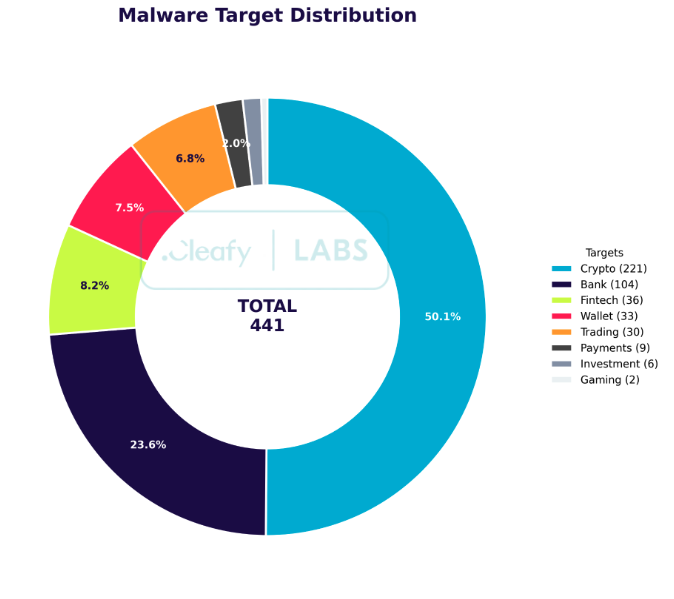
More than 400 apps across the globe are currently being targeted.
Because Albiriox is offered as a Malware-as-a-Service (MaaS), anyone subscribing can spread it however they want. Subscriptions start at $650 per month, giving criminals a plug-and-play option without building malware themselves.
Common tactics include things like fake apps and social engineering, especially smishing or links mimicking trusted brands or app stores. One campaign even tricked Austrian users with a fake “Penny Market” app that looked like a Google Play page, installing a malicious dropper once clicked.
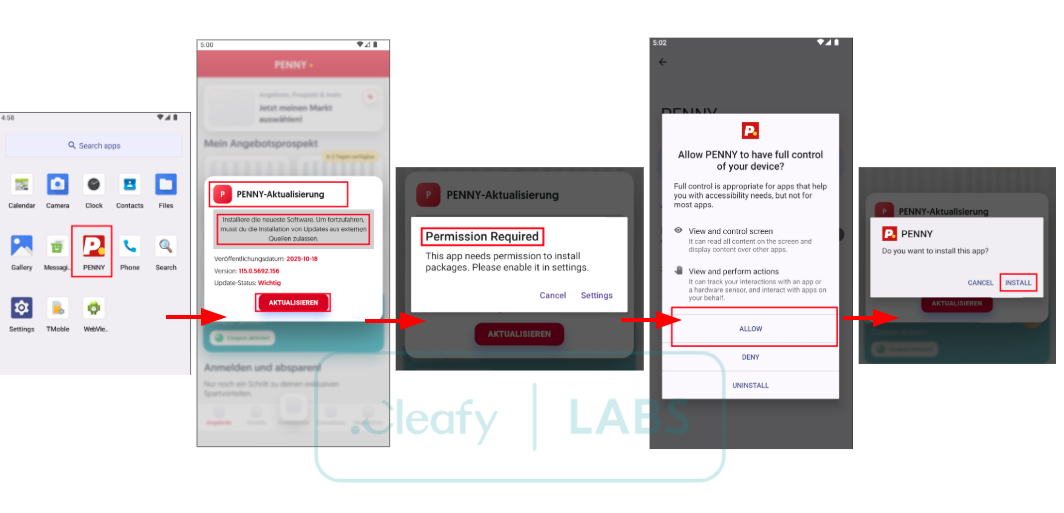
One of the first apps to fall victim to this new malware was the app of a well-known German discount supermarket chain.
Staying safe on Android
Even though Google Play Protect defends against known malware by default on devices with Google Play Services, you can’t just rely on it. Attackers constantly push fake apps via SMS and other social engineering methods, so vigilance is key.
Albiriox is highly advanced, packing multiple tools that let hackers control your device almost like it’s in their hands. Features like live remote control and on-device fraud tools let attackers open banking or crypto apps, start transfers, and even approve them using your own session.
On top of that, Black-screen masking hides all activity behind a fake or black screen while the malware works in the background, and Accessibility abuse automates taps, reads what’s on your screen, and bypasses security prompts.
Do you check developer names and reviews before installing an Android app?
25 Votes
Always, that’s a must.
68%
Sometimes, if the app seems suspicious.
28%
Rarely, I usually trust links or recommendations.
4%
Never, I just install apps quickly.
0%
Stay safe
If you spot an app on your phone with a vague name like “security,” “investment,” or “utility” and think, "Wait… did I install that?”, then your first move should be a deep scan with a trusted Android malware app – don’t ignore it.
But I believe the smarter move is to prevent these shady apps from appearing in the first place. How? Stick to official app stores and be skeptical of links sent through texts, emails, or messaging apps – that is where most of the sketchy apps sneak in.
When it comes to finance or shopping apps, take a moment to verify the developer’s name, check how many people have actually downloaded it, and read through user reviews instead of blindly trusting a single promotional link.
Keeping your Android system, Google Play services, and all banking or crypto apps fully updated is also essential, since every update brings new security fixes. Permissions deserve extra attention too – ask yourself if an app really needs access to your camera, SMS, or accessibility features to do what it claims.
Follow these habits, and your Android phone will stay much safer, keeping those sneaky apps and potential security risks firmly at bay.


Popular stories





Latest News





Things that are NOT allowed:
To help keep our community safe and free from spam, we apply temporary limits to newly created accounts: