A Pixel 10 Pro user on social media revealed what he did to get his Gemini/Google Assistant to work after the feature was not responding to his voice. This person, who goes by the username @OkMortgage6745 on Reddit, had just switched from the iPhone to a Pixel 10 Pro. I should point out that Pixel users can choose between using Google Assistant or Gemini as the phone's virtual digital assistant.
How to get the Google Assistant or Gemini to activate if the "Hey Google" hptwprd doesn't work
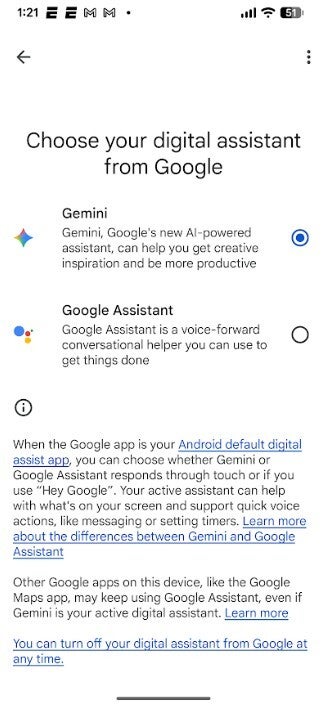
The difference is that Gemini delivers more in-depth responses to queries. Gemini can even set alarms and timers as long as your Pixel is running Android 10 or later. Google, by the way, was supposed to phase out Google Assistant by the end of 2025. But the feature got a last-minute reprieve and will be hanging around until sometime this year. If you want to switch from Google Assistant to Gemini, go to Settings > Apps > Assistant > Digital assistants from Google. Tap on Gemini to use AI as your digital assistant.
Which assistant do you have set on your Pixel?
29 Votes
Gemini.
75.86%
Google Assistant.
24.14%
But we digress. The new Pixel 10 Pro user, as noted, couldn't get Gemini or Google Assistant to activate by saying the "Hey Google" hotword. Keep in mind that the "Hey Google" hotword is supposed to work for both Google Assistant and Gemini (Google has yet to come up with a 'Hey Gemini' hotword). The Reddit user tried seven things in an attempt to get "Hey Google" to work. None of were successful. The seven attempts included:
Restarting the phone (multiple times)
Switching from Gemini→ Google Assistant → back to Gemini, with restarts in between
Clearing Google cache and data (Gemini wouldn’t even allow cache clearing)
Uninstalling Google app updates (kind of worked, but broke other things)
Booting into Safe Mode
Re-training Voice Match
Basically every Reddit / forum suggestion out there
What did work was this:
Recommended For You
Go to Settings
Tap your name at the top (with “Google services & preferences” underneath)
Tap "All services" in the tab under your email.
Scroll to "Settings for Google app"
Tap "Search, Assistant & Voice"
Tap "Gemini"
Enable "Talk to Gemini hands-free"
Enable "Gemini on lock screen"
As one Redditor pointed out, the above fix was able to get the "Hello Google" hotword opening up the digital assistant on his Pixel 8 Pro after it stopped working. Another Pixel user had the same problem with his assistant two days ago. After trying the above fix, this Pixel user can now verbally activate Gemini or Google Assistant by saying, "Hello Google."
Google will phase out Google Assistant in favor of Gemini sometime in 2026
You might want to bookmark this article in case you need to refer to it one day. By the way, if you have yet to try Gemini as the assistant for your Pixel, I strongly recommend giving it a shot. As good as Google Assistant is, Gemini has a much broader wealth of knowledge. If you can get past AI's tendency to hallucinate every now and then, you'll really find Gemini to be a big improvement.
How to install the Gemini app for Android on your Pixel
As we previously stated at the beginning of this article, Google had originally planned to phase out Google Assistant at the end of last year and will now attempt to pull this off in 2026. Eventually you will lose Google Assistant so you might as well get used to using Gemini now.
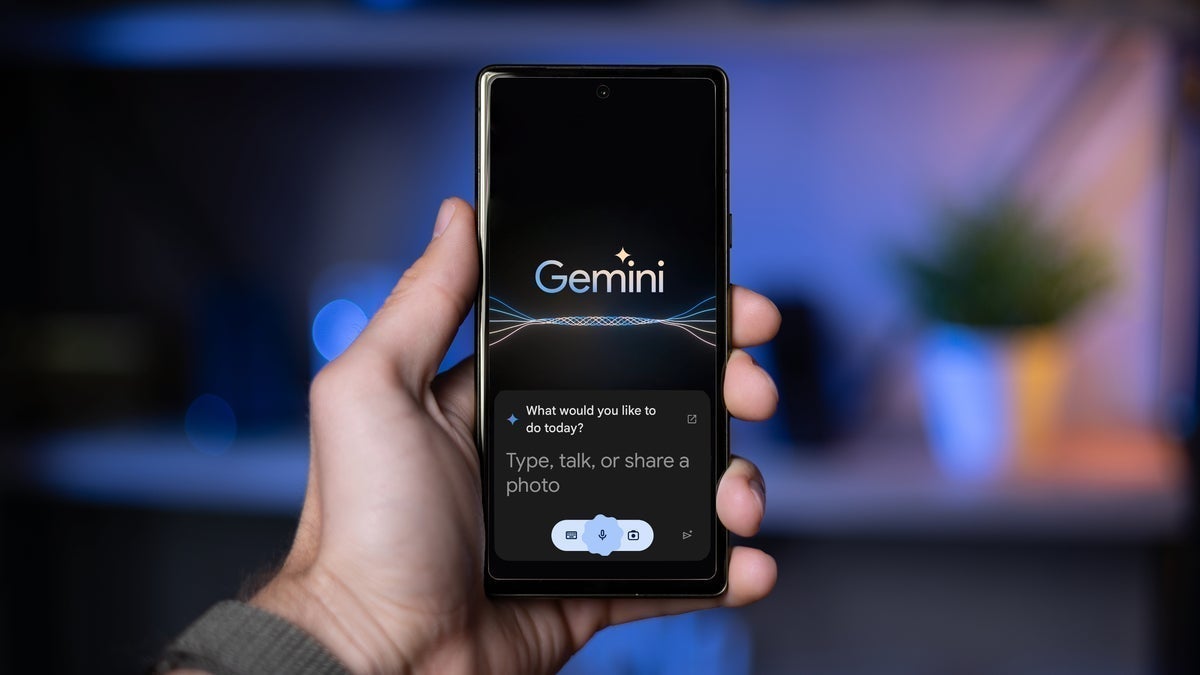
Pixel users can choose between having Google Assistant or Gemini as their digital helper. | Image credit-PhoneArena
You can also install the Gemini app from the Google Play Store by tapping on this link. Here's something interesting. If you have Gemini set as your assistant on your Pixel and you've also installed the Gemini app, you can open the app and set a timer or alarm just as you can do when activating Gemini by using the hotword. Just open the app and say "Set a timer" for the number of minutes you want timed. Or say "set an alarm" for the specific time you want the alarm to go off.
Six-month unlimited plan is now 57% off
$90
$210
$120 off (57%)
Mint Mobile is now allowing you to get whichever plan you like for either three, six, or 12 months for just $15/mo. If you go for the six-month unlimited service, for instance, you'll now have to pay just $90 upfront instead of $210.
Alan, an ardent smartphone enthusiast and a veteran writer at PhoneArena since 2009, has witnessed and chronicled the transformative years of mobile technology. Owning iconic phones from the original iPhone to the iPhone 15 Pro Max, he has seen smartphones evolve into a global phenomenon. Beyond smartphones, Alan has covered the emergence of tablets, smartwatches, and smart speakers.
A discussion is a place, where people can voice their opinion, no matter if it
is positive, neutral or negative. However, when posting, one must stay true to the topic, and not just share some
random thoughts, which are not directly related to the matter.
Things that are NOT allowed:
Off-topic talk - you must stick to the subject of discussion
Offensive, hate speech - if you want to say something, say it politely
Spam/Advertisements - these posts are deleted
Multiple accounts - one person can have only one account
Impersonations and offensive nicknames - these accounts get banned
To help keep our community safe and free from spam, we apply temporary limits to newly created accounts:
New accounts created within the last 24 hours may experience restrictions on how frequently they can
post or comment.
These limits are in place as a precaution and will automatically lift.
Moderation is done by humans. We try to be as objective as possible and moderate with zero bias. If you think a
post should be moderated - please, report it.
Have a question about the rules or why you have been moderated/limited/banned? Please,
contact us.












Things that are NOT allowed:
To help keep our community safe and free from spam, we apply temporary limits to newly created accounts: