Gboard gets new feature to make typing on glass easier
Google is testing a new feature for the Gboard app that makes it easier to fix a typo and other issues.
If you ask me to choose which virtual keyboard I prefer between the one on my iPhone 15 Pro Max and the one on my Pixel 6 Pro, I'm not sure that I could come up with a definitive response. I love the way I have my Gboard QWERTY set up on my Pixel with an emoji bar at the top followed by a toolbar underneath, the numbers row under that, and long pressing on each key will type an alternate symbol, mostly punctuation. That beats the iPhone keyboard, which requires you to tap on an extra key to type a comma or a period. Still, I seem to type faster on iOS so it's basically a draw.
New Cursor mode for Gboard will make it easier for users to fix typos
If you are prone to making typos, Gboard has a feature called the Glide cursor control that allows you to move your cursor left or right by pressing on the space bar and swiping on the same bar. It's similar to Trackpad Mode on the iPhone's virtual QWERTY keyboard that does the same exact thing. Google is working on a way to make it easier to change paragraphs or lines to fix a typo or add a word.
Will you use the new Cursor controls?
205 Votes
Yes, it will help users more easily correct typos.
88.78%
No. The current setup is not that bad.
11.22%
Android Authority discovered code in version 16.8.2.867538971-beta-arm64-v8a of the Gboard app. The new Cursor mode appears when you press down on the space bar. The digital keys disappear and are replaced with a virtual touch area and a virtual cursor surfaces. Drag the virtual cursor around to the spot where you want to change the text. Unlike the current version of Gboard, the new Cursor mode is unrestricted, and the cursor can move in any direction allowing you to move the cursor more easily to another line or even another paragraph.
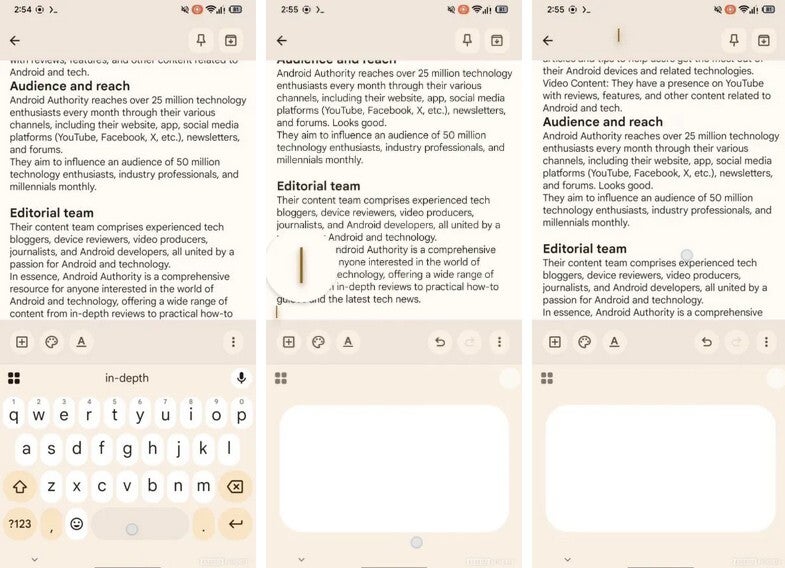
The new Cursor mode is being tested by Google. | Image by Android Authority
This is a big improvement to the Gboard app
This is so much better than the current version, which requires the user to continually swipe to the left or right until they reach the end of the line. From there, they can move the cursor up and down to the line or paragraph that contains the typo. The new virtual trackpad will allow users to move the cursor anywhere.
For many Android users, this feature cannot arrive soon enough. Unfortunately, just because Android Authority was able to enable the feature, it doesn't mean that Google has decided to go through with this. On the other hand, there really is no reason why this feature shouldn't roll out soon.


Popular stories






Latest News





![Another batch of Galaxy S26 series users in the US are getting a nice surprise today [UPDATED]](https://m-cdn.phonearena.com/images/article/183643-wide-two_350/Another-batch-of-Galaxy-S26-series-users-in-the-US-are-getting-a-nice-surprise-today-UPDATED.webp)
Things that are NOT allowed:
To help keep our community safe and free from spam, we apply temporary limits to newly created accounts: