Security has always been a top priority for me. That’s why I lock everything from my phone to my laptop and sometimes even separate files. And I can’t tell you how grateful I am that the great engineers of this Earth created fingerprint sensors. Previously, you had to remember passwords—or a password, as, let’s be honest, most of us use the same one for everything—but now, to enter an app, all you need to do is place your finger on the sensor, and the phone lets you in the moment it authenticates your print.
Many apps work this way, including Google’s Find Hub—previously named Find My Device. However, there is a significant downside to this method: the need to constantly scan your fingerprint just to use the app. Don’t get me wrong, this is great as far as security is concerned... but not so great when you’re in a hurry and need to make several quick checks—like seeing whether your kid is heading home to do their homework or towards a nearby cafe after school. Thankfully, Google has introduced a change to the Find Hub app for Android that saves you time and makes the use of the application less infuriating.
How often do you use Find Hub?
11 Votes
Daily: I use the "People" tab to keep track of family.
18.18%
Weekly: Just to find my earbuds or tablet around the house.
9.09%
Rarely: Only when I've lost something.
72.73%
A faster way to check out Devices or People lists
As 9to5Google first reported, a server-side update to the Find Hub app has removed the need for biometric confirmation when opening the Devices or People lists. You’ll still have to use a fingerprint scan or Face ID to enter the app if you haven’t used it for a while or need to log in again, but it should no longer require constant authentication when visiting these two lists.
Recommended For You
Why does this change make it easier for users?
The sole reason Find Hub was created is to help you, well, find lost devices. And you’ll likely agree that it’s not great to constantly have to unlock your phone just to see whether you need to turn left or right at the next intersection to reach your lost tablet. Now, you can easily glance at your phone’s screen whenever you’re unsure where to turn next without the hassle of unlocking it every single time.
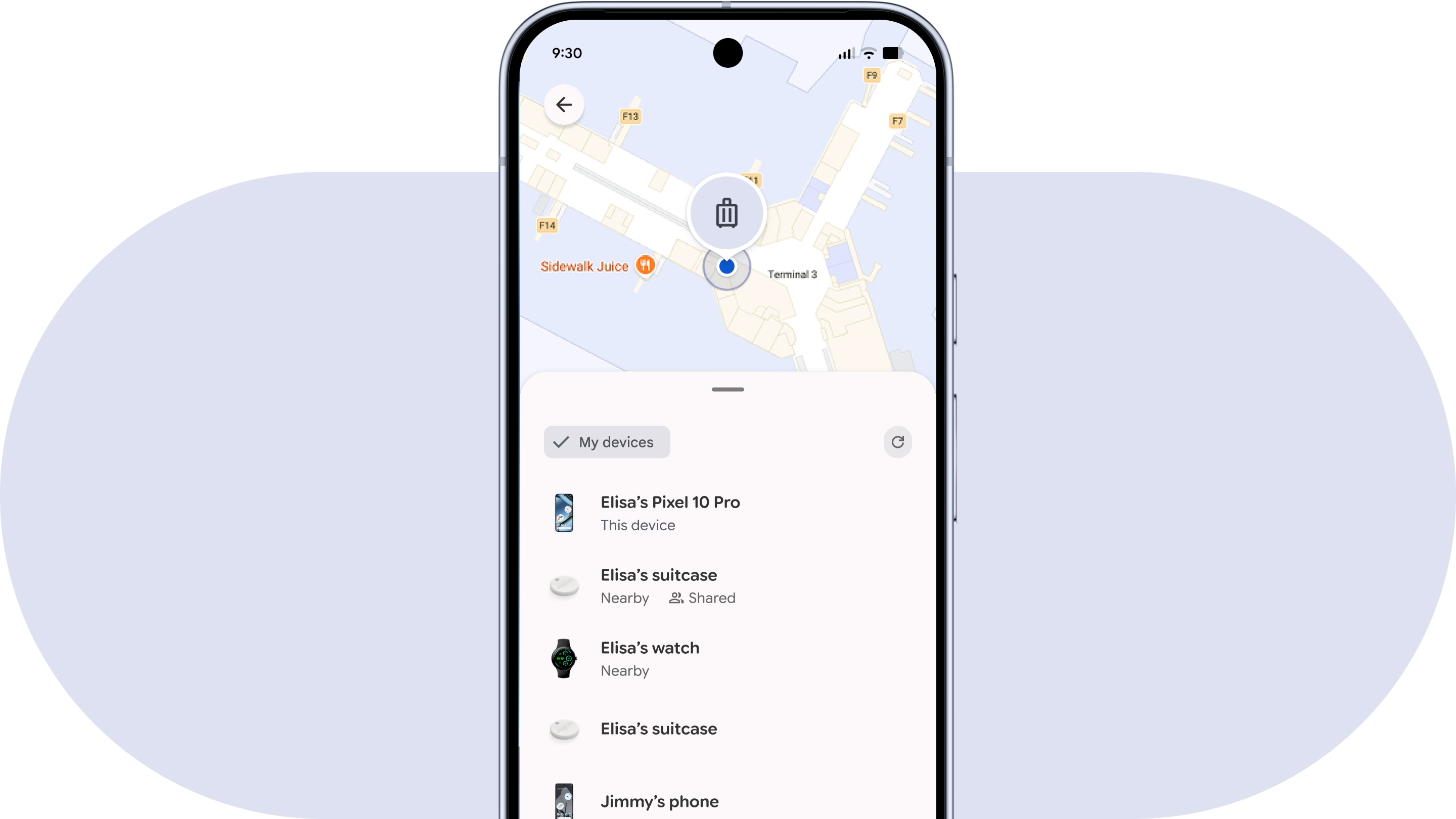
Find Hub showing a lost luggage location | Image by Google
What do I think of this change?
I believe Google removing the need for constant verification when checking the Devices or People lists is a step in the right direction. Fortunately, I’ve never had to use the Find Hub app to hunt for a lost device—and I hope it stays that way—but I can imagine how frustrating it might be to verify your identity every time you need to see where a device, friend, or family member is.
Now, imagine a scenario where you’ve lost your tablet. In addition to being angry at yourself, you’re also in a hurry to get your device before someone else beats you to it; that constant verification would likely drive anyone crazy. That’s why I’m glad Google has streamlined this process, albeit silently.
Preslav Mladenov is a News and Affiliate Content Writer at PhoneArena who started on his tech journalism journey in December 2021. With persistent knack for finding the best deals out there, he swiftly became a pivotal Affiliate Content Writer, guiding readers towards significant savings on a plethora of gadgets, including smartphones, smartwatches, tablets, Bluetooth speakers, and headphones. Mladenov's deep-seated knowledge of mobile tech, paired with a rich background in sales, empowers him to unearth the finest deals on the web.
A discussion is a place, where people can voice their opinion, no matter if it
is positive, neutral or negative. However, when posting, one must stay true to the topic, and not just share some
random thoughts, which are not directly related to the matter.
Things that are NOT allowed:
Off-topic talk - you must stick to the subject of discussion
Offensive, hate speech - if you want to say something, say it politely
Spam/Advertisements - these posts are deleted
Multiple accounts - one person can have only one account
Impersonations and offensive nicknames - these accounts get banned
To help keep our community safe and free from spam, we apply temporary limits to newly created accounts:
New accounts created within the last 24 hours may experience restrictions on how frequently they can
post or comment.
These limits are in place as a precaution and will automatically lift.
Moderation is done by humans. We try to be as objective as possible and moderate with zero bias. If you think a
post should be moderated - please, report it.
Have a question about the rules or why you have been moderated/limited/banned? Please,
contact us.











![Another batch of Galaxy S26 series users in the US are getting a nice surprise today [UPDATED]](https://m-cdn.phonearena.com/images/article/183643-wide-two_350/Another-batch-of-Galaxy-S26-series-users-in-the-US-are-getting-a-nice-surprise-today-UPDATED.webp)
Things that are NOT allowed:
To help keep our community safe and free from spam, we apply temporary limits to newly created accounts: