Android 17, codenamed "Cinnamon Bun," is expected to arrive this coming June. Earlier this month, we ran through some of the UI changes that Google is testing for the next major Android build. One major change we previously discussed is the possibility that Google will separate Quick Settings and the Notification Shade, and the Wi-Fi/internet toggles.
Last year's Material 3 Expressive UI update added blurs to the background of system-wide pages
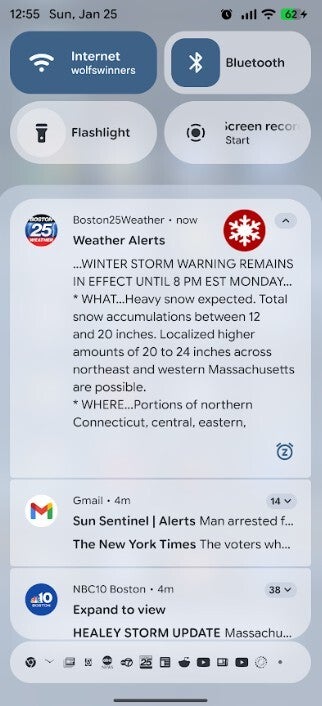
Last year's Material 3 Expressive UI update added system-wide blurs to the interface background on system-level features such as the Quick Settings and Notification Shade. Swiping up to see the app drawer shows a blurred-out image of your home screen as opposed to viewing a solid block of color. The "recents" menu is also another place where you can see the blurry background quite clearly.
Does a blurry background make you more or less distracted?
160 Votes
More distracted since it captures my attention.
35.63%
Less distracted since the text and icons don't blend.
28.13%
Neither more nor less distracted.
36.25%
The addition of the "blur" to Quick Settings and the Notification Shade came with the release of Android 16 QPR1. At the time, Google said that it decided to "subtly blur" the backgrounds of both in order to give these panels a "sense of depth, so the motion feels lightweight and you’re able to stay aware of the apps you’re using in the background."
Blurring the background page prevents it from being a distraction
According to 9to5Google, system flags they've discovered have an appropriate title for this look, which is apparently named blur. The advantage to having the blur is that it allows users to have a good idea what the page is behind the one being viewed. Blurring the image prevents the background from being a distraction to users. While the blurred image of the background page could still be recognizable, without the blur, the texts and icons in the background would compete with the image in the foreground.
The blur seen in the background of the Notification panel in Android 16. | Image credit-PhoneArena
How to disable the blur
Some users are more distracted by the blur than helped by it. If that describes you, blurs can be disabled by following these directions:
Open Settings.
Go to Accessibility.
Tap Color and motion.
Toggle off "Disable background blur" (or "Remove blur").
The aforementioned report notes that the lozenge-shaped volume bar in Android 17 will have a translucent look which is comparable with frosted glass. If the volume bar is shown inside an app, you will be able to clearly see what is behind the volume slider. Blurs will have a tint determined by the user's Dynamic Color theme.
Recommended For You
Android 17 is not expected to be a major redesign and should be considered a continuation of Android 16's Material 3 Expressive rollout.
Free Galaxy A17 5G with Straight Talk
Get a free Galaxy A17 with Straight Talk. To claim this deal, you need to pair the phone with activation on a Silver Unlimited Plan or higher. This tier costs $45 per month. Offer valid through 01/10/27 while supplies last online.
Alan, an ardent smartphone enthusiast and a veteran writer at PhoneArena since 2009, has witnessed and chronicled the transformative years of mobile technology. Owning iconic phones from the original iPhone to the iPhone 15 Pro Max, he has seen smartphones evolve into a global phenomenon. Beyond smartphones, Alan has covered the emergence of tablets, smartwatches, and smart speakers.
A discussion is a place, where people can voice their opinion, no matter if it
is positive, neutral or negative. However, when posting, one must stay true to the topic, and not just share some
random thoughts, which are not directly related to the matter.
Things that are NOT allowed:
Off-topic talk - you must stick to the subject of discussion
Offensive, hate speech - if you want to say something, say it politely
Spam/Advertisements - these posts are deleted
Multiple accounts - one person can have only one account
Impersonations and offensive nicknames - these accounts get banned
To help keep our community safe and free from spam, we apply temporary limits to newly created accounts:
New accounts created within the last 24 hours may experience restrictions on how frequently they can
post or comment.
These limits are in place as a precaution and will automatically lift.
Moderation is done by humans. We try to be as objective as possible and moderate with zero bias. If you think a
post should be moderated - please, report it.
Have a question about the rules or why you have been moderated/limited/banned? Please,
contact us.













Things that are NOT allowed:
To help keep our community safe and free from spam, we apply temporary limits to newly created accounts: