x PhoneArena is looking for new authors! To view all available positions, click here.
  • Home
  • News
  • How to enable multiple user accounts on a Jelly Bean device right now

How to enable multiple user accounts on a Jelly Bean device right now

Posted: , by Ray S.

Categories:

Share:

Discuss 32
How to enable multiple user accounts on a Jelly Bean device right now
We recently informed you that random code has been found in Jelly Bean hinting at the eventual arrival of a multiple user accounts feature to Android. While Google is yet to announce such functionality, though, it looks like users of Jelly Bean devices can take advantage of the code that's already in place and enable the feature right now!

Thanks to the bright folks over at XDA-Devs, we now know a quick and easy way of turning multiple user accounts on, but keep in mind that this functionality is not yet ready for mass deployment, meaning that it will most-probably contain bugs and other such unpleasant stuff.

But enough talking, let's get right to enabling the feature!


HOW TO ENABLE MULTIPLE USER ACCOUNTS ON A JELLY BEAN DEVICE

1. First things first, if you want to enable multiple user accounts on your Android phone or tablet, you'll have to start by rooting your device, and then downloading the Terminal Emulator app from the Google Play Store.

2. Once you have the app installed, you need to launch it. When inside the app, you need to type and execute these two commands (without the quotes):

"su"

"pm create-user test"

3. Note that in the second command, "test" is the name of the new user that you are creating. Well, congrats, you have now created a new user on your Android device!

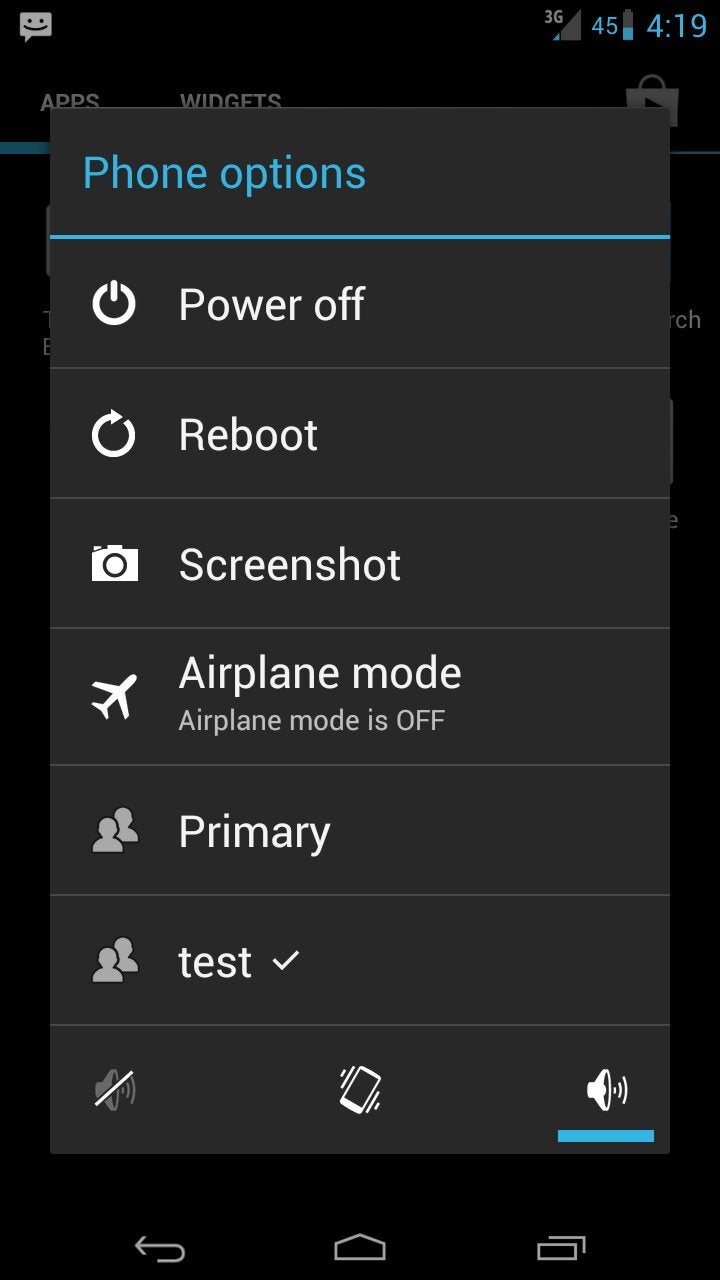
4. But that wouldn't mean much if you can't access it, right? Fortunately, you can! You simply have to hold down the power button, and right there at the bottom of the list you'll see "Primary" - your main account, and "test", which is the new user account.

How to enable multiple user accounts on a Jelly Bean device right now
5.
Choosing the "test" option will send you to a brand new homescreen, which you can customize in an entirely different way from your primary one! Most info like photos, app info, music, contacts and Google Account will not be visible between accounts, but there might be some omissions that are not fixed by the Android team yet.

6. Repeat step 2 to create even more user accounts.

7. At some point or another, however, you may feel that you are self-sufficient and you no longer want multiple user accounts on your device. That's OK, because you can just as easily get rid of the additional accounts, by opening the Terminal Emulator app and executing the following commands (without the quotes):

"su"

"pm remove-user 1"

8. Note that in the second command, "1" is the second account on the device (or in other words, the first additional account that you've created), because your primary one is 0. If you have a third account, you just substitute "1" with "2" in the second command.

Coll stuff, eh? Just remember that the guys over at XDA warn that this functionality is not yet fully tested, so who knows what issues or bugs may hide beneath the surface.

source: XDA

Share:

Discuss32

32 Comments

  • Options
    Close


Want to comment? Please login or register.

1. wassup posted on 03 Aug 2012, 09:46 21

Now, this is innovation, unlike black rectangles

2. ishfaq.mehraj posted on 03 Aug 2012, 09:53 15

Great work guys... Android rocks...

3. The_Innovation posted on 03 Aug 2012, 09:59 4

Question. Is that a Galaxy Nexus? If so, how did all those options appear while pressing the power button? Reboot and screenshot options? All I get is power off and airplane mode. Is that part of the additional user feature?

8. 305Bucko posted on 03 Aug 2012, 11:44

Its obviously a Nexus as it IS the only device that has the raw Jellybean version. Any other device would have HTC Sense, TouchWiz, or MotoBlur options.

If you have a Nexus and dont see those options you probably dont have JB 4.1

10. MobileCaseReview posted on 03 Aug 2012, 12:21

Those options are not exclusive to JB 4.1 on Nexus. Most stock ICS and custom ics builds and up have those options available. All depends on the devleopers.

15. The_Innovation posted on 03 Aug 2012, 15:56

I'm aware of that, but some people manage to download it early on other phones. I have a Nexus, on 4.1. I don't see those extra options. Perhaps in settings? But I don't think so.

13. parthpatels007 posted on 03 Aug 2012, 13:47 2

yup it is a GNexus but since it's a custom ROM shown in the picture, you wont get them in your stock ICS/JB ROM

16. The_Innovation posted on 03 Aug 2012, 15:57

Oh, but is there a way for me to get it at all?

4. Nikolas.Oliver posted on 03 Aug 2012, 10:33 2

Quote from pockenow

"God Knows, You don't want justin bieber apps littering on your homescreen" lol

5. tlsmithsr posted on 03 Aug 2012, 10:37

Nice.. just set my kids am account up with their own apps and settings

6. remixfa posted on 03 Aug 2012, 11:15 1

SWEET. :)

though i've already got the "best of both worlds" of multiple accounts on my wifes N7. She is the primary google account for her apps and such, and my google account is logged into G-Music for access to all of that. And since you can "switch" accounts for both the Play store and G-Music pretty much on the fly, there isnt really a whole lot of need for a separate front screen log in. At least not for us. :)

7. bloodline posted on 03 Aug 2012, 11:19

im getting su not found !!???

9. 305Bucko posted on 03 Aug 2012, 11:46 1

you need to be rooted to have SuperUser priviledges

11. vladimir86 posted on 03 Aug 2012, 12:23

you dont have to have nexus decice for that i have htc one x with JB cm10 previe12 and it works fine for me great job!!!!

12. PhoneCritic posted on 03 Aug 2012, 13:18 2

Beautiful!!!!
Great Job Google. This will go far for the Nexus 7. I figure in the coming months all Nexus 7 will get an update that will official turn this feature on. Excellent Job this will help with the sales of Nexus 7 device

14. amiaq posted on 03 Aug 2012, 14:13

Does Google has patent for this? We don't want iOS to copy us do we? On the other hand iOS might not care with this feature since their owners are "SO RICH" that all their households can afford an iPad each.

17. The_Innovation posted on 04 Aug 2012, 12:13

So, how do I root? Also, what advantages would that give me?

18. 305Bucko posted on 04 Aug 2012, 13:13

Go to youtube and do a search for "how to root Galaxy Nexus" and pick the video with the best reviews.

Its not complicated. It will give you superuser priviledges after you root. just follow the instruction.

19. The_Innovation posted on 04 Aug 2012, 16:51

Ok thank you. I heard that it gives better battery performance by giving you privileges to get rid of some background applications. Is this true? Because battery boosting is the only reason I'd ever consider rooting.

20. OptimusOne posted on 04 Aug 2012, 17:02

not necessarily

21. The_Innovation posted on 04 Aug 2012, 19:32

Care to elaborate mate?

22. 305Bucko posted on 05 Aug 2012, 10:59

OptimusOne is right. "not necesarilly" will this give you better battery life. Some claim its better, some worse, but most say theres no difference. The number one reason people root is to allow the hotspot feature to tether for free. Most carriers ask Google to deactivate that feature since they want control to be able to charge for hotspot.

Multiuser is also a good reason to root since you can now hand your phone to someone else to borrow/use while all your info is kept private.

23. The_Innovation posted on 05 Aug 2012, 12:31 2

Makes sense, thanks.

24. Asasindude26 posted on 05 Aug 2012, 14:30 2

Just rooted my Gnex and my Nexus 7 so it should work for you :)

25. The_Innovation posted on 05 Aug 2012, 15:08

Can you provide a legitimate website that shows how please?

26. 305Bucko posted on 05 Aug 2012, 19:41

Would you like us to install it for you too

27. The_Innovation posted on 06 Aug 2012, 00:09

Would you?

29. OptimusOne posted on 06 Aug 2012, 07:58

i definitly would

28. OptimusOne posted on 06 Aug 2012, 07:57 1

just use google. see if the website has good coments and feedback. then you kniow it works

http://forum.xda-developers.com/showthread.php?t=1531865

30. The_Innovation posted on 06 Aug 2012, 08:46

Thanks, appreciate it.

31. valkandroid posted on 28 Dec 2012, 08:11

Hi all!

I'm trying to create a restricted access user account for my 3-year-old.

Just installed Terminal Emulator and typed in "su", then "pm create-user NAME_OF_USER", but I haven't been able to go any further as I got stuck after "Error: couldn't create user". I surely must have missed something, but then what ...?

I rooted my Samsung Galaxy Nexus with Nexus Root Toolkit under Windows 7 64bits and flashed CM 10.1 with TWRP if that's of any help to understand why I can't go any further ...

PS: I have both Superuser and SuperSU apps. Could THAT be the problem?

--
Samsung Galaxy Nexus Maguro yakju
CyanogeMod 10.1 w/ TWRP

32. valkandroid posted on 07 Jan 2013, 16:36

OK, that was because CM 10.1 is 4.2.1 and not 4.1 ...

Want to comment? Please login or register.

Hot Phones

  • Samsung Galaxy S4Samsung Galaxy S4
  • Apple iPhone 5Apple iPhone 5
  • Samsung GALAXY Note IISamsung GALAXY Note II
  • HTC OneHTC One
  • Sony Xperia ZSony Xperia Z
  • Google Nexus 4Google Nexus 4
  • LG Optimus GLG Optimus G
  • Nokia Lumia 920Nokia Lumia 920