If you've ever wondered why Windows 11 doesn't let you change the taskbar location like Windows 10, the short answer is that the Windows 11 taskbar was built from scratch, and it doesn't include the code from Windows 10 that allows you to move the taskbar to the top or sides of the screen.
It wasn't a priority behavior
Microsoft ended support for Windows 10 on October 14th this year, forcing many loyal fans, including me, to switch to Windows 11. As someone who preferred keeping the taskbar at the top of the screen, I quickly noticed that there isn't any official way to move the taskbar in Windows 11, unlike in Windows 10. Now, I've finally found the reason why Microsoft decided to axe such a cool feature from its latest operating system.
In 2022, Microsoft held an AMA session on YouTube, during which one of the questions was about when Windows 11 would get the ability to move the taskbar to different locations. Tali Roth, who was the product manager at Windows at the time, addressed this question by first clarifying that the Windows 11 taskbar was built from scratch rather than simply being copied from the previous Windows version. Since the Windows 10 taskbar offered plenty of features, the team decided to take a data-driven approach, first adding those features to the Windows 11 taskbar that were used by most Windows 10 users.
Recommended For You
A few other features, such as drag-and-drop support, were scheduled to be added to the taskbar later. The remaining Windows 10 taskbar features were considered not very demanding. As a result, the development team decided not to include them. Unfortunately, the ability to relocate the taskbar also fell into this latter category.
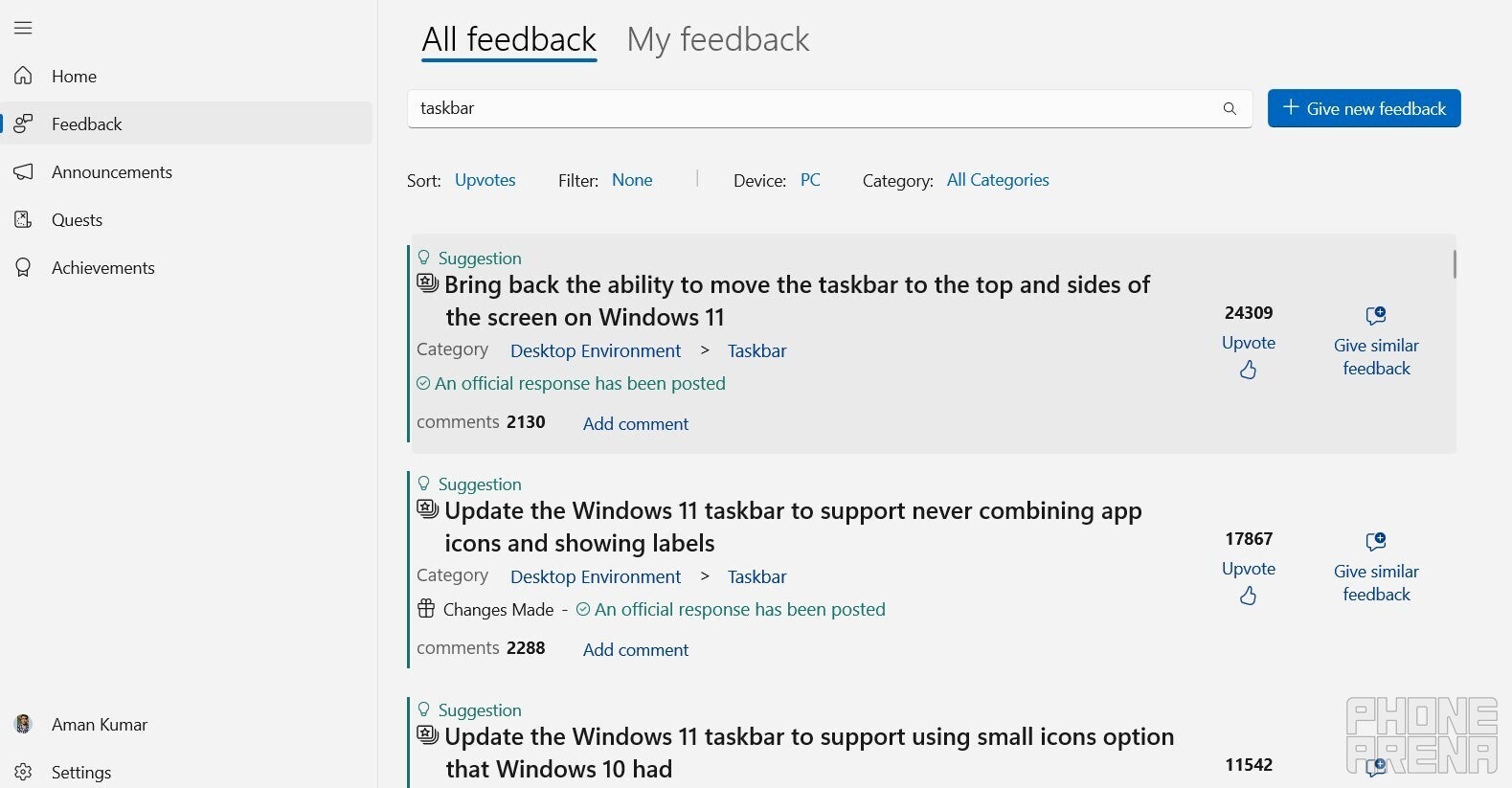
Tali Roth further said that the engineering required to introduce this feature is too extensive for something with such low demand. Interestingly, the option to move the taskbar has the highest number of upvotes on the Microsoft Feedback Hub when you search for the keyword "taskbar." A large number of Windows users are even asking about this feature on online forums like Reddit. This makes me wonder what data Microsoft actually looked at that led them to believe there isn't much demand for this behavior.
The taskbar's recent updates tell a completely different story
Feedback tab in the Microsoft Feedback Hub app. | Image by PhoneArena
Not providing the option to relocate the taskbar due to low demand suggests that Microsoft wants to cater to the majority of its users. However, a few of its recent taskbar changes tell a completely different story. In a recent preview build available to users enrolled in the Windows Dev and Beta channels, the company reportedly introduced the Ask Copilot bar on the taskbar. The sad part is that it replaces the legacy Windows Search, which has been part of the Windows ecosystem for decades.
The Redmond giant is also looking to introduce AI agents to the taskbar that can perform actions on your behalf with the help of AI. For instance, you could ask it to research a particular topic in the background while you're working on something else on your computer. In essence, Microsoft is trying to bring several AI-driven features to the taskbar, which the majority of Windows users, including myself, never asked for.
Which Windows 10 features do you miss in Windows 11?
33 Votes
Windows 10 context menu.
54.55%
Live tiles.
21.21%
Cortana.
6.06%
Timeline.
6.06%
Something else? Please specify in the comments.
12.12%
Bring back the old taskbar
Windows 11 does come with many new features, but the availability of interesting options like relocating the taskbar is one of the many reasons why I think Windows 10 is better than Windows 11. Fortunately, there are plenty of third-party tools, such as StartAllBack and Start11, that let you change the taskbar's location on Windows 11. I personally have StartAllBack installed on my computer, which not only allows me to move the taskbar anywhere I want but also offers many other features, such as changing the taskbar's visual style, adjusting icon sizes, margins, and more.
Still, I would prefer Microsoft to offer this behavior by default. The 24,309 upvotes to bring back this ability on the Feedback Hub app definitely indicate that there's a huge demand, and it's now up to Microsoft to listen to this feedback and make changes to the Windows 11 code to reintroduce this feature.
Mint Mobile's 6-month plans now cost $10/mo
$10
/mo
$35
$25 off (71%)
Mint Mobile is celebrating its 10-year anniversary with a special offer on its six-month subscription plans. For a limited time, you can get your preferred tier (6GB, 17GB, 23GB or unlimited) for just $10/mo. That saves you between 50% and 71% on the carrier's mobile plans, making it way easier to recommend.
Aman Kumar is a news writer at PhoneArena covering Google Pixel phones, Android features, AI-powered smartphone tools, and mobile tech news. Before joining PhoneArena, he spent over five years writing about consumer technology for publications like MakeUseOf, How-To Geek, and Guiding Tech. His current daily drivers are the Pixel 10 and Samsung Galaxy S26 Plus, while his red iPhone SE (2nd gen) remains a personal favorite. Aman also appreciates bold smartphone experiments and still considers the Nokia N-Gage one of the industry’s most iconic designs.
A discussion is a place, where people can voice their opinion, no matter if it
is positive, neutral or negative. However, when posting, one must stay true to the topic, and not just share some
random thoughts, which are not directly related to the matter.
Things that are NOT allowed:
Off-topic talk - you must stick to the subject of discussion
Offensive, hate speech - if you want to say something, say it politely
Spam/Advertisements - these posts are deleted
Multiple accounts - one person can have only one account
Impersonations and offensive nicknames - these accounts get banned
To help keep our community safe and free from spam, we apply temporary limits to newly created accounts:
New accounts created within the last 24 hours may experience restrictions on how frequently they can
post or comment.
These limits are in place as a precaution and will automatically lift.
Moderation is done by humans. We try to be as objective as possible and moderate with zero bias. If you think a
post should be moderated - please, report it.
Have a question about the rules or why you have been moderated/limited/banned? Please,
contact us.



Things that are NOT allowed:
To help keep our community safe and free from spam, we apply temporary limits to newly created accounts: