Depending on your skill level, typing faster on a glass screen can sometimes slow you down. However, a new Gboard update is about to make your daily texting a little less frustrating. A clever new shortcut is coming that handles the keyboard switching for you, along with a fresh look for the settings menu.
Typing on your phone just got a little smoother
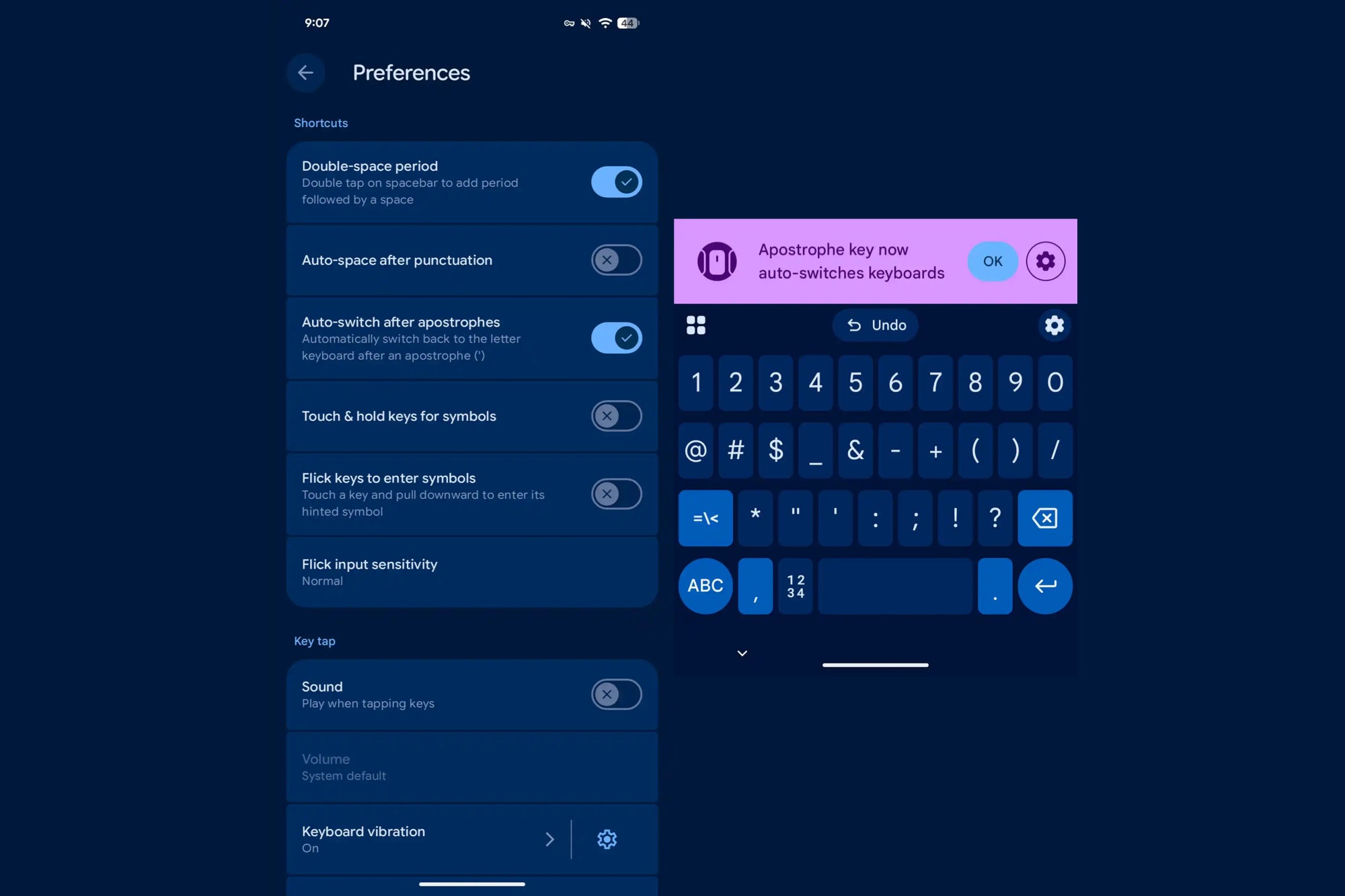
If you have ever been in the middle of typing a contraction like "I'm" or "don't" you know the slight annoyance of having to tap the numbers key, hit the apostrophe, and then manually tap back to the letters to finish the word. According to a new report, Google is testing a feature in the beta version of Gboard (version 16.6) that fixes this flow.
With this update, Gboard will automatically switch back to the main letter keyboard right after you tap an apostrophe. Previously, you had to hit the space bar or the "?123" key to get back to your letters. This means you can immediately type the "t" in "don't" or the "s" in "it's" without that extra step.
How to manage this new setting
When this feature rolls out to your device, you should see a prompt letting you know it is active. If you decide it is not for you, you can turn it off easily. Here's how you do it:
Open Gboard Settings
Tap on Preferences
Scroll down to Shortcuts
Toggle the option for auto-switching
While the typing shortcut is still in beta, regular users are also seeing changes. As of version 16.5 in the stable channel, the Gboard settings menu has received a "Material 3" design refresh. This fresh new look is more modern, using rounded containers to group related items together so it's easier on the eyes.
Recommended For You
A small change that goes a long way
Gboard beta settings with the option to auto-switch after apostrophes. | Image credit — 9to5Google
When you think about it, mobile keyboards are all about reducing friction, so anything that keeps your thumbs in a rhythm makes the whole experience of using a phone feel faster and more premium. This is especially helpful for people who prefer tapping out words rather than using glide typing (swiping across keys). It puts Gboard on par with other competitors that have tried to streamline punctuation, and it strongly suggests that Google is paying attention to the actual usability of their app, not just adding flashy AI features.
The settings redesign also matters because it brings visual consistency to your phone. If you are using a modern Android device like a Pixel or a Galaxy, having apps that match the system's design language makes everything feel more cohesive.
How do you usually handle typing on your phone?
117 Votes
I tap every single letter and deal with the switching.
34.19%
I am a glide typing pro so I barely lift my finger.
40.17%
I rely heavily on voice-to-text to avoid typing altogether.
15.38%
I use a third-party keyboard that handles this better.
10.26%
Finally, a smarter keyboard
I think the auto-switch feature is one of those quality-of-life improvements that you do not realize you need until you have it, and then you cannot go back. I have often found myself tapping the wrong key because I switch devices so often, and my muscle memory is all over the place. However, having one less tap to worry about can effectively take the guesswork out of it.
If you are a Gboard beta tester, you might see this pop up soon. For everyone else, keep an eye on your updates because this is one small tweak that may actually make a big difference.
On the Visible+ Pro plan, you get access to 5G Ultra Wideband data on Verizon's fastest network. Along with unlimited roaming across Mexico and Canada, 2 days of Global Pass per month, 3x hotspot speeds, 4K streaming, and Smartwatch service.
Johanna Romero is a Senior News Writer at PhoneArena, covering mobile technology news across Android, iOS, wearables, and the Google ecosystem she knows best. Drawing on 15 years in IT and tech support from 2007 to 2022, she brings a user-friendly eye for the practical features and lesser-known tricks readers care about. Google named her an official #TeamPixel member in 2022, and she also reviews the latest devices on her YouTube channel, JoJo the Techie.
A discussion is a place, where people can voice their opinion, no matter if it
is positive, neutral or negative. However, when posting, one must stay true to the topic, and not just share some
random thoughts, which are not directly related to the matter.
Things that are NOT allowed:
Off-topic talk - you must stick to the subject of discussion
Offensive, hate speech - if you want to say something, say it politely
Spam/Advertisements - these posts are deleted
Multiple accounts - one person can have only one account
Impersonations and offensive nicknames - these accounts get banned
To help keep our community safe and free from spam, we apply temporary limits to newly created accounts:
New accounts created within the last 24 hours may experience restrictions on how frequently they can
post or comment.
These limits are in place as a precaution and will automatically lift.
Moderation is done by humans. We try to be as objective as possible and moderate with zero bias. If you think a
post should be moderated - please, report it.
Have a question about the rules or why you have been moderated/limited/banned? Please,
contact us.














Things that are NOT allowed:
To help keep our community safe and free from spam, we apply temporary limits to newly created accounts: