OnePlus today announced the successor of the original OnePlus Pad Go, the OnePlus Pad Go 2. The budget-friendly tablet is intended to offer you high-quality performance and looks while remaining affordable.
OnePlus Pad Go 2: Save up to $80 in gifts!
$369
99
$399
99
$30 off (8%)
Pre-order the new OnePlus Pad Go 2 at the official store and get a free OnePlus Pad Go 2 Folio Case (worth $44.99) or OnePlus Pad Go 2 Stylo (worth $79.99). Trade in an any device in any condition, and you can get $30 off the device.
OnePlus Pad Go 2 is here: sleek, affordable, and capable
The OnePlus Pad Go 2 is a tablet priced in the mid-range category, but focused on offering you a high-quality experience.
Design and Display
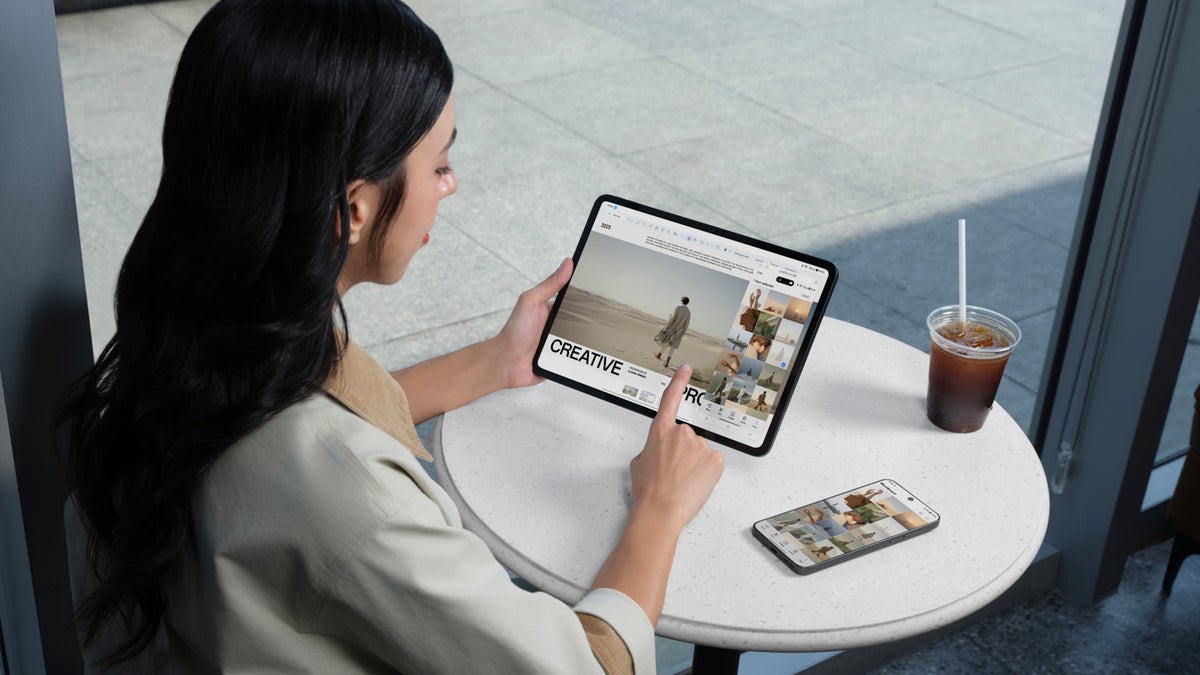
The OnePlus Pad Go 2 is equipped with a large 12.1-inch display featuring Dolby Vision support, a 2800x1980 resolution, and a 284 PPI. It comes with TÜV Rheinland Smart Care 4.0 certification for reduced eye strain. It features a 7:5 aspect ratio, which provides 14% more active area than your traditional 16:10 display. That aspect ratio allows for a book-style layout for reading and a wider view for documents and web browsing.
The design is simple with no surprises in that department, and one color that you can pick – Shadow Black. But don't get me wrong – this one color isn't your regular, somewhat boring, black. The tablet features a matte finish that looks modern and interesting with an intense dark carbon shade.
The tablet is super portable, weighing around 597g (the Wi-Fi variant). It's also just 6.83mm thin.
Recommended For You
OnePlus Omnibearing Sound Field
The OnePlus Pad Go 2 features four speakers, and on top of that, the device detects the screen orientation automatically to adjust stereo channels.
Multitasking
OnePlus tablets are great for multitasking, and the OnePlus Pad Go 2 doesn't make an exception to this rule. With Open Canvas, there's support for two apps in split-screen mode plus one floating window. Gesture controls make the experience even smoother.
For example, you can swipe down with two fingers to activate split-screen mode, or you can pinch inwards with four fingers to transform any full-screen app into a floating window that you can then move around the screen as you wish.
Ecosystem
Meanwhile, the OnePlus Pad Go 2 is equipped with great capabilities for connectivity with other devices, even if your other devices are not OnePlus devices. The tablet is designed to fit into your existing ecosystem of devices.
If you have a OnePlus phone, you can take advantage of features like Screen Mirroring, while your phone's display appears as a floating window on your tablet (and you can drag files between the devices) or Clipboard Synchronization (you can copy text on one device and paste it on another). You also have Shared Gallery and App Relay (you can continue using an app from your phone on your tablet).
If you don't have a OnePlus phone, though, there's the new O+ Connect, which helps your OnePlus Pad Go 2 to share documents, photos, and media with Apple devices and vice versa. O+ Connect also enables wireless file sharing with Mac or Windows.
Meanwhile, the tablet also supports Quick Share for file transfer with other Android devices.
Battery and hardware
The OnePlus Pad Go 2 is equipped with a 10,050 mAh battery cell supporting 33W fast charging. According to OnePlus, with the 33W SUPERVOOC charging, the tablet can go from 0 to 100% in a little over an hour and a half. The device also supports reverse charging at 6.5W, so you can charge your phone on it.
The tablet is powered by the MediaTek Dimensity 7300-Ultra chip built on a 4nm process, and supports 5 years of software updates.
OnePlus Pad Go 2 specs at a glance:
MediaTek Dimensity 7300-Ultra
8GB of RAM + 128GB of storage
10,050 mAh battery, 33W SUPERVOOC charging
12.1-inch LCD display, 2800x1980 resolution, 284 PPI
Rear camera: 8MP
Front camera: 8PM
OxygenOS 16
Shadow Black color
What matters most to you in a mid-range tablet like the OnePlus Pad Go 2?
10 Votes
Smooth multitasking and performance
40%
Battery life and fast charging
20%
Smart features and AI tools
10%
Price above everything else
30%
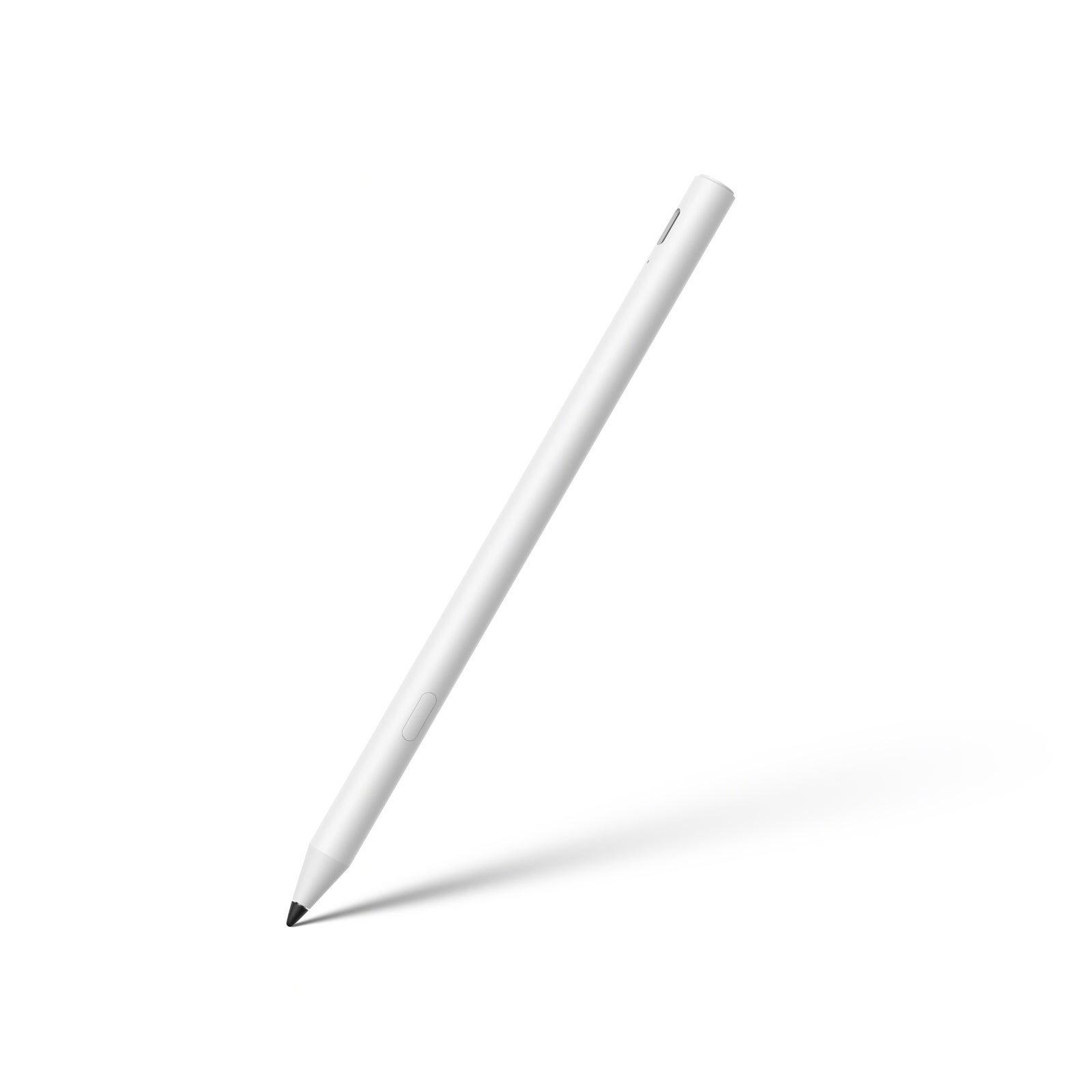
OnePlus Pad Go 2 Stylo
Image Credit – OnePlus
The tablet supports the OnePlus Pad Go 2 Stylo. The stylus offers a natural feel of pen and paper, and has super-low latency and 4,096 levels of pressure sensitivity.
The OnePlus Pad Go 2 also supports shortcuts, so you don't lose the moment when you're feeling inspired. For example, a swipe from the upper corner opens a new note or lets you add annotations with the stylus. The screen-off quick note is enabled by default, so you just need to tap the display with the Stylo, and you're greeted with a lock screen notepad.
Meanwhile, switching between tools is easy and quick. You can tap to toggle between the current tool and the eraser, for example. On the other hand, you can press and hold the shortcut button on the Stylo to activate the partial screenshot function.
OnePlus says that the Stylo has up to 20 hours of battery life, and on top of it all, it has fast charging support: with 10 minutes of charging from 0%, you get up to 12 hours of use.
OnePlus AI
Of course, the device is equipped with OnePlus AI to take your productivity to the next level. You can take advantage of features like AI Writer (for writing generation), AI Recorder (for meeting or lecture transcripts), AI Editor, AI Translate and Summary, AI Speaker (which reads your on-screen content aloud), and Google Gemini.
The integration with Google Gemini brings Circle to Search to the OnePlus Pad Go 2, and a dedicated AI button on the lock screen offers you quick access to Google's AI chatbot at any time.
Price and Availability
Pre-orders start today, December 17, and the tablet will be available for purchase from December 26 on oneplus.com, and in January at retailers Amazon and Best Buy. The tablet costs $399.99.
A budget-friendly iPad rival
The OnePlus Pad Go 2 isn't the only budget-friendly tablet on the market. Apple's entry-level iPad (A16) starts at $349 and comes with an 11-inch screen and 128GB of storage. It's a solid choice if you're already using other Apple products.
Samsung offers the Galaxy Tab S10 FE at around $449, which features a 10.9-inch display with a 90Hz refresh rate and comes with the S Pen stylus included. The Tab S10 FE also has IP68 water and dust resistance, making it one of the most durable tablets in this price range. Both tablets offer good performance for everyday tasks, making them direct competitors to the OnePlus Pad Go 2 at $399.
Budget tablets are getting really impressive
I think it's great to see companies like OnePlus focusing on affordable tablets that don't cut too many corners. Not everyone needs a fancy iPad Pro or a top-tier Samsung Galaxy Tab, but everyone deserves a device that works well for everyday stuff. The OnePlus Pad Go 2 at $399 seems like a smart option for people who want something reliable without breaking the bank.
What's really cool is that budget tablets these days can handle most things you'd want to do. You can watch Netflix, browse the web, video chat with friends, and multitask efficiently. A few years ago, cheap tablets felt like toys, but now they actually feel like real devices you can depend on. Including the OnePlus Pad Go 2.
Get iPhone 18 Pro with Visible, get $480 off!
$719
/mo
$1199
$480 off (40%)
On the Visible+ Pro plan, you get access to 5G Ultra Wideband data on Verizon's fastest network. Along with unlimited roaming across Mexico and Canada, 2 days of Global Pass per month, 3x hotspot speeds, 4K streaming, and Smartwatch service.
Iskra Petrova is a news writer at PhoneArena, where she covers mobile tech news and maintains the site’s device hubs with the latest leaked specs, rumors, and official details for upcoming phones. She joined PhoneArena in 2020 after three years in technical support for Microsoft Exchange, giving her practical experience with software infrastructure and troubleshooting. Iskra holds a Master’s Degree in Literature, which helps her translate complex tech details into clear, reader-friendly coverage. She is a daily Apple ecosystem user, while also closely following Sony Xperia’s camera-focused phones and Samsung’s Galaxy Z Flip series.
A discussion is a place, where people can voice their opinion, no matter if it
is positive, neutral or negative. However, when posting, one must stay true to the topic, and not just share some
random thoughts, which are not directly related to the matter.
Things that are NOT allowed:
Off-topic talk - you must stick to the subject of discussion
Offensive, hate speech - if you want to say something, say it politely
Spam/Advertisements - these posts are deleted
Multiple accounts - one person can have only one account
Impersonations and offensive nicknames - these accounts get banned
To help keep our community safe and free from spam, we apply temporary limits to newly created accounts:
New accounts created within the last 24 hours may experience restrictions on how frequently they can
post or comment.
These limits are in place as a precaution and will automatically lift.
Moderation is done by humans. We try to be as objective as possible and moderate with zero bias. If you think a
post should be moderated - please, report it.
Have a question about the rules or why you have been moderated/limited/banned? Please,
contact us.









![Another batch of Galaxy S26 series users in the US are getting a nice surprise today [UPDATED]](https://m-cdn.phonearena.com/images/article/183643-wide-two_350/Another-batch-of-Galaxy-S26-series-users-in-the-US-are-getting-a-nice-surprise-today-UPDATED.webp)
Things that are NOT allowed:
To help keep our community safe and free from spam, we apply temporary limits to newly created accounts: