With One UI 9.0, Galaxy users will see this data in their phones' status bar
With One UI 9.0, Samsung Galaxy phones will deliver important data to users directly from their status bar.

Network speeds are being added to the status bar of certain Galaxy phones | Image by PhoneArena
The status bar is the area on the top of a phone's display that uses icons, numbers, letters, and other characters to convey information to the device user. This information typically includes
battery life (usually in the form of a battery icon), a Wi-Fi indicator, signal strength bars, an LTE or a 5G connection indicator, and the time.
Some Android phones do offer status bar speed indicators out of the box
While some Android phones also show network speed in the status bar, this is something that has been lacking on Pixel and Galaxy phones. Some phones made by Xiaomi, Redmi, and
Poco do offer this feature by going to Settings > Display > Control Center & Notification Shade and toggle on "Show connection speed."
What info in the status bar do you view the most?
223 Votes
Battery life
68.16%
Time
11.66%
Signal strength
13.45%
Something else
3.59%
I never look at the status bar
3.14%
OnePlus, Realme, and Oppo phones do show network speed. Go to Settings > Notification & Status Bar > Status Bar and toggle on "Real-time network speed." You can elect to show the network speed in the status bar of your Vivo and iQOO handsets by going to Settings > Display & Brightness > Status Bar and toggle on "Real-time network speed."
Galaxy phones running One UI 9.0 can have network speed data appear in the status bar
While Pixel handsets must rely on third-party apps to do such a thing, Samsung phones running One UI 9.0 can now show their network speed in the status bar. Now you're probably asking yourself, "Don't the signal bars show this?" Well, the answer is, "Absolutely not."
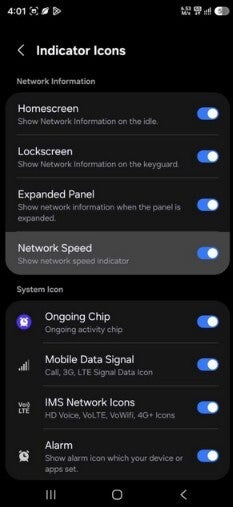
Toggle in the QuickStar Good Lock module that will display network speed in your Galaxy phone's status bar. | Image by Samsung Guru
The infamous signal bars show an indication of the strength of a signal, not the speed down or up (going to and from your device respectively). Once you have One UI 9.0 installed on your Samsung Galaxy phone, go to the QuickStar Good Lock module, and you should see an option in the Indicator Icons menu to enable the network speed indicator. The speed indicator will appear in the status bar at the top of the display.
Additionally, in One UI 9.0, QuickStar also features a toggle allowing you to disable the "Ongoing Chip." This will allow you to turn off the expandable ongoing activity chip that shows live activity from various apps in the Now Bar such as timers, countdowns, voice recordings, and ongoing phone calls.
With a couple of One UI 9.0 beta updates already disseminated to Galaxy S26 series users, the stable version of One UI 9.0 for Samsung's current flagship series is expected to be released next month. Here are the directions:
- Download and open the Good Lock app from the Galaxy Store by tapping on this link.
- Install and open the QuickStar module.
- Tap Visibility of indicator icons.
- Toggle on the Network Speed option.
It's only human nature to want to know how fast we are going, and this is why we want to see the downlink and uplink speeds on our phones.
Some Android apps from the Play Store can show network speed data on the status bar
For the rest of us who own an Android phone without such a capability, there is always the Play Store. Some of the apps that can show you the downlink and uplink speeds of your network on your phone's status bar include:
- NetSpeed Indicator: Tap this link to install.
- Internet Speed Meter Lite: Click here to install on your Android phone.
- Network Guru: Tap on the link to install on your Android phone.
These phones will be the first to get One UI 9.0 and when they might ship
Keep in mind that these apps all have some type of in-app purchases available. If you don't need to continuously monitor your network's speeds, there is always the tried-and-true on-demand favorite. This would be the Speedtest by Ookla app. Besides getting your downlink and uplink speeds, the app is now the mobile home to Downdetector, which will show you which online services are experiencing an outage.
The first phones from Samsung to have One UI 9.0 installed will be the Galaxy Z Fold 8, Galaxy Z Fold 8 Ultra, and the Galaxy Z Flip 8. These foldable models are expected to be unveiled on July 22 and released during the first week of August.

Popular stories




Latest News






Things that are NOT allowed:
To help keep our community safe and free from spam, we apply temporary limits to newly created accounts: