A couple of months ago we told you that Google was rolling out Pixel Camera 10.1 which, at that time, was the latest version of the app that powers the Pixel camera. Pixel Camera 10.1 contained mostly cosmetic changes to the app's UI in line with Google's Material 3 Expressive design. For example, the shape of the buttons flanking the shutter were round but changed to rounded squares called squircles. The settings pages for the Pixel Camera app also received the Material 3 Expressive treatment and feature containers.
Pixel Camera app 10.2 is rolling out this week
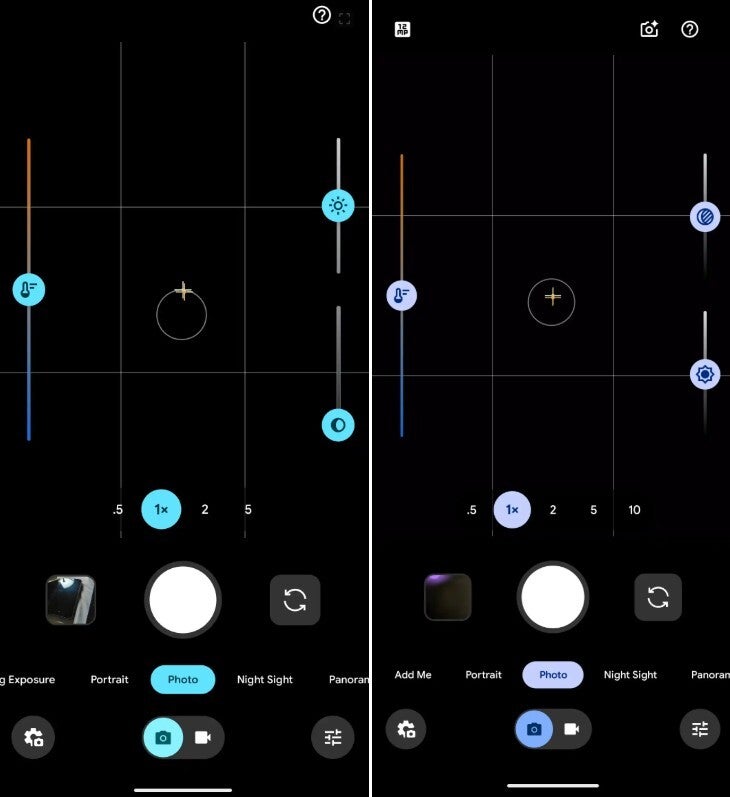
Google is now disseminating the Pixel Camera 10.2 app. One change in this new variant of the app flips the changes made to the Quick access controls in version 10.1 back to the way they were in Pixel Camera 10. Launched last year, Quick access control buttons appear when you tap the viewfinder revealing sliders on the left and right side of the screen that allow you to control white balance, brightness, and shadows.
Pixel Camera app 10.2 is expected to once again change the order of the Quick access sliiders. | Image credit-9to5Google
With the Pixel Camera 10.1 release from October, the order of the Quick access sliders was changed making the first slider the controls for shadows followed by the one for brightness, and then the slider for white balance. The circular icons above the handle at the bottom of the screen were also changed. But Google must have thought that these changes weren't good because with the Pixel Camera 10.2 update, the order of the Quick access sliders has been flipped again bringing them back to the original order: white balance, brightness, and shadows.
No one can figure out why Google does the things it does
This is the only change discovered so far in Pixel Camera 10.2. One would need to be a psychiatrist to understand half the things that Google does, and this is one of those app updates that make you scratch your head and ask, "Why?"
Are you happy with the Pixel's camera features?
376 Votes
Yes. They are basically the same as any flagship.
50%
No. Google could do better.
34.84%
Don't own a Pixel.
15.16%
With the update rolling out now, it has not yet hit my Pixel 6 Pro, which is running version 10.1 of the camera app. If, for some weird reason, you don't have a recent version of the app on your Pixel, you can update it to version 10.1 by installing it from the Google Play Store. Simply tap on this link to download Pixel Camera on your phone. There is one important thing I should let you know. The version of the app in the Play Store is still 10.1.
iPhone 13 Pro flash sale! Limited time offer!
Save $30 on iPhone 13 Pro from Back Market. Discount automatically applied at checkout. Offer ends 20 September 2026 at 23:59.
Alan, an ardent smartphone enthusiast and a veteran writer at PhoneArena since 2009, has witnessed and chronicled the transformative years of mobile technology. Owning iconic phones from the original iPhone to the iPhone 15 Pro Max, he has seen smartphones evolve into a global phenomenon. Beyond smartphones, Alan has covered the emergence of tablets, smartwatches, and smart speakers.
A discussion is a place, where people can voice their opinion, no matter if it
is positive, neutral or negative. However, when posting, one must stay true to the topic, and not just share some
random thoughts, which are not directly related to the matter.
Things that are NOT allowed:
Off-topic talk - you must stick to the subject of discussion
Offensive, hate speech - if you want to say something, say it politely
Spam/Advertisements - these posts are deleted
Multiple accounts - one person can have only one account
Impersonations and offensive nicknames - these accounts get banned
To help keep our community safe and free from spam, we apply temporary limits to newly created accounts:
New accounts created within the last 24 hours may experience restrictions on how frequently they can
post or comment.
These limits are in place as a precaution and will automatically lift.
Moderation is done by humans. We try to be as objective as possible and moderate with zero bias. If you think a
post should be moderated - please, report it.
Have a question about the rules or why you have been moderated/limited/banned? Please,
contact us.









Things that are NOT allowed:
To help keep our community safe and free from spam, we apply temporary limits to newly created accounts: