iPadOS 26.2 is now available to the public, and the update brings more tweaks to the OS as well as the return of the Slide Over feature.
iPadOS 26.2 now live, less-feature-rich but more refined
iPadOS 26.1 brought a lot of changes in terms of features, but iPadOS 26.2 focused on performance and small refinements rather than anything big.
Despite that, there are still some new tweaks to enjoy.
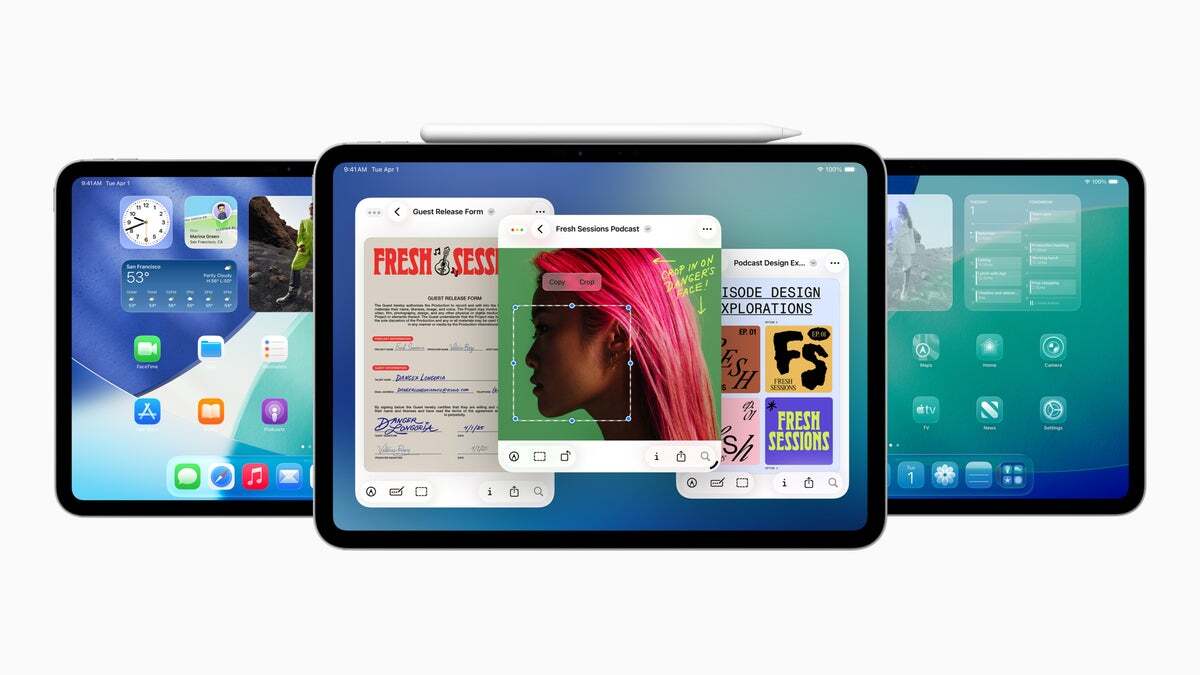
First off, iPadOS 18's Slide Over feature is back. That's a productivity feature that was gone with iPadOS 26, and Apple brought it back with iPadOS 26.1. Now, with iPadOS 26.2, the Cupertino giant is refining the feature a bit more.
Previously, the feature didn't allow apps to be quickly displayed in Slide Over with the drag-and-drop gesture. Now, the element is back with iPadOS 26.2, for all the users who missed it when iPadOS 26 came.
iPadOS 26. | Image Credit – Apple
But that's not all. AirDrop codes are now here, a way for you to share files more securely in case the person you want to share a file with is not in your contacts. That feature also gets rid of exposing you by setting AirDrop to work with "Everyone for 10 Minutes".
You can activate it by going to Settings, then General, then AirDrop. From there, you can tap on Manage Known AirDrop Contacts. You'll have a one-time code that can be shared with someone else to allow AirDrop file transfers. Access gets terminated after 30 days.
Recommended For You
iPadOS 26.2 also has some tweaks when it comes to the Liquid Glass look. You now have a new slider for Lock Screen customization that allows you to choose how transparent the clock will be. There are also changes to the animations across the OS.
How do you feel about iPadOS 26.2?
18 Votes
I like these small, practical improvements
27.78%
It’s fine, but I wanted more new features
27.78%
It doesn’t change much for me
16.67%
I haven’t updated yet
27.78%
Reminders are also getting some update love with the new iPadOS version. Now, when you create an urgent reminder, you can set a more obvious alert for it. The reminder can be marked as "Urgent", and you will get an alarm when it is due.
The Podcasts app, on the other hand, can now automatically create chapters. That would help you quickly navigate the app even if manual chapters weren't created by the author. On top of that, you'll be able to see and follow any podcast that's mentioned in the episode from the player and transcript.
The Games app is getting filters. You can choose between categories, size, and other options to discover a game. Meanwhile, the ability to track the scores of challenges in real-time has been added for multiplayer games. iPadOS 26.2 also brings controller support, and you will be able to navigate the app with your controller. A must-have feature for a gaming app, if I may add.
iPadOS 26.2 now available for download to supported iPad models
You can update to iPadOS 26.2 by going to the Settings app, then going to General, and then tapping on Software Update. The update, if available for your device, will show up there, and you can install it following the instructions.
If you have enabled Automatic Updates, then you don't need to perform the step. You can enable the option from the same Software Update page.
iPadOS 26 is supported on the following iPad models:
iPad mini (6th generation)
iPad mini (A17 Pro)
iPad (10th generation)
iPad (A16)
iPad Air (4th generation)
iPad Air (5th generation)
iPad Air 11-inch (M2)
iPad Air 11-inch (M3)
iPad Air 13-inch (M2)
iPad Air 13-inch (M3)
iPad Pro 11-inch (1st generation)
iPad Pro 11-inch (2nd generation)
iPad Pro 11-inch (3rd generation)
iPad Pro 11-inch (4th generation)
iPad Pro 11-inch (M4)
iPad Pro 11-inch (M5)
iPad Pro 12.9-inch (3rd generation)
iPad Pro 12.9-inch (4th generation)
iPad Pro 12.9-inch (5th generation)
iPad Pro 12.9-inch (6th generation)
iPad Pro 13-inch (M4)
iPad Pro 13-inch (M5)
iPad mini (5th generation)
iPad (8th generation)
iPad (9th generation)
iPad Air (3rd generation)
A simple update that fixes the little things
In my opinion, iPadOS 26.2 may not be impressive in terms of fancy features, but you'll end up appreciating it over time. I like that Apple focused on fixing and polishing things instead of throwing in more.
The return and refinement of Slide Over alone makes the iPad feel more productive again, and small touches like AirDrop codes and better reminders are just the quality-of-life updates we currently need on the iPad.
Iskra Petrova is a news writer at PhoneArena, where she covers mobile tech news and maintains the site’s device hubs with the latest leaked specs, rumors, and official details for upcoming phones. She joined PhoneArena in 2020 after three years in technical support for Microsoft Exchange, giving her practical experience with software infrastructure and troubleshooting. Iskra holds a Master’s Degree in Literature, which helps her translate complex tech details into clear, reader-friendly coverage. She is a daily Apple ecosystem user, while also closely following Sony Xperia’s camera-focused phones and Samsung’s Galaxy Z Flip series.
A discussion is a place, where people can voice their opinion, no matter if it
is positive, neutral or negative. However, when posting, one must stay true to the topic, and not just share some
random thoughts, which are not directly related to the matter.
Things that are NOT allowed:
Off-topic talk - you must stick to the subject of discussion
Offensive, hate speech - if you want to say something, say it politely
Spam/Advertisements - these posts are deleted
Multiple accounts - one person can have only one account
Impersonations and offensive nicknames - these accounts get banned
To help keep our community safe and free from spam, we apply temporary limits to newly created accounts:
New accounts created within the last 24 hours may experience restrictions on how frequently they can
post or comment.
These limits are in place as a precaution and will automatically lift.
Moderation is done by humans. We try to be as objective as possible and moderate with zero bias. If you think a
post should be moderated - please, report it.
Have a question about the rules or why you have been moderated/limited/banned? Please,
contact us.












![Another batch of Galaxy S26 series users in the US are getting a nice surprise today [UPDATED]](https://m-cdn.phonearena.com/images/article/183643-wide-two_350/Another-batch-of-Galaxy-S26-series-users-in-the-US-are-getting-a-nice-surprise-today-UPDATED.webp)
Things that are NOT allowed:
To help keep our community safe and free from spam, we apply temporary limits to newly created accounts: