After the official shutdown of Samsung Messages, Google Messages is likely the only popular texting application available for Android. It surely offers some important capabilities like RCS support, end-to-end encryption, and more; however, it lacks two basic yet very important features. Fortunately, they could be added to the app very soon, as they have been reportedly spotted in its beta build.
Improved long press menu
The menu that appears upon long-pressing a message in Google Messages is currently not very user-friendly. Firstly, you see a pill with emoji actions and Photomoji. Then, there are four action buttons at the top: copy, delete, star, and a three-dots button.
Tapping the three-dots button opens an additional menu that contains options like reply, share, forward, and view details. The gist is that you need to go through multiple steps to access even basic actions like reply, share, and forward. That's fortunately changing in the new Google Messages update.
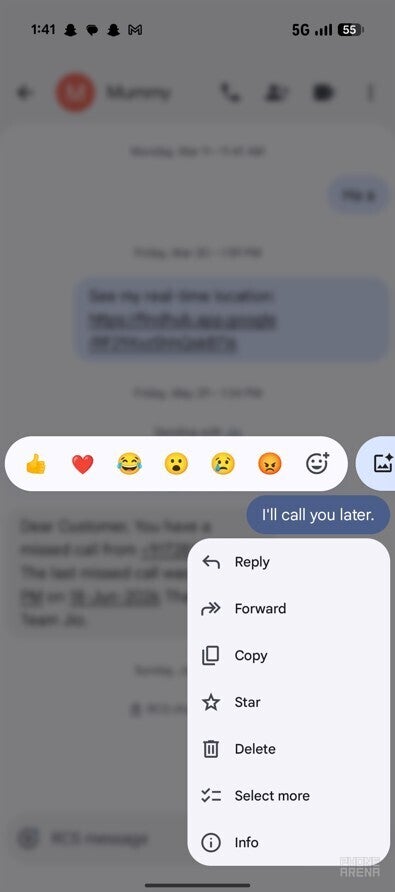
In the latest version, long-pressing a particular message opens a new menu that contains all the essential action buttons. Additionally, a blur effect has been added to the background, giving a more modern look to the app. There's no change in the emoji bar, and it still appears upon long-pressing a message.
Recommended For You
Google Messages new long press menu. | Image by PhoneArena
The change was first spotted way back in January of this year, but at that time it was available only to a few testers. Now, it is available widely on almost every device that has been enrolled to receive the latest Google Messages beta build. I spotted this change on my Pixel 10 in the Google Messages beta version 20260803_03_RCO0.
What's the next thing you really like to see in Google Messages?
112 Votes
Themes & customization like WhatsApp.
44.64%
Effects and reactions like iMessage.
22.32%
Advanced chat tools like Telegram.
22.32%
Google Messages is great the way it is.
10.71%
Select only what you want
The biggest problem with Google's messaging app is that it doesn't allow you to select a particular part of a message. For instance, in the message, "Hey, this is Aman from PhoneArena," you can't select and copy a particular section like "from PhoneArena." Instead, you only have the option to select and copy the entire message.
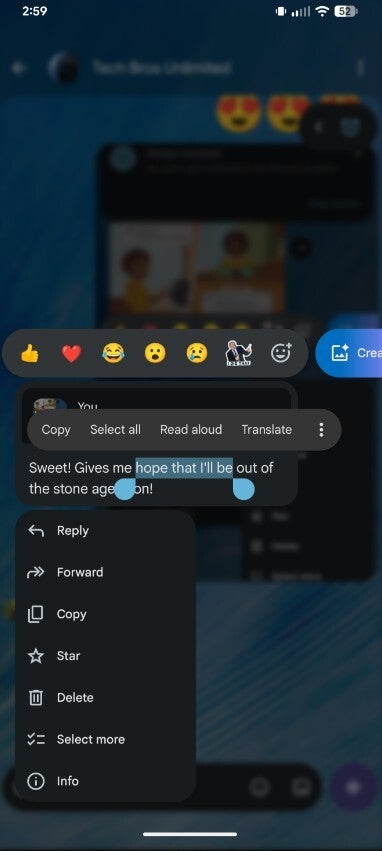
The workaround here is to copy the entire message, paste it where you want, and then manually delete the unnecessary part from it. The Big G has apparently realized that sometimes users want to copy a particular section from a long message instead of copying it as a whole. Along with the new long press menu, the company has also rolled out the ability to select only the needed part of a message.
New copy option in Google Messages. | Image by Reddit
This change also surfaced for the first time months ago, but it now appears to be reaching more Google Messages beta testers. Unfortunately, I wasn't lucky enough to receive this upgrade on my device. As mentioned above, I'm running the beta version 20260803_03_RCO0 of the app.
Users have been demanding these upgrades for a long time
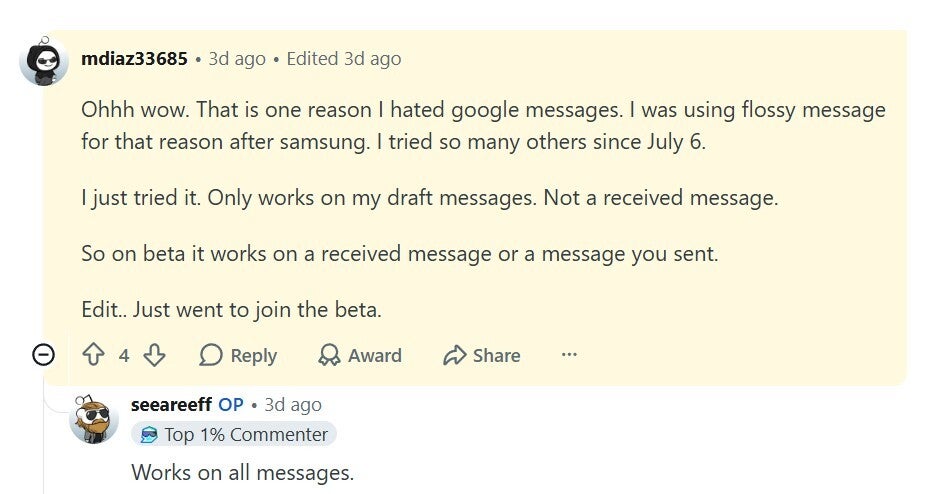
After the closure of Samsung Messages, its users were asked to switch to Google Messages. However, some users didn't like the Google messaging application as it lacks basic capabilities like the ability to select and copy a specific part of a text message. A user who appears to be a former Samsung Messages app user commented that the only reason they started using a third-party SMS application instead of the Google Messages app is that it doesn't feature the mentioned capability.
Reddit user complaining about the unavailablity of basic Google Messages features. | Image by Reddit
Another user joked about how long both the above-mentioned features have been in the beta phase. That's something I also agree with, as it's been more than 6 months since they were first spotted and are still not available in the stable build of the application.
Google Messages is slowly getting all the important boxes checked
While Google Messages offers the outstanding RCS capability, it lacks many basic functions that you generally expect to be available on any texting application. The good news is that the tech giant is slowly adding all of them. It recently received the trash feature; you can now also change the theme, which has been one of the biggest complaints of Samsung Messages users.
The new long press menu and the ability to select only the text that you want also appear to be very close to being added to the stable build of the app. All these changes are slowly but steadily shaping Google Messages to become one of the best messaging applications for Android.
Here are some more Google Messages stories you might be interested in:
Follow me on X and Threads to remain updated on every change Google is planning for its products.
Get iPhone 18 Pro with Visible, get $480 off!
$719
/mo
$1199
$480 off (40%)
On the Visible+ Pro plan, you get access to 5G Ultra Wideband data on Verizon's fastest network. Along with unlimited roaming across Mexico and Canada, 2 days of Global Pass per month, 3x hotspot speeds, 4K streaming, and Smartwatch service.
Aman Kumar is a news writer at PhoneArena covering Google Pixel phones, Android features, AI-powered smartphone tools, and mobile tech news. Before joining PhoneArena, he spent over five years writing about consumer technology for publications like MakeUseOf, How-To Geek, and Guiding Tech. His current daily drivers are the Pixel 10 and Samsung Galaxy S26 Plus, while his red iPhone SE (2nd gen) remains a personal favorite. Aman also appreciates bold smartphone experiments and still considers the Nokia N-Gage one of the industry’s most iconic designs.
A discussion is a place, where people can voice their opinion, no matter if it
is positive, neutral or negative. However, when posting, one must stay true to the topic, and not just share some
random thoughts, which are not directly related to the matter.
Things that are NOT allowed:
Off-topic talk - you must stick to the subject of discussion
Offensive, hate speech - if you want to say something, say it politely
Spam/Advertisements - these posts are deleted
Multiple accounts - one person can have only one account
Impersonations and offensive nicknames - these accounts get banned
To help keep our community safe and free from spam, we apply temporary limits to newly created accounts:
New accounts created within the last 24 hours may experience restrictions on how frequently they can
post or comment.
These limits are in place as a precaution and will automatically lift.
Moderation is done by humans. We try to be as objective as possible and moderate with zero bias. If you think a
post should be moderated - please, report it.
Have a question about the rules or why you have been moderated/limited/banned? Please,
contact us.









Things that are NOT allowed:
To help keep our community safe and free from spam, we apply temporary limits to newly created accounts: