Google tests new features designed to make the Google Messages app easier to use
For the first time ever, the Google Messages attachment sheet icons can be customized and made to take up a full page.

Google Messages gets useful new features | Image by PhoneArena
I've been an Android user since 2009 when I purchased the Motorola DROID. Ever since Google made it available, I made it a point to sign up to join the beta program for each of Google's core apps. This is a decision that has paid off over the years since it gave me the opportunity to show you new features before they reached your Android phone.
These are the core Google apps that have a beta program:
To join a beta for one of the above apps, go to the Play Store, look up the appropriate Play Store listing for each app that you are interested in, and scroll down until you see the "Join the beta" section. Tap "Join" and confirm. If the beta is too full, which does happen, you will receive a notice telling you this.
These are the core Google apps that have a beta program:
- Google Play Services
- Google Messages
- Google Chrome
- Google Phone (Dialer)
- Google Maps
- Google Photos
- Google Clock
- Google Calculator
- Gboard
- Android Auto
How to join a beta program for a core Google app
To join a beta for one of the above apps, go to the Play Store, look up the appropriate Play Store listing for each app that you are interested in, and scroll down until you see the "Join the beta" section. Tap "Join" and confirm. If the beta is too full, which does happen, you will receive a notice telling you this.
Poll
122 Votes
My favorite way of communicating is by...
Phone call
25.41%
Email
7.38%
Text
67.21%
What brings this up is news that Google is testing a couple of new looks for the Google Messages app. Your Android phone must be running the v20260731 beta of the Google Messages app.
Check to see which version of Google Messages is on your phone
To see exactly which version of the app you are running, go to Settings > Apps > See all apps. Scroll down to Messages and tap on it. This is the app's App Info page, and if you scroll to the very bottom, you'll find the version number of the app that is on your phone.
- Gallery
- Camera
- GIFs
- Files
- Real-time Location
- Contacts
- Sticker
- Schedule Send
- One-time Location
You can now customize the shortcut icons inside the attachment sheet
It used to be that the order of this grid could not be changed. But with this update, you can now long-press on any of the nine icons and move it around. You can keep repeating this until the shortcut menu is in exactly the order you want it in.
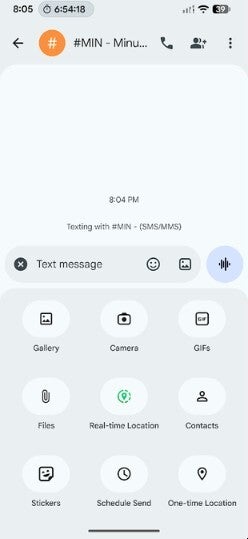
Google Messages users can now customize the shortcut icons inside the attachment sheet. | Image by PhoneArena
With this change, a Google Messages user who uses Schedule Send often to send out messages at a certain time can find the correct shortcut icon more easily by moving it to the top of the grid. Suppose you like to adorn your messages with stickers. You can now move the stickers shortcut right where you would most easily find it.
There is one other change that Google has made to the Messages app. When you have an ongoing conversation open and you press the attachment icon (the "+" button to the left of the text field), a caret, similar to an arrow pointing downward, will appear at the top of the attachment sheet. Tap on it, and the grid goes into full-screen mode.
Why this was added to the Google Messages app
Once again, there is a reason to do this. Allowing the grid to go full-screen makes the shortcut icons easier to use. This part of the update is not showing up on my Pixel 6 Pro running the latest Android 17 QPR1 Beta build.
Even though Google Messages is often the default messaging app on an Android phone, there is also a good chance that your Android handset has a different messaging app installed. If that is the case, simply tap on this link to have Google Messages downloaded on your Android phone.
You like reading about Google Messages? Then you will love readng these:
My critcism about Google Messages was not warranted.
"Tap to draft" allows you to make changes to Smart Replies before sending them.

Popular stories
Latest News


Things that are NOT allowed:
To help keep our community safe and free from spam, we apply temporary limits to newly created accounts: