Google has started rolling out custom chat wallpapers in Google Messages, finally letting you set a photo or built-in background behind your texts. The catch is it is a tiny beta-only rollout, arriving weeks before Samsung Messages shuts down and pushes Galaxy S26 Ultra owners toward the app that ships on most of the best Android phones, Pixel 10 Pro included.
Custom wallpapers are showing up for a lucky few
Google is swapping the old "Change colors" toggle for a new "Chat theme" screen, and it is showing up on real phones. You keep the per-chat colors, and now you can put a wallpaper behind the conversation too.
Telegram user Pintu Patra spotted it on a Pixel, and Reddit users started reporting the same change on Samsung beta builds. Most of that thread still does not have it, so this reads as a slow server-side push, not a wide release.
Samsung Messages is dying, which raises the stakes
If you live in Google Messages, this is the personalization it has lacked for years. You can finally make a thread feel like yours, not a wall of gray bubbles.
The timing is also interesting. Samsung Messages shuts down next month, and millions of Galaxy owners are being moved onto Google Messages whether they want to or not. Wallpapers and per-chat colors are exactly what those users bragged about for years, so it softens the forced move.
Recommended For You
If you text from a Galaxy, this is aimed right at you. It still does not bring back everything Samsung Messages did though, since folders and categories are missing, and a wallpaper will not help you find an old text.
What you get, and how to find it
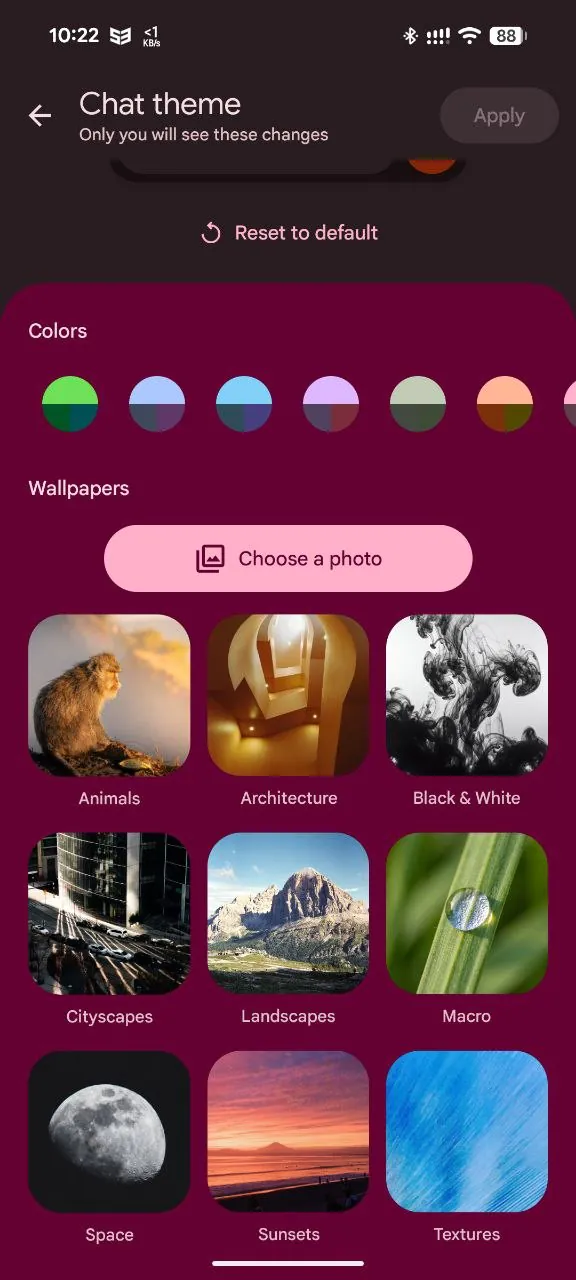
Pintu Patra's screenshot shows the layout: color palettes up top, then a wallpaper grid sorted into categories like Animals, Cityscapes, Landscapes, Macro, Space, Sunsets and Textures. A "Choose a photo" button lets you use your own image, and "Reset to default" undoes it all in one tap.
A line at the top, "Only you will see these changes," means the look is local to you, so your wallpaper will not show on the other person's phone.
The new Chat theme screen in Google Messages, with color palettes up top and a categorized wallpaper gallery below. | Image by Pintu Patra via Telegram
Here's how to find Chat theme
Open an RCS conversation in Google Messages.
Tap the three-dot menu in the top corner.
Look for "Chat theme" where "Change colors" used to be.
Pick a color, choose a wallpaper or your own photo, then tap Apply.
I'm one of the people stuck waiting
Here is the frustrating part for me. I basically live in Google Messages on my Pixel, but I stay out of the beta on purpose, because being a tester sometimes locks me out of features non-testers already have.
So a beta-only rollout means I am doing what you might be doing right now, squinting at someone else's screenshot. I still think it is a real win, and I am glad the gap is closing. I am just hoping the wide release does not take its sweet time.
Johanna Romero is a Senior News Writer at PhoneArena, covering mobile technology news across Android, iOS, wearables, and the Google ecosystem she knows best. Drawing on 15 years in IT and tech support from 2007 to 2022, she brings a user-friendly eye for the practical features and lesser-known tricks readers care about. Google named her an official #TeamPixel member in 2022, and she also reviews the latest devices on her YouTube channel, JoJo the Techie.
A discussion is a place, where people can voice their opinion, no matter if it
is positive, neutral or negative. However, when posting, one must stay true to the topic, and not just share some
random thoughts, which are not directly related to the matter.
Things that are NOT allowed:
Off-topic talk - you must stick to the subject of discussion
Offensive, hate speech - if you want to say something, say it politely
Spam/Advertisements - these posts are deleted
Multiple accounts - one person can have only one account
Impersonations and offensive nicknames - these accounts get banned
To help keep our community safe and free from spam, we apply temporary limits to newly created accounts:
New accounts created within the last 24 hours may experience restrictions on how frequently they can
post or comment.
These limits are in place as a precaution and will automatically lift.
Moderation is done by humans. We try to be as objective as possible and moderate with zero bias. If you think a
post should be moderated - please, report it.
Have a question about the rules or why you have been moderated/limited/banned? Please,
contact us.











Things that are NOT allowed:
To help keep our community safe and free from spam, we apply temporary limits to newly created accounts: