Google's June 2026 Pixel Drop just folded Emergency Sharing into the Pixel Watch's detection features, with the Pixel Watch 4 leading the lineup, so a detected car crash, fall, or loss of pulse now calls emergency services and texts your chosen contacts on its own.
Google ties your watch's safety tools into one alert
With the June 2026 Pixel Drop, Emergency Sharing now sits on top of three features the Pixel Watch already runs: Car Crash Detection, Fall Detection, and Loss of Pulse Detection. When the watch flags a serious incident and you cannot respond, it calls emergency services and pings your chosen contacts with your location.
You can even pick different contacts per event, so a fall and a loss of pulse do not have to alert the same people. This came straight from Google's own Pixel Drop announcement, not a leak, so the details are about as firm as it gets.
We covered the full June drop earlier, when it hit Pixel phones, the Pixel 10 Pro Fold, and the watch on the same day.
Would you trust your watch to call for help and text your people for you?
38 Votes
Setting this up the moment it lands on my watch
34.21%
Love it, but false alarms would make me nervous
52.63%
I trust myself to call for help over a watch
13.16%
My Apple Watch already does this for me
0%
Why this matters more than it looks on paper
Day to day, it means you set your emergency contacts once and the watch handles both the 911 call and the heads-up text if you cannot. No fumbling for a phone at the worst possible moment.
Recommended For You
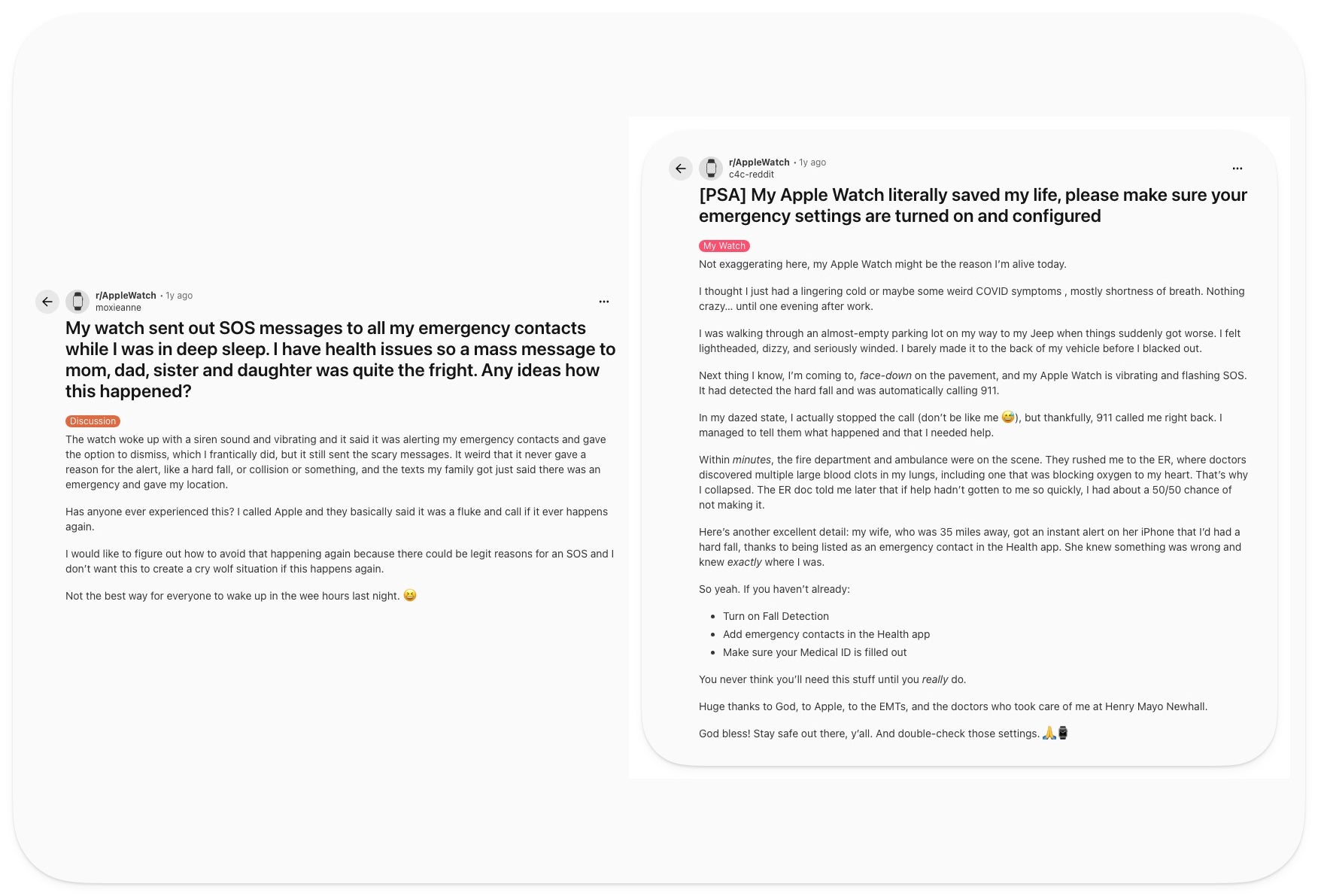
Apple Watch owners have lived with this kind of auto-alerting for years, and it cuts both ways. One r/AppleWatch user described collapsing in a parking lot from blood clots, with the watch catching the hard fall, calling 911, and alerting their spouse 35 miles away.
Two r/AppleWatch owners, two very different nights with the same emergency feature. | Image by PhoneArena
The flip side hit another r/AppleWatch user who woke to the watch firing an SOS and texting their whole family overnight for no clear reason, which Apple called a fluke. The lesson for Google is plain: this only earns trust if the detection is accurate enough to skip the false alarms.
We saw the groundwork for this when Loss of Pulse Detection reached US wrists and turned the watch into something that can act on a stopped heart.
If you wear an Apple Watch or a Galaxy Watch, this update does not move your needle much, since contact alerts on a fall or crash are already in your corner. It mostly matters for Pixel Watch owners.
Who gets it, broken down by watch model
The split matters, so check your model before you lean on any of it. Fall Detection and Car Crash Detection reach the Pixel Watch 2 and newer, while Loss of Pulse Detection stays on the Pixel Watch 3 and Pixel Watch 4.
On older models, you still get crash and fall coverage, just not the pulse piece. Either way, none of it works until you set your emergency contacts, which we have walked through before for Pixel's safety tools.
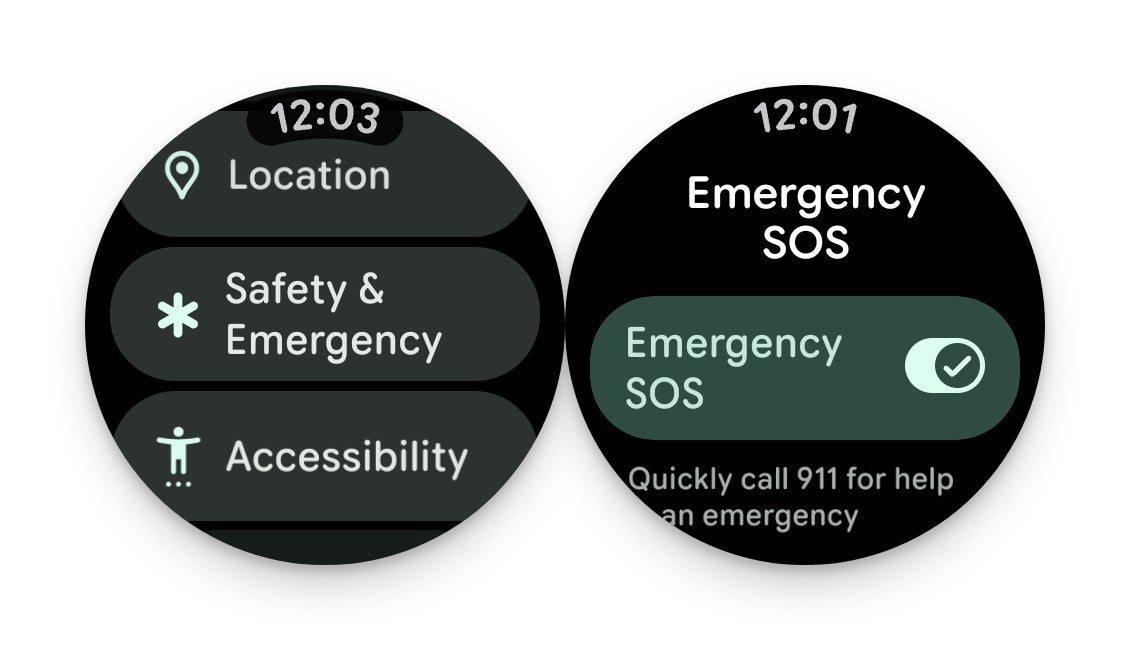
The Pixel Watch's 'Safety & Emergency' menu is where Emergency Sharing and the SOS toggle live. | Image by Google
Where I land on a watch that calls for help
I think unifying these alerts is the right move, even if it is overdue. Scattered safety toggles are easy to half-set and forget, and one clean Emergency Sharing flow is far more likely to be on when it counts.
Our Pixel Watch 4 review already called the safety factor one of its strongest pulls, and this ties a tidy bow on it.
My one ask is accuracy, because the Apple Watch stories show this kind of feature lives or dies on whether people trust it not to cry wolf. Nail the detection, and this quietly becomes the most important thing on your wrist.
Get iPhone 18 Pro with Visible, get $480 off!
$719
/mo
$1199
$480 off (40%)
On the Visible+ Pro plan, you get access to 5G Ultra Wideband data on Verizon's fastest network. Along with unlimited roaming across Mexico and Canada, 2 days of Global Pass per month, 3x hotspot speeds, 4K streaming, and Smartwatch service.
Johanna Romero is a Senior News Writer at PhoneArena, covering mobile technology news across Android, iOS, wearables, and the Google ecosystem she knows best. Drawing on 15 years in IT and tech support from 2007 to 2022, she brings a user-friendly eye for the practical features and lesser-known tricks readers care about. Google named her an official #TeamPixel member in 2022, and she also reviews the latest devices on her YouTube channel, JoJo the Techie.
A discussion is a place, where people can voice their opinion, no matter if it
is positive, neutral or negative. However, when posting, one must stay true to the topic, and not just share some
random thoughts, which are not directly related to the matter.
Things that are NOT allowed:
Off-topic talk - you must stick to the subject of discussion
Offensive, hate speech - if you want to say something, say it politely
Spam/Advertisements - these posts are deleted
Multiple accounts - one person can have only one account
Impersonations and offensive nicknames - these accounts get banned
To help keep our community safe and free from spam, we apply temporary limits to newly created accounts:
New accounts created within the last 24 hours may experience restrictions on how frequently they can
post or comment.
These limits are in place as a precaution and will automatically lift.
Moderation is done by humans. We try to be as objective as possible and moderate with zero bias. If you think a
post should be moderated - please, report it.
Have a question about the rules or why you have been moderated/limited/banned? Please,
contact us.








Things that are NOT allowed:
To help keep our community safe and free from spam, we apply temporary limits to newly created accounts: