For the past few months, a Cocker Spaniel named Spike has been my constant companion. Not only does he make sure I don’t miss my morning and evening walks, but he has officially staged a takeover of my smartphone’s gallery.
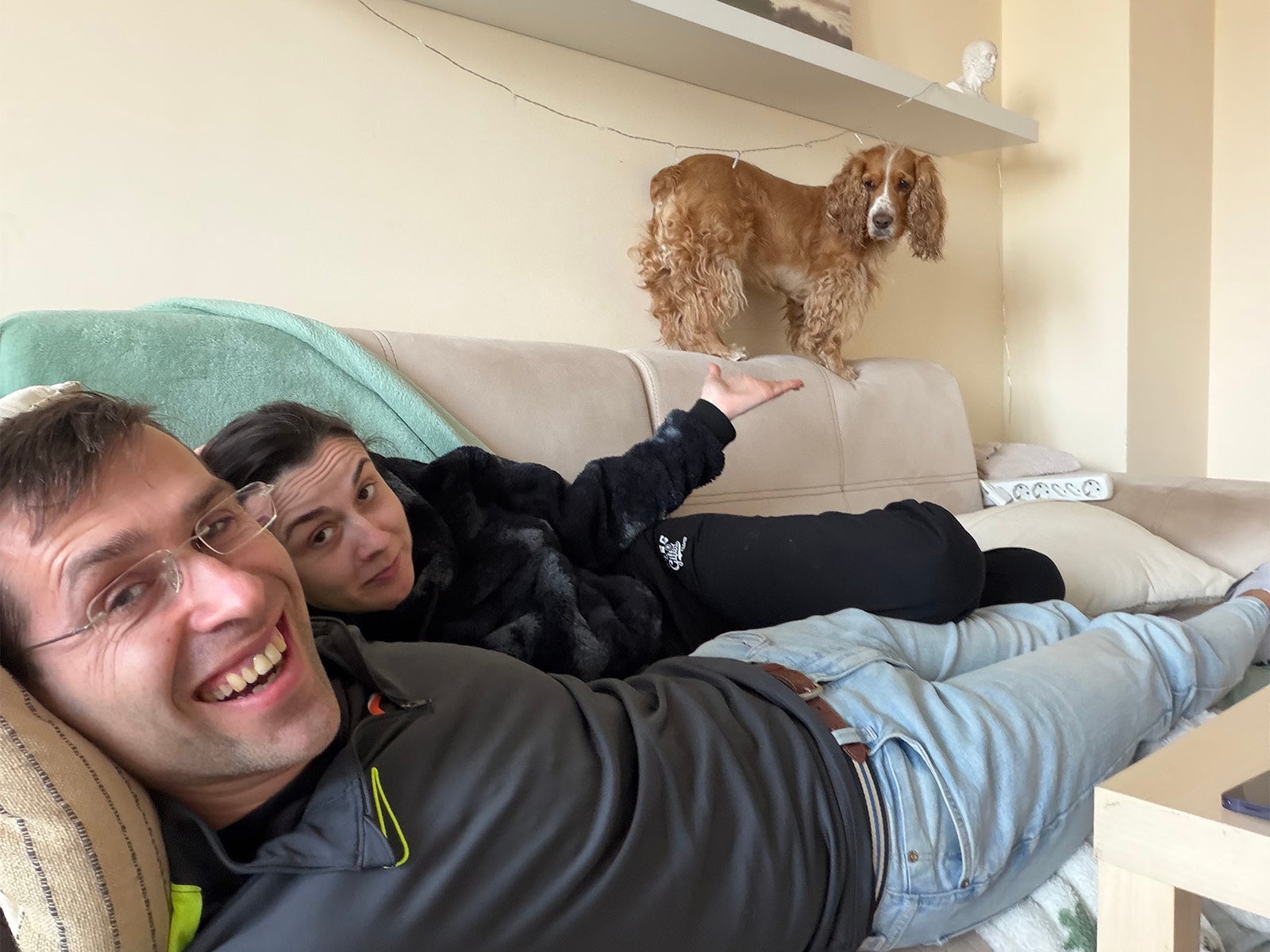
Spike is a cute and smart boy, but he's also great at giving me just that look when food hits the table. He also seems to have missed the memo that he’s a dog: he probably thinks he is part cat, part mountain goat, as he loves climbing on sofas, nightstands and tables. Surprisingly, he fits in almost all of those places.
This dog thinks he is a mountain goat | Image by PhoneArena
With that, though, came a new challenge: how do I take the best pictures without missing those fun and utterly chaotic moments? Well, I’ve been using the Galaxy S26 Ultra lately, and I’ve discovered a few game-changing tricks to get the right shots every time.
Galaxy S26 Ultra 12/512GB: Get it now over at Samsung!
$1299
$1499
$200 off (13%)
Samsung is letting you save up on the Galaxy S26 Ultra with an eligible trade-in. Get up to $720 instant trade-in credit or $200 off without trade-in. This is Samsung's latest and greatest phone, and the first phone in the world with Privacy Display, so don't miss out!
Before we dive into the lab tests, let's kick this off with some real-world samples.
Here is my furry companion Spike running towards me. For most of my pictures of Spike, I used the powerful 5X (115mm) camera. The Galaxy also has a 3X camera for those mid-range zoom shots, which is also a welcome addition. The phone was quick enough to focus correctly even when just using the default settings.
Recommended For You
If you want to get the best detail in your photos, I recommend using the 50MP mode on the 5X camera. The boost in detail makes these shots frame-worthy and it makes cropping a part of the image easier without losing much detail.
Alright, you saw some photos, but what is the technology behind them? When you capture fast movement, you first need to have a reliable burst mode on your phone.
So let's see how well the Galaxy S26 Ultra performs with burst mode photos in comparison with the other major flagship phones on the market.
PhoneArena Burst Rate Test:
Phone
Burst Rate
Galaxy S26 Ultra
22
Galaxy S25 Ultra
21
iPhone 17 Pro
11
Pixel 10 Pro XL
30*
*Pixel produced burst-rate photos with a lower resolution.
First, let me clarify that burst mode refers to taking dozens of photos in quick succession.
On the Galaxy, you trigger it by tapping on the shutter button and sliding your finger down. On other phones, like the iPhone, you do a swipe left to start burst mode. The latest Pixel phones do not have a traditional burst mode and instead, they use Top Shot to capture a short video. You can then later select the best frame out of it, but that comes with a downside — those frames are captured in a much lower 1440 x 1080-pixel resolution.
In our lab test, we measured that the Galaxy S26 Ultra was able to capture 22 frames per second in full-resolution burst mode photos. Impressive! The iPhone 17 Pro managed a burst rate of 11fps. The Pixel was fastest, but again, it did not have an option for full-resolution photos.
PhoneArena Auto-focus Speed Test:
Phone
AF Speed (in DaVinci Frames)
AF Speed (in milliseconds)
Galaxy S26 Ultra
23
383
Galaxy S25 Ultra
25
417
iPhone 17 Pro
57
950
Pixel 10 Pro XL
24
400
Another thing we tested in our lab is the auto-focusing speed. We ran the test procedure multiple times to get an accurate average result. The method was simple, but reliable — we used a high framerate recording of the time it took to focus from one object to another. We measured this in individual frames on a DaVinci Resolve timeline for proper accuracy and converted the results in milliseconds as well.
The S26 Ultra managed the best score with an auto-focusing speed of 23 frames. It was slightly faster than its predecessor and beat the Pixel 10 Pro XL by a tiny margin. The iPhone was noticeably slower with its AF speed.
Those two tests confirm that the Galaxy has the best frame rate and auto-focus speed to record fast moving objects like a pet.
Master the settings first
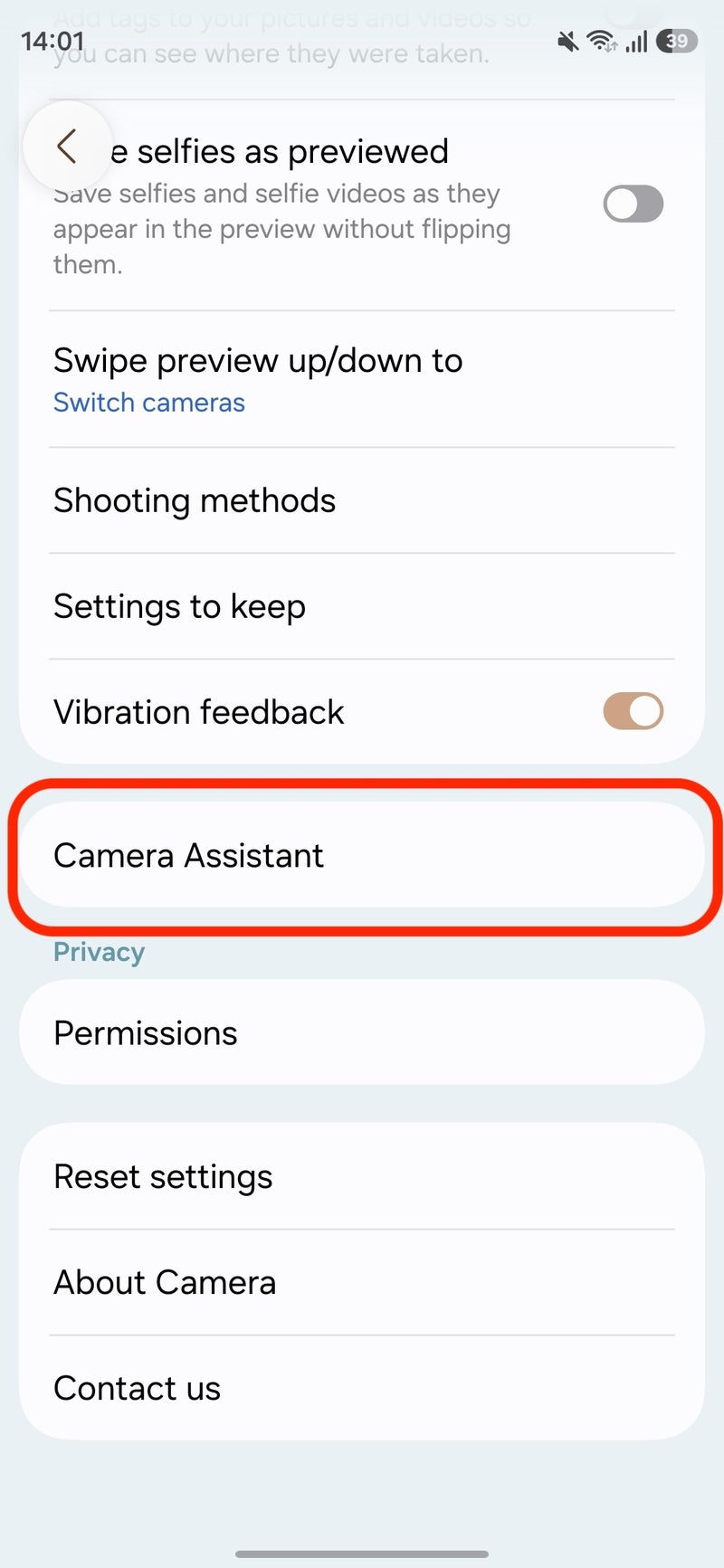
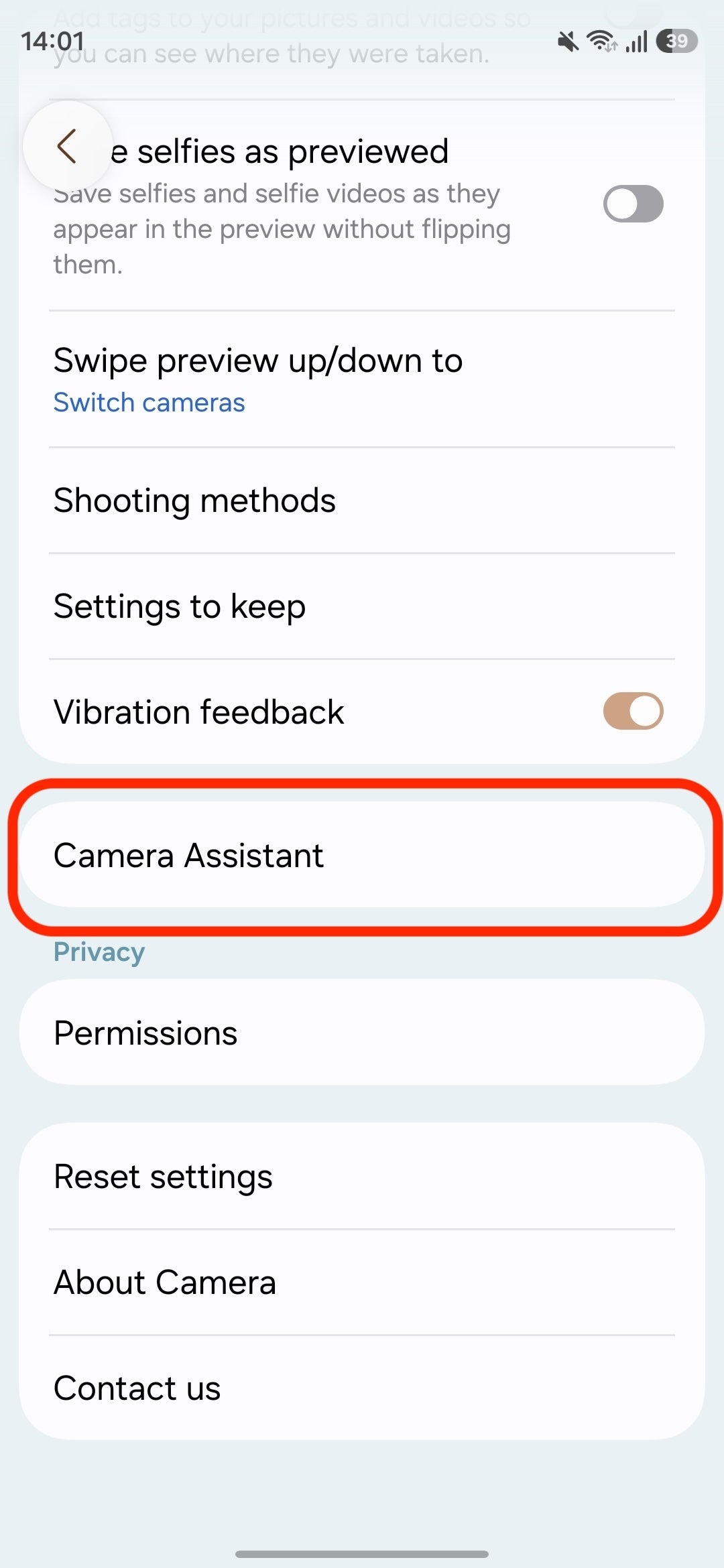
There are a few settings that will help you get tack-sharp photos every time. The Galaxy is quite unique in this aspect since it has the Camera Assistant app (you can download it on the Galaxy Store).
With other phones, you typically need a third-party app to get fine control of settings (and even those apps rarely go into as much detail as the Camera Assistant).
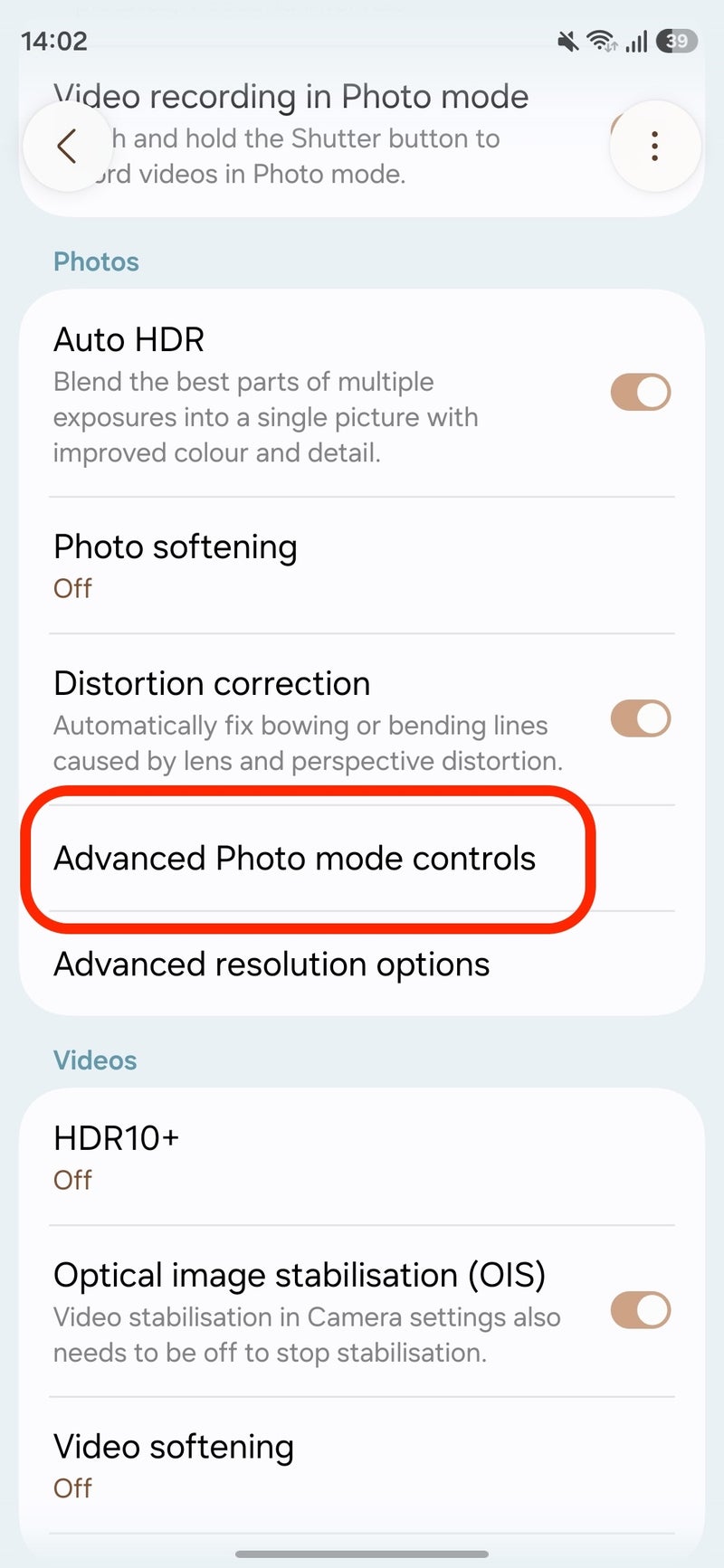
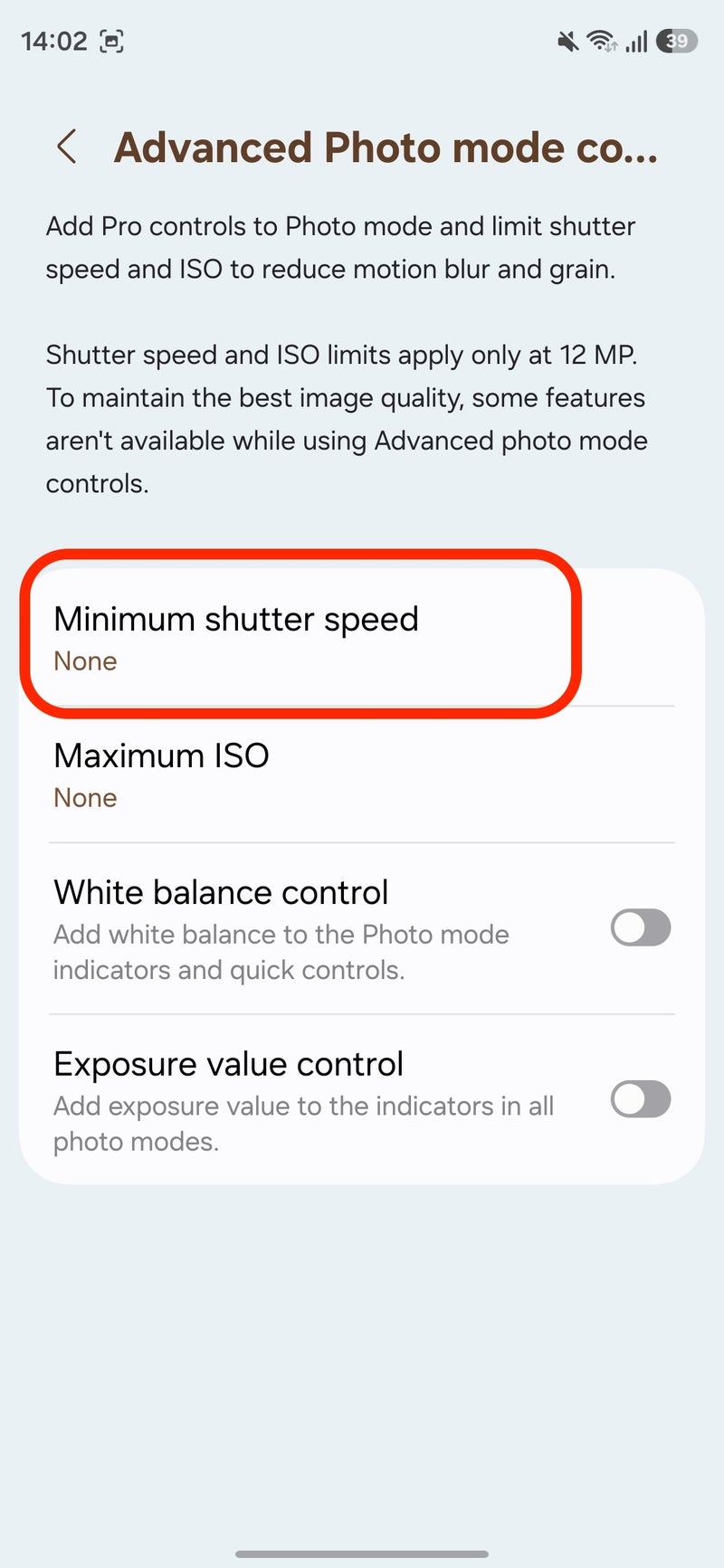
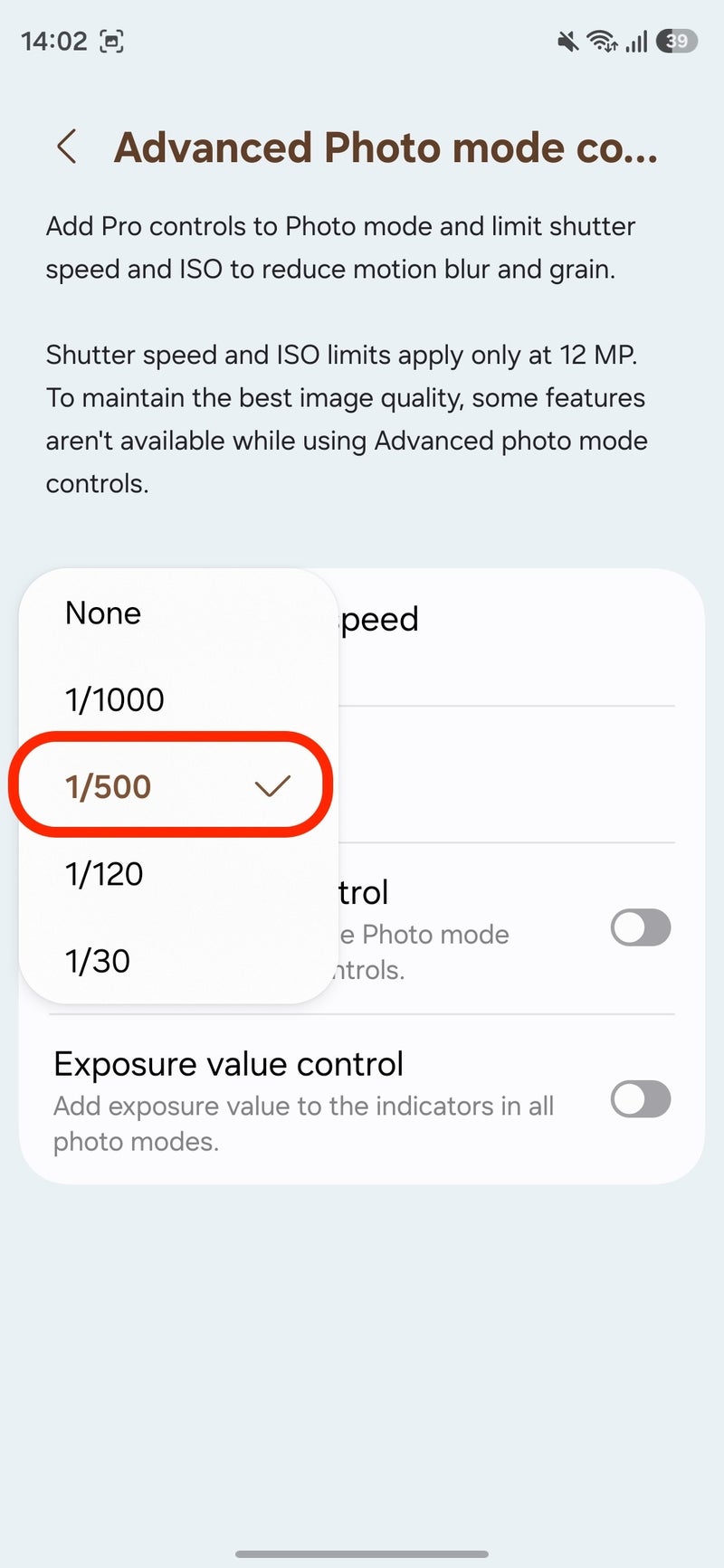
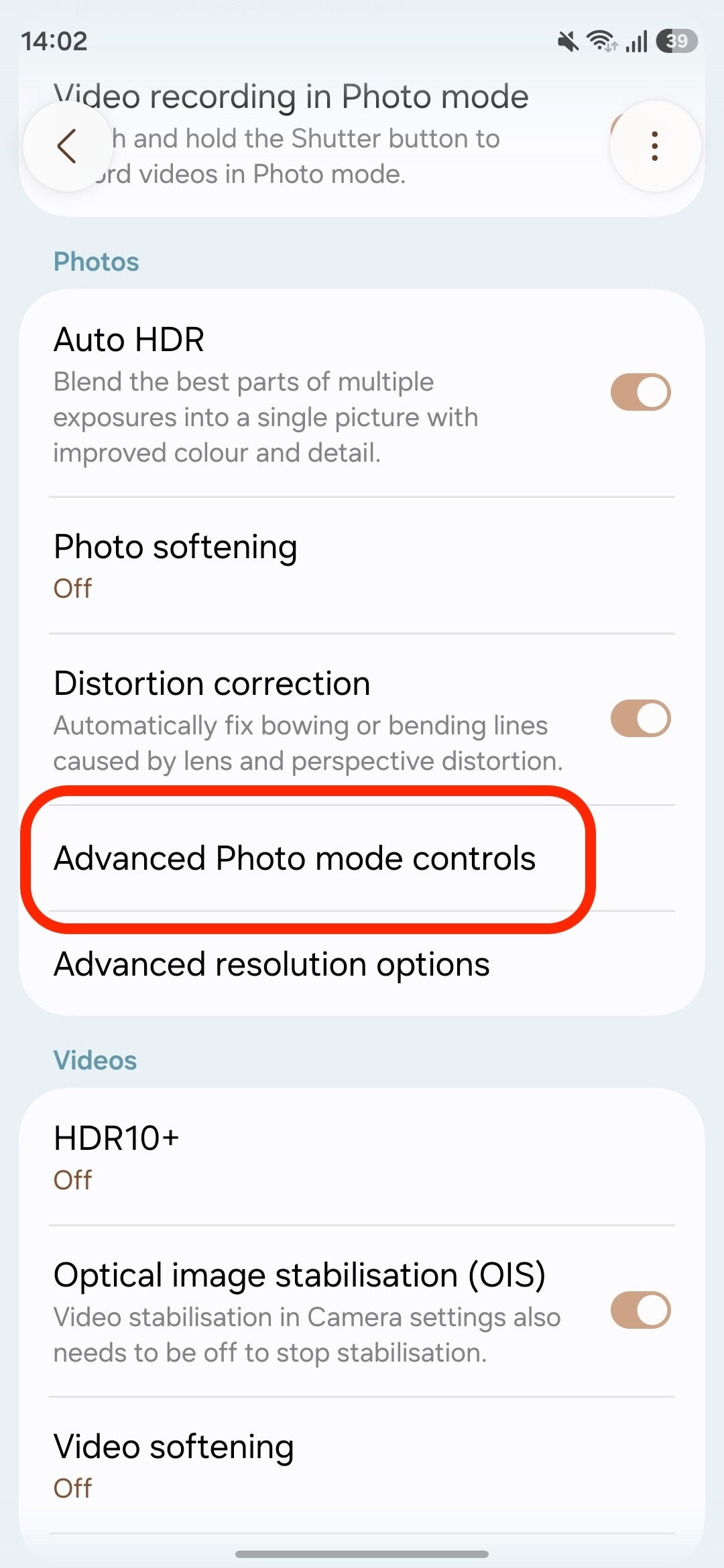
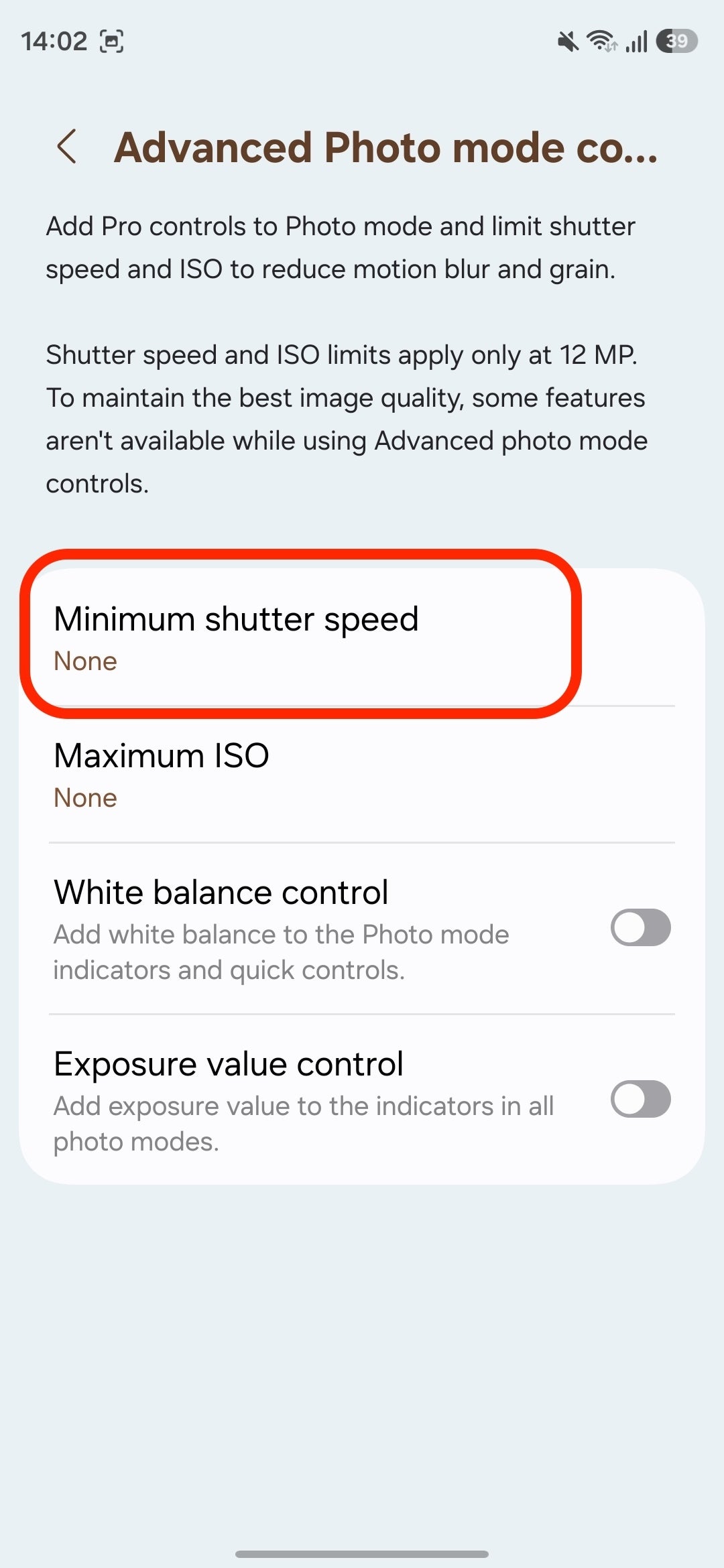
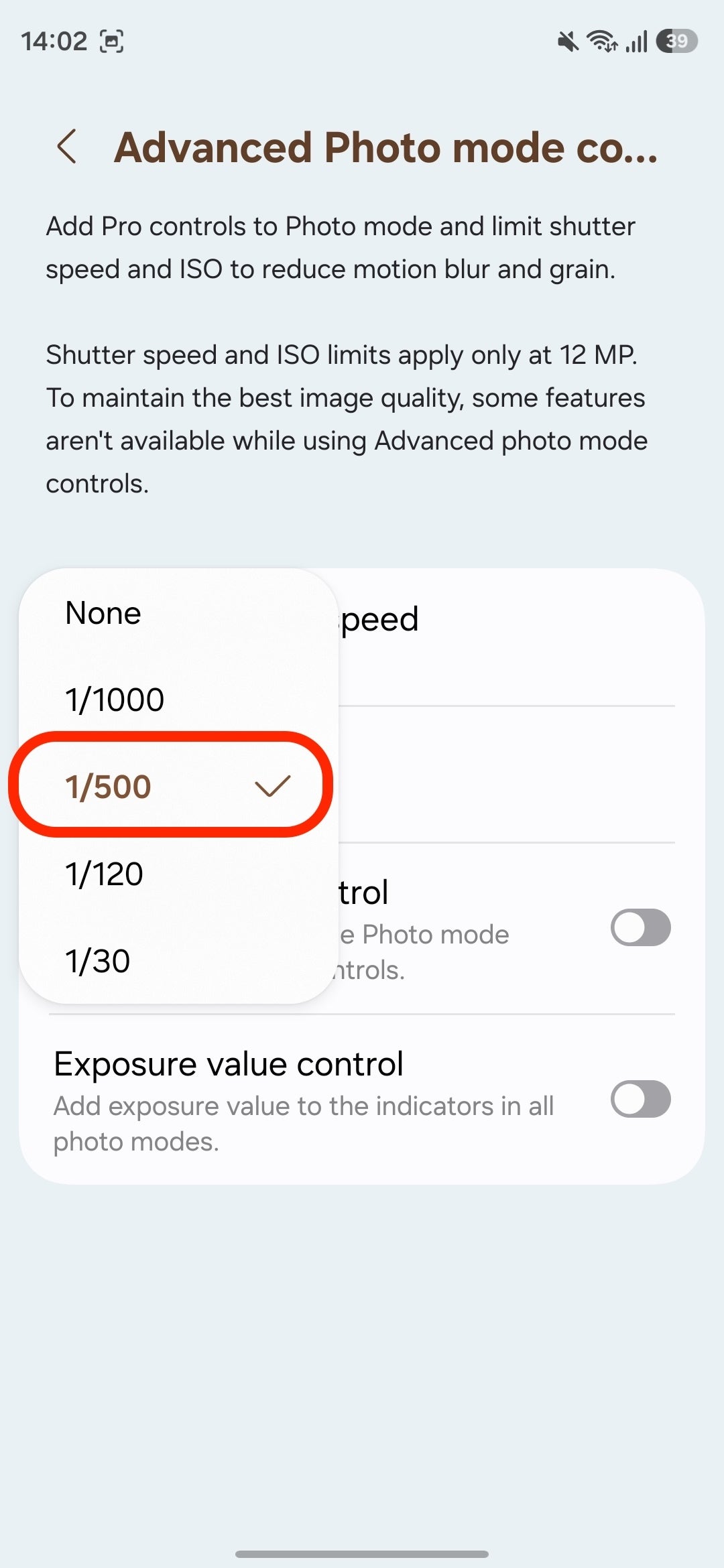
One setting I like to change when I go out to shoot action is setting a minimum shutter speed. Be it Spike running around, trying to freeze the motion of a flying bird or that occasional photo of the Saturday run club, this helps a bunch.
For fast motion, I set the minimum shutter speed at 1/500, and this is usually enough to freeze the motion in the frame, but for extra fast movement, you can even set a speed of 1/1,000.
Object Tracking AF
Samsung also has a very handy tracking autofocus option that locks in the focus on Spike even when he's zooming toward the sofa. Cocker Spaniels are notoriously wiggly, and on many other phones, this would have been just a blurry shot.
How to enable this:Open Settings in the Camera app, scroll down to the General section, and make sure that "Tracking auto focus" is enabled.
Pro Tip: Once Spike is in frame, tap on his nose or face on the screen. The S26 Ultra will then lock onto him like a heat-seeking missile.
AI super powers
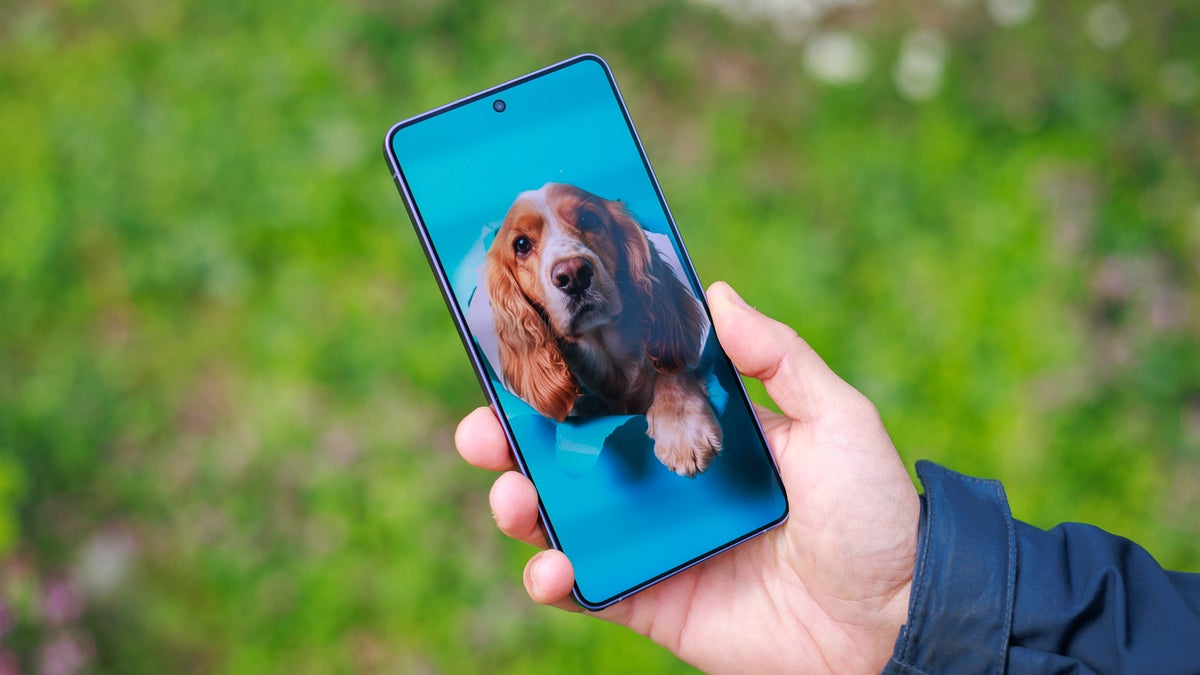
Okay, you've got to admit that this AI generated image with Spike in sunglasses is just incredibly cool (use the Studio style under Portraits). The new AI styles work just as well with pets as they do with people. The third image uses an AI style called Peekaboo, which I also find to produce excellent results. And the last one turns your dog into a felt toy. You have a total of nine preset AI styles to choose from.
< BeforeAfter >
In my case with Spike, a bunch of the photos in my gallery are just him climbing a nightstand or a table, and believe me, he doesn't care if there is food on that table. In this case, if I want to share the image on social media, I would usually like to remove all the mess around him, and the AI eraser on the Galaxy does a brilliant job.
I also used one of the AI styles to create this cool invitation for Spike's 6th birthday celebration. You can see his birthday cake and a few moments from that day in the next couple of photos.
Portrait Mode
When speaking of pet photos, you have to mention portrait mode.
The ability to blur the background and get that creamy bokeh while your pet remains the main focus makes for a much more dramatic and memorable image.
On the S26 Ultra, the advanced depth mapping is able to handle Spike's ears with aplomb. Samsung's new model has improved AI depth-mapping specifically for fur and just take a look at the photo below:
Notice the accurate separation in this image | Image by PhoneArena
Cocker Spaniels are a notoriously difficult subject for portrait mode because of all the fur and those big flappy ears. However, the Galaxy was able to correctly seperate the strands of hair from the background.
Conclusion
Okay, I have to admit that trying to photograph a chaotically moving, furniture-climbing spaniel was a sport in itself.
But the Galaxy S26 Ultra held up very well and the little settings like shutter speed control made my life so much easier. Whether you have a high-energy “mountain climber” like me or some other cute pet around, try out these tips and see if you can keep up with their speed.
Free Galaxy A17 5G with Straight Talk
Get a free Galaxy A17 with Straight Talk. To claim this deal, you need to pair the phone with activation on a Silver Unlimited Plan or higher. This tier costs $45 per month. Offer valid through 01/10/27 while supplies last online.
Victor, a seasoned mobile technology expert, has spent over a decade at PhoneArena, exploring the depths of mobile photography and reviewing hundreds of smartphones across Android and iOS ecosystems. His passion for technology, coupled with his extensive knowledge of smartphone cameras and battery life, has positioned him as a leading voice in the mobile tech industry.
A discussion is a place, where people can voice their opinion, no matter if it
is positive, neutral or negative. However, when posting, one must stay true to the topic, and not just share some
random thoughts, which are not directly related to the matter.
Things that are NOT allowed:
Off-topic talk - you must stick to the subject of discussion
Offensive, hate speech - if you want to say something, say it politely
Spam/Advertisements - these posts are deleted
Multiple accounts - one person can have only one account
Impersonations and offensive nicknames - these accounts get banned
To help keep our community safe and free from spam, we apply temporary limits to newly created accounts:
New accounts created within the last 24 hours may experience restrictions on how frequently they can
post or comment.
These limits are in place as a precaution and will automatically lift.
Moderation is done by humans. We try to be as objective as possible and moderate with zero bias. If you think a
post should be moderated - please, report it.
Have a question about the rules or why you have been moderated/limited/banned? Please,
contact us.



































Things that are NOT allowed:
To help keep our community safe and free from spam, we apply temporary limits to newly created accounts: