iPhone 18 Pro and iPhone 18 Pro Max owners finally have the full picture of how Apple Reference Image proves a photo is real. Apple just published a detailed breakdown of the feature, and it takes a very different route from Google's approach on the Pixel 10 series, starting right at the camera sensor.
Apple explains how Reference Image works on the iPhone 18 Pro
Apple explained the whole process in a new post on its Security Research blog, just days after the feature was introduced alongside the iPhone 18 Pro duo, which we covered at launch. The feature is opt-in and limited to the Main camera. It also won't be available in China at launch, and according to this report, EU users can't capture reference images at launch either, though they can still develop and view them.
Apple Reference Image offers a trustworthy, scalable guarantee that a reference image is what it claims to be: a real photograph, captured by a real sensor in an iPhone camera, at a specific time. It sets a new standard for verifiable digital photography.
Apple Security Engineering and Architecture and Camera & Photos teams, Apple Security Research blog, September 16, 2026
Apple also says it's the only image provenance system with quantum-secure defenses, which means these signatures should stay trustworthy for decades rather than just a few years.
Recommended For You
When would you turn on Reference mode on an iPhone 18 Pro?
33 Votes
Only for news, protests or anything I might need to prove
15.15%
For insurance claims and damage photos, nothing else
12.12%
I'd leave it on all the time, just in case
42.42%
Never, nobody is doubting my photos anyway
30.3%
Apple Reference Image vs Pixel's C2PA Content Credentials
For most of us, this matters less for vacation photos and more for pictures that need to prove something happened, like a fender bender for an insurance claim or a photo shared during breaking news.
When you switch to Reference mode, the sensor reboots into a secure mode and signs the pixel data the moment it's captured, before any software can touch it. That signed file, which Apple calls a secure digital negative, is saved next to your regular photo, along with a time window from Apple's timestamp service showing when it was taken.
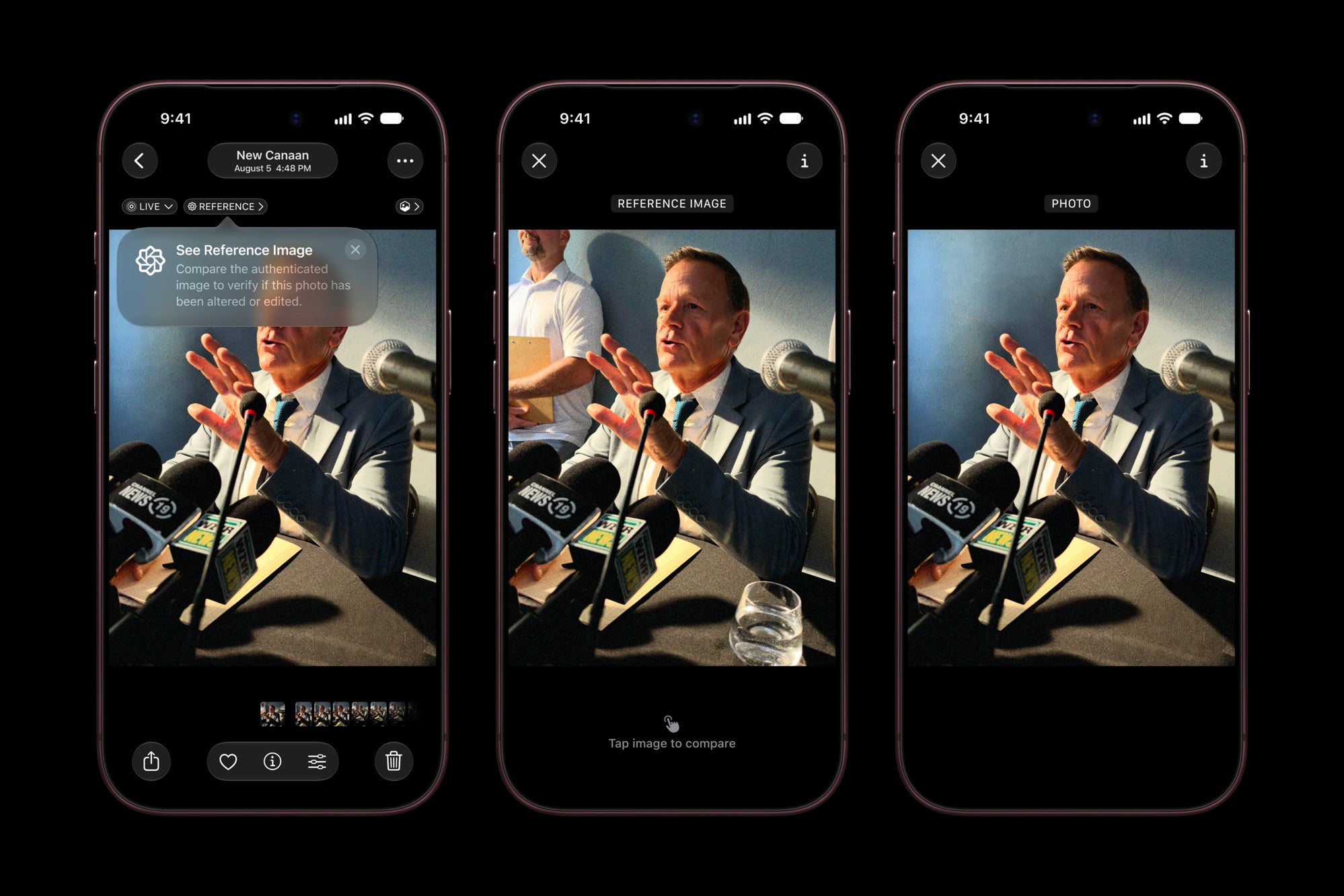
Reference images show up alongside the original photo in the Photos app. | Image by Apple
When you want to prove the photo is real, you "develop" that negative, which sends it to Private Cloud Compute. There, Apple checks that the sensor and the phone belong together, then processes the image into a signed JPEG that you can compare with the original.
Google took a different route starting with the Pixel 10 series, which adds C2PA Content Credentials to every photo taken with Pixel Camera, as it announced on its blog. Apple's argument is that C2PA-based systems attach provenance after capture, so a compromise anywhere in the editing chain can go unnoticed. That said, if you have a Pixel, your photos carry verifiable credentials by default, which is something iPhone 18 Pro owners have to turn on themselves.
What iPhone 18 Pro owners should know before using Reference mode
Reference mode has to be on before you take the photo, since regular photos can't be verified after the fact. Once a negative is developed, it moves to your deleted photos, where it's purged after 30 days unless you recover it. Apple also says it never sees your images, and nothing publicly ties a reference image to you or links two of your photos together.
Reference Image could be a big deal, if it catches on
I think this is one of the more meaningful camera features Apple has introduced in a while, even if it's not the flashiest.
Of course, it's limited to one camera on two phones for now. I'd personally love to see it spread to the rest of the iPhone lineup and the other lenses, so proving a photo is real becomes something all of us can do without thinking twice.
More on the iPhone 18 Pro and Apple Reference Image:
Johanna Romero is a Senior News Writer at PhoneArena, covering mobile technology news across Android, iOS, wearables, and the Google ecosystem she knows best. Drawing on 15 years in IT and tech support from 2007 to 2022, she brings a user-friendly eye for the practical features and lesser-known tricks readers care about. Google named her an official #TeamPixel member in 2022, and she also reviews the latest devices on her YouTube channel, JoJo the Techie.
A discussion is a place, where people can voice their opinion, no matter if it
is positive, neutral or negative. However, when posting, one must stay true to the topic, and not just share some
random thoughts, which are not directly related to the matter.
Things that are NOT allowed:
Off-topic talk - you must stick to the subject of discussion
Offensive, hate speech - if you want to say something, say it politely
Spam/Advertisements - these posts are deleted
Multiple accounts - one person can have only one account
Impersonations and offensive nicknames - these accounts get banned
To help keep our community safe and free from spam, we apply temporary limits to newly created accounts:
New accounts created within the last 24 hours may experience restrictions on how frequently they can
post or comment.
These limits are in place as a precaution and will automatically lift.
Moderation is done by humans. We try to be as objective as possible and moderate with zero bias. If you think a
post should be moderated - please, report it.
Have a question about the rules or why you have been moderated/limited/banned? Please,
contact us.








Things that are NOT allowed:
To help keep our community safe and free from spam, we apply temporary limits to newly created accounts: