Now Playing is probably one of the best Pixel-exclusive apps that allow you to instantly recognize any song that is playing in the background. The app in its current form already checks all the essential boxes of an ideal music recognition app, but Google is looking to make it even better, as it is reported to be working on every important feature for it.
Now Playing could get a really useful change
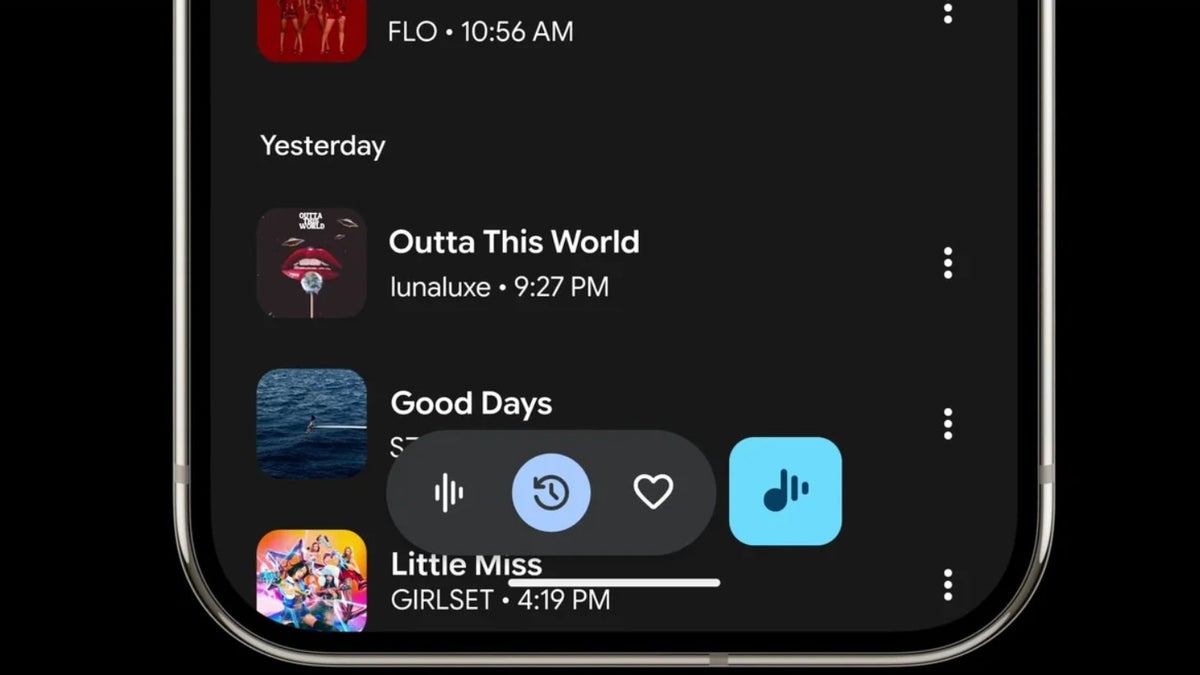
Google launched Now Playing in 2017 with the Pixel 2. Since then, it was available as a dedicated feature in Google phones until March this year, when the Big G replaced it with its dedicated app. Its functioning is very simple: once you have the app installed, it will keep recognizing the songs playing in the background and showing the result on the lock screen.
However, not everyone prefers locking their screen just for the sake of finding out which song is playing. It would have been a lot better if Now Playing had displayed the identified song somewhere on the active screen, like in the notifications bar. This way, you could have simply swiped down from the top of the screen and checked out the song name instead of having to go through the process of locking the phone.
Turns out, Google is actually working on introducing a capability like this. In the Android System Intelligence app available for the Pixel 11 phones, signs related to Now Playing notifications have reportedly been spotted. The identified string says this: enableMusicRecognitionNotifications.
Recommended For You
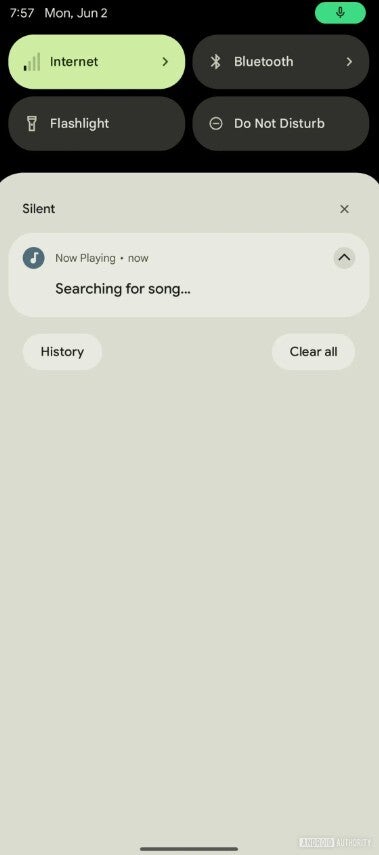
Notification of Now Playing app. | Image by Android Authority
The wording of this string strongly suggests that the tech giant could soon introduce the option for users to enable notifications for the Now Playing app. While it can be seen in the surfaced image how the new capability could look, it doesn't work at the moment.
Which old Pixel capability do you want Google to bring back?
46 Votes
Unlimited Google Photos backups.
60.87%
Rear fingerprint scanner.
15.22%
Active Edge.
8.7%
Now Playing notifications.
15.22%
Now Playing used to offer a feature like this before
Before the introduction of the standalone app, Now Playing used to show the identified songs in the notification center in addition to the lock screen. For reference, you were required to open the Settings menu and then navigate to Display > Lock screen > Now Playing > Notifications. Then, enable the toggle next to "Allow Android System Intelligence notifications."
The Pixel 5 and previous phones are incompatible with the app as they reached their official end of cycle for software updates in 2023, and the app was made available with the March 2026 Pixel Drop. Most likely, in those phones, Now Playing works as a feature, meaning it shows identified songs in the notifications panel as well.
Don't miss out on these interesting Pixel stories:
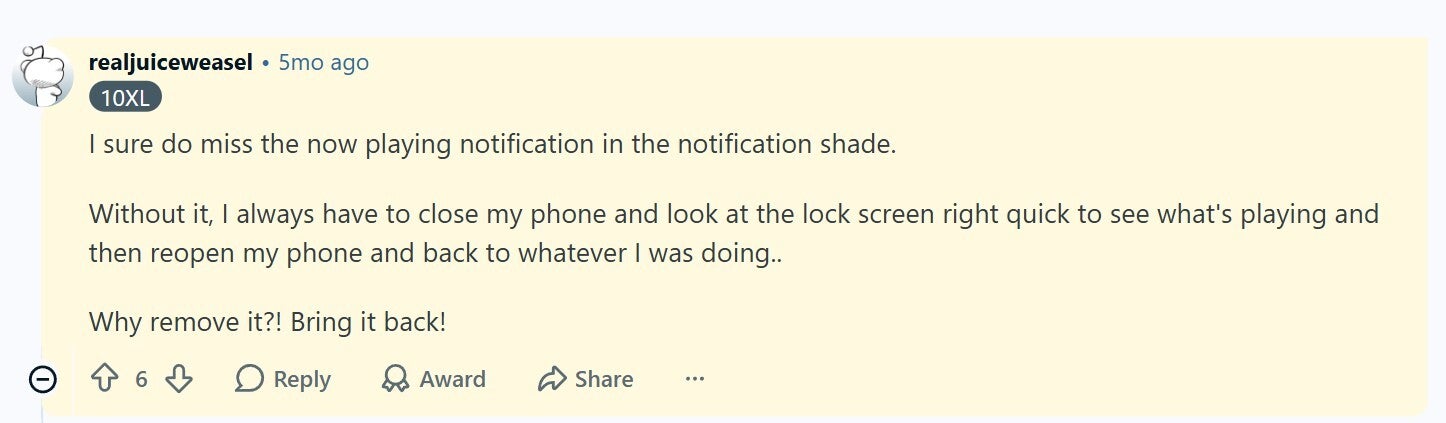
Its one of the capabilities many Pixel fans have been missing since Google launched the feature as an app. A Reddit user commented under a related post that they really miss the Now Playing notification in the notification shade.
Reddit comment about Now Playing feature. | Image by Reddit
Interestingly, there is a workaround you can try until Google restores this capability to the app.
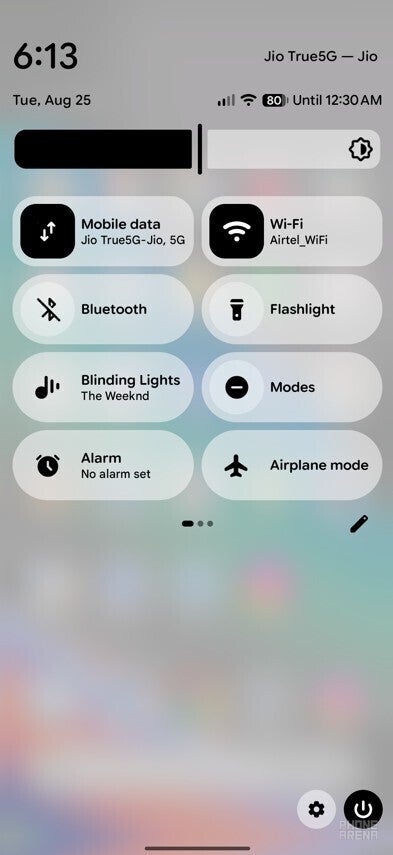
Now Playing in Quick Settings tile. | Image by PhoneArena
What you can do is add a tile in the quick settings menu for Now Playing. This way, you won't have to lock your Pixel screen to check the music that the app has identified. Instead, you would simply have to slide down from the top of the screen to open the quick settings menu and check the Now Playing tile to know about the recognized track.
Now Playing is about to get even better
Before switching to a Pixel 10 from an iPhone last year, I used to rely on apps like Shazam to find out the name of a song that I really found interesting. Now Playing has made the job a lot easier by eliminating the need to download a dedicated song recognition app. By introducing the capability to show the songs in the notification, Google is definitely going to make one of its best apps even better.
How about giving me a follow on my social profiles?
Mint Mobile is celebrating its 10-year anniversary with a special offer on its six-month subscription plans. For a limited time, you can get your preferred tier (6GB, 17GB, 23GB or unlimited) for just $10/mo. That saves you between 50% and 71% on the carrier's mobile plans, making it way easier to recommend.
Aman Kumar is a news writer at PhoneArena covering Google Pixel phones, Android features, AI-powered smartphone tools, and mobile tech news. Before joining PhoneArena, he spent over five years writing about consumer technology for publications like MakeUseOf, How-To Geek, and Guiding Tech. His current daily drivers are the Pixel 10 and Samsung Galaxy S26 Plus, while his red iPhone SE (2nd gen) remains a personal favorite. Aman also appreciates bold smartphone experiments and still considers the Nokia N-Gage one of the industry’s most iconic designs.
A discussion is a place, where people can voice their opinion, no matter if it
is positive, neutral or negative. However, when posting, one must stay true to the topic, and not just share some
random thoughts, which are not directly related to the matter.
Things that are NOT allowed:
Off-topic talk - you must stick to the subject of discussion
Offensive, hate speech - if you want to say something, say it politely
Spam/Advertisements - these posts are deleted
Multiple accounts - one person can have only one account
Impersonations and offensive nicknames - these accounts get banned
To help keep our community safe and free from spam, we apply temporary limits to newly created accounts:
New accounts created within the last 24 hours may experience restrictions on how frequently they can
post or comment.
These limits are in place as a precaution and will automatically lift.
Moderation is done by humans. We try to be as objective as possible and moderate with zero bias. If you think a
post should be moderated - please, report it.
Have a question about the rules or why you have been moderated/limited/banned? Please,
contact us.





Things that are NOT allowed:
To help keep our community safe and free from spam, we apply temporary limits to newly created accounts: