Google tests useful UI change on the YouTube for Android app
Those who double-tap to move ahead using the YouTube for Android app are not getting all of the info they might want
YouTube for Android gets useful UI change. | Image by PhoneArena
Google, as is its wont, loves to play around with the UIs of its apps until it can find a way to come up with a quality of life improvement. One of the apps it is testing a new UI for is streaming video app YouTube. As most of you know, double-tapping on the right-side of a YouTube video moves the stream ahead by 10 seconds or a time that you can customize. Double-tapping the left side of the screen will move the stream backward by 10 seconds or the time period that you set.
How to customize the time interval you skip ahead on the YouTube app
This feature is available on both iOS and Android. I am now going to show you how to customize the time interval that the stream will move forward or back when you double tap. On Android open the YouTube app and tap your profile icon on the bottom right of the screen. Then tap the Settings gear icon in the top right > General > Double-tap to seek > Choose your interval from 5, 10, 15, 20, 30, or 60 seconds.
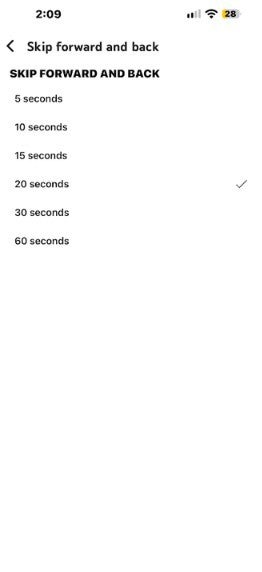
You can adjust the time interval you skip ahead while watching a YouTube video. | Image by PhoneArena
On iOS, open YouTube and tap your profile icon on the bottom right of the screen. Then tap the Settings gear icon in the top right > Playback > Skip forward and back > Choose your interval from 5, 10, 15, 20, 30, or 60 seconds.
Moving ahead on a YouTube video by double-tapping the screen
Now that we got that out of the way, let's get down to brass tacks. Right now, when you double-tap on the right to move ahead, or double-tap on the left to move back, you cannot see how much time you've moved ahead. On the other hand, you can also move ahead or go back with a video by using the scrub bar. If you press and hold the scrub bar, you can move ahead or go back and the time you've skipped will appear.
What do you watch the most on YouTube?
33 Votes
YouTube shorts
18.18%
Original content
63.64%
Older, nostalgic videos
15.15%
Sports highlights
0%
Something else
3.03%
This could be the reasoning behind updating the UI
Enjoy articles about YouTube? Here are some more for you to read:
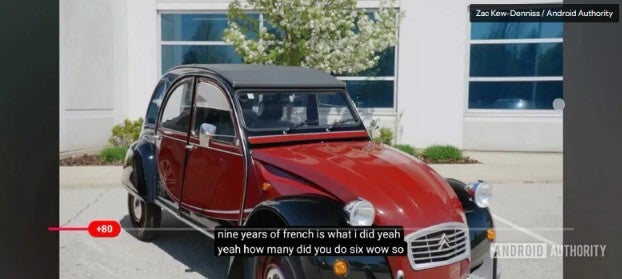
With this update, YouTube users on Android will see how much time they have skipped ahead when double-tapping. | Image by Android Authority
Where Google is testing the new YouTube UI
The updated UI is being tested on the stable version 21.33 of YouTube for Android. Even though it is being tested on the stable version of the app, Google has apparently limited the test to selected Pixel and Galaxy models, although it has not yet hit my Pixel 6 Pro.
Even though the test is being limited to certain Android phones, iPhone users shouldn't feel bad. If Google does make the update permanent for Android users, you can be pretty sure that the iOS YouTube app will get the same feature.


Popular stories


Latest News

Things that are NOT allowed:
To help keep our community safe and free from spam, we apply temporary limits to newly created accounts: