A new Android bug is making it impossible to install new apps. Are you affected? [UPDATE]
A widespread bug is making life difficult for app hunters.
Update from 12/7:
A Google representative has confirmed to PhoneArena that a fix for this has already started to roll out, and the issue should be resolved for most users by the end of the day.
The original story from earlier today follows below:
If you're an Android user, and you’ve tried to look up a new app today only to have the Play Store close on you, you aren’t losing your mind. A frustrating new bug is causing the Google Play Store to crash the second you touch the search bar.
The search bar is currently a no-go zone
The Play Store is usually the most stable part of the Android ecosystem, but right now, it’s having a bit of a meltdown. As I have personally experienced since yesterday, and according to a growing number of new reports, the simple act of tapping the search icon causes the entire app to fold instantly. It doesn't seem to be picky about which phone you're using or which version of Android you're running.
The reports also indicate that while some users have found success with clearing their cache, for others, the problem persists regardless of how many times they restart. It seems to be a server-side hiccup related to the latest related to the latest Play Store updates that Google will need to address on their end.
A major headache for users
This isn’t just a minor glitch; it’s a breakdown of the primary way we interact with our devices. When you look at the Apple App Store, the stability during these "glitch" windows is usually much higher. While Apple has its own set of issues regarding developer restrictions, the basic utility of searching for an app almost always "just works."
However, it's not all lost as there are workarounds to this. Some users have suggested uninstalling the latest Play Store updates to roll back the version, which seems to have done the trick for many — yours truly included. For me, the affected Play Store version is 49.2.33-31.
Here's how you can uninstall Play Store updated (if needed):
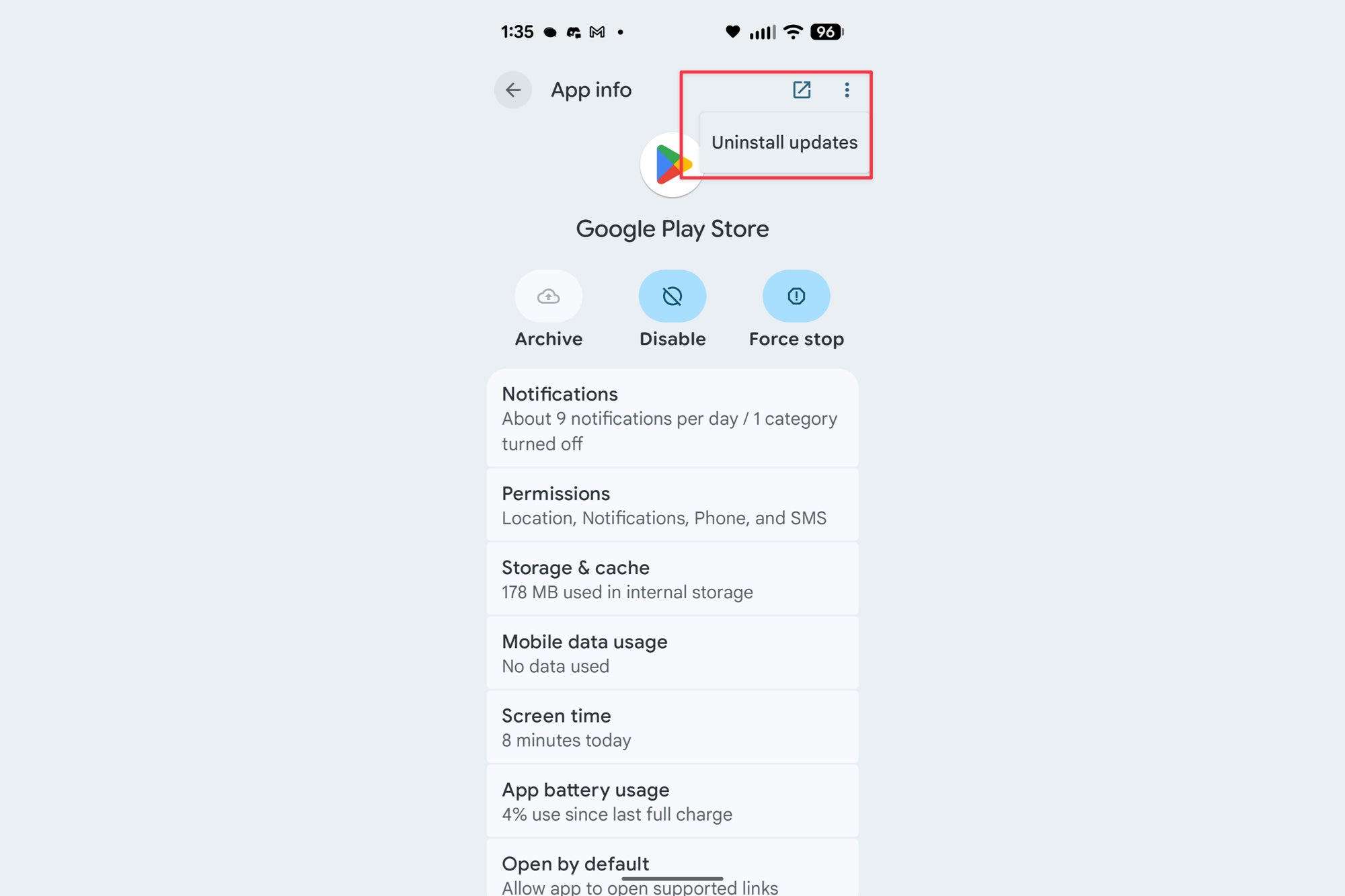
Uninstalling Play Store udpates. | Image credit — PhoneArena
- Go to Settings.
- Tap on Apps.
- Tap on "See all xxx apps".
- Search for Google Play Store and tap on it.
- Look for the 3 dots on the top right.
- Tap on "Uninstall updates".
- Go back in to the Play Store and proceed with your search.
Additionally, others have suggested searching for the app within an internet browser, and then tapping on the app link so it can take you straight to its listing in the Play Store, as a workaround. This is all, of course, a very temporary solution. Hopefully a true fix is rolled out very soon.
Have you been affected by this Play Store search bug?
17 Votes
Yes, and I cannot install any new apps.
17.65%
Yes, but I hadn’t noticed until you mentioned it.
5.88%
No, I can search for apps with no problem.
76.47%
Navigating the wait for a solution
As this is clearly a widespread issue, we’re expecting Google to roll out a fix soon. For now, unless you absolutely need to download a new app, maybe just stick to your "My Apps" list. In the meantime, we have reached out to Google for an update and will update this article as soon as we hear back.


Popular stories




Latest News






Things that are NOT allowed:
To help keep our community safe and free from spam, we apply temporary limits to newly created accounts: